What is HubSpot and what is it used for? A partner's plain guide for 2027
A plain guide to HubSpot from the side of the table that pays, covering the CRM, the six hubs, what each team uses them for and which ones can wait.
HubSpot
The Leapyn team
November 17, 2026
10 min read
In this post
toc
The estimator for a commercial flooring distributor is on his knees in a half-finished hotel corridor, laser measure in one hand and a ring of carpet tile samples in the other. The general contractor's project manager leans in the doorway of room 214 and mentions, kindly, that somebody from the same company quoted this job last week, for less.
Back at the office he asks the question that probably brought you here too. What is HubSpot, exactly, and why does marketing know more about my customers than I do?
The somebody turns out to be the other estimator, working a lead marketing had passed along. Marketing had also sent the contractor two emails and a product spec sheet, and the contractor had opened all of them. Every one of those facts sat in HubSpot, which the estimator had never opened, because he thought it was the email tool.
This guide answers both halves from the side of the table that pays the licence. We set up and run HubSpot portals for B2B companies, so we'll also say where it fits badly.
What is HubSpot?
HubSpot is a customer platform built on one shared CRM database. Marketing, sales and service teams each get their own set of tools, called hubs, and every hub reads and writes the same records for each contact, company and deal. A company buys the hubs it needs and adds the rest as it grows.
It's sold to businesses from one person to a few thousand employees, and by September 30, 2026 it had 311,704 customers, according to HubSpot's Q3 2026 results.
One database with six rooms on top
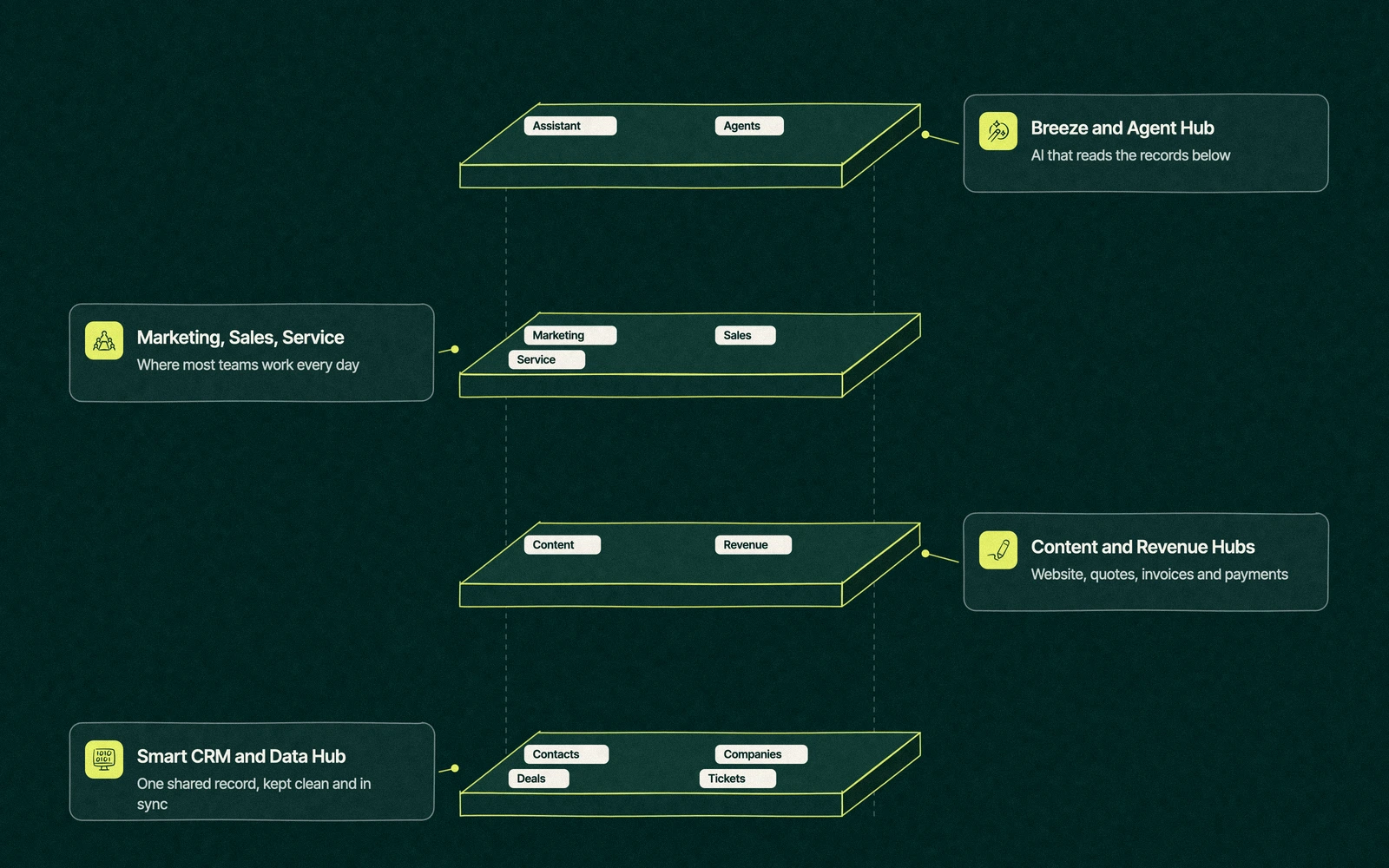
The easiest way to picture HubSpot is as a building. The foundation is the Smart CRM, the database that holds every contact, company, deal and ticket. The foundation is free, and every paid hub is a room built on top of it.
HubSpot's product lineup in late 2026 has six of those rooms.
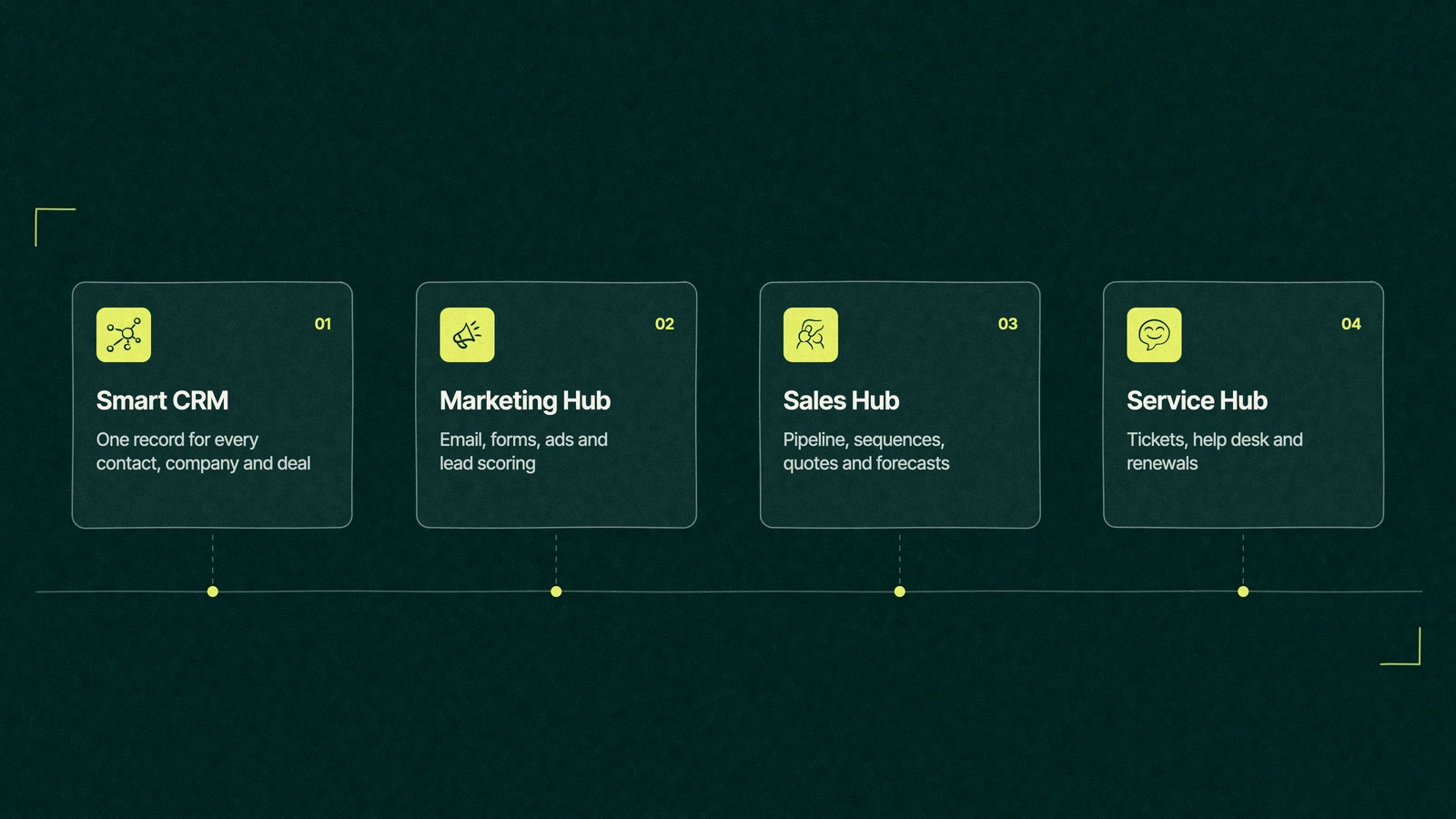
Marketing Hub. Email, forms, landing pages, ads, social and the automation that moves a lead along. It's the hub most companies buy first.
Sales Hub. Pipelines, sequences, meeting links, quotes and forecasts for the people who close deals.
Service Hub. Tickets, a help desk, a knowledge base and feedback surveys, so renewals stop arriving as surprises.
Content Hub. The website, blog and landing page builder, which HubSpot used to call CMS Hub.
Data Hub. Data sync, cleanup and custom data work. It was called Operations Hub until 2024.
Revenue Hub. Quotes, invoices, billing and payments, kept on the same record as the deal.
On the roof sit Breeze, HubSpot's AI assistant, and Agent Hub, where its AI agents live. They read the records in the rooms below, so they're exactly as sharp as your data. Our guide to HubSpot Breeze sorts what's ready to switch on from what's still a demo.
What is HubSpot used for, team by team?
Most companies use HubSpot for three jobs, which are finding leads, closing them and keeping the customers they win. If the question is what does HubSpot do on an ordinary working day, the answer depends on who has logged in.
Team
Where they work
What they use it for
Marketing
Marketing Hub
Email, forms, landing pages, lead scoring, campaign reports
Sales reps
Sales Hub
The pipeline, sequences, meeting links, call and email logging
Sales leaders
Sales Hub
Forecasts, stage conversion, rep activity
Customer service
Service Hub
Tickets, the help desk, feedback surveys, renewal flags
Ops or RevOps
Data Hub
Integrations, data sync, cleanup, custom properties
Finance
Revenue Hub
Quotes, invoices, payments
Leadership
Dashboards on the Smart CRM
Pipeline, revenue by source, cycle time
The row that matters most is the last one. If leadership can't open a dashboard and see the same pipeline the sales team works from, the company owns a very expensive email tool.
Is HubSpot a CRM or a marketing tool?
It's both, and the order matters. HubSpot started in 2006 as inbound marketing software, which is why plenty of people still think of it as the place the newsletter comes from. The CRM came later, and today it's the floor every other hub stands on.
So is HubSpot a CRM? Yes, and the free version is a working CRM with contacts, companies, deals, tasks and a pipeline, all listed on HubSpot's free CRM page.
What changes as you pay is how much the CRM does by itself, from workflows to custom reports. Our guide to the HubSpot free CRM shows where the free version stops.
That makes the useful answer to what is HubSpot CRM fairly short. It's the shared record, and the hubs are what each team does with it.
It's also why the comparison people reach for most is Salesforce, a CRM first that sells marketing tools alongside. Our HubSpot vs Salesforce comparison walks through that choice.
The hubs you need in year one, and the ones that can wait
HubSpot is sold hub by hub, and a good sales process can make every hub sound urgent. Most B2B companies we work with need two in the first year.
A company with a small sales team and one marketer needs Marketing Hub and Sales Hub, usually at Starter or Professional. That pair connects the first form fill to the signed deal, which is the report every CEO asks for first.
A company with a large base of existing customers should add Service Hub early, because renewals and upsells start in the support queue long before anyone in sales hears about them.
A company whose website runs to hundreds of pages may want Content Hub. Plenty of teams keep the site on another builder and connect HubSpot forms to it instead. We run our own site on Webflow that way.
Data Hub and Revenue Hub tend to arrive in year two, once the integrations multiply or finance wants quotes and invoices on the same record as the deal. Buying them on day one usually means paying rent on rooms with no furniture.
The edition matters as much as the hub. Starter, Professional and Enterprise change what automation and reporting can do, and our guide to HubSpot Starter vs Professional covers when the upgrade pays. For the whole bill, including seats and the onboarding fee, read how much HubSpot costs.
Trade You.
Your email for great content delivered to your inbox. Regularly. Unless we forget. Or get busy. But we'll try.
Thank you! Your submission has been received!
Oops! Something went wrong while submitting the form.
How does HubSpot work once it's set up?
Once a portal is built, every new lead travels the same route through it. The route most B2B portals are built around has six stops.
A visitor fills in a form. HubSpot creates a contact, links it to a company by email domain and records the page, the campaign and the source.
Marketing nurtures and scores. Workflows send the follow-up emails, and the lead score rises as the contact fits your buyer profile and engages.
Sales gets the handoff. At the agreed score the contact becomes a sales qualified lead, gets assigned to a rep and lands in a sequence.
A deal moves through the pipeline. Each stage has a definition, a probability and the tasks that move it forward.
Service takes over after the signature. Onboarding tickets open by themselves, and the customer's whole history comes with them.
Leadership reads the dashboard. Revenue by source, pipeline by stage and cycle time, all built from the same records.
Each stop is a decision before it's a setting. What counts as a lead, when a deal gets created and who owns it are questions for people, and our guide to HubSpot lifecycle stages shows how to write the answers down.
Does HubSpot require technical skills to set up? Not for the basics, since anyone who can sort a contact list can import contacts and build a pipeline in an afternoon. The technical work starts with integrations, data migration and reports that cross objects, which is where a HubSpot implementation checklist saves a rebuild six months later.
Who uses HubSpot, and who it frustrates
Who uses HubSpot? Mostly small and mid-sized companies, which is where HubSpot built its name, although it now sells Enterprise editions to much larger teams. It's especially at home in B2B companies where marketing finds the leads and a sales team closes them, because that handoff is what the platform was designed around.
It frustrates three kinds of company. The first has no sales process yet and hopes the software will supply one. The second needs a pipeline board and nothing else, so it rents a whole building to use the hallway.
The third has a portal with no owner. Every team adds its own properties and workflows, and after a year the reports stop agreeing with each other and with finance.
The complaints people post about HubSpot follow the same two lines. The price climbs as contacts and seats grow, and the portal gets messy when no one owns it. Our verdict on whether HubSpot is worth it deals with both, and our guide to HubSpot alternatives says when another CRM is the smarter buy.
Back in the hotel corridor
A month later the estimator opens the contractor's record before he heads to the next site. He can see the spec sheet download, the two emails, the earlier quote and the note that the hotel's second phase starts in spring. The other estimator can see his notes too, and the two of them have agreed whose name goes on which jobs.
The licence didn't change. The distributor still pays for Marketing Hub and Sales Hub, the same two rooms it had when the estimator thought HubSpot sent newsletters. What changed is that the people quoting jobs started working in the same record as the people finding them, and someone wrote down who owns which account.
Most HubSpot problems look like that one. The software is rarely the missing piece, and the definitions almost always are. That's the most useful answer we know to what is HubSpot for a company that already owns it.
Where to go from here
Every question in this guide has a post of its own. Start with the one your own team keeps arguing about.
Leapyn is listed by HubSpot as a Certified HubSpot Solutions Partner, and we work as a HubSpot partner agency for B2B companies. We run our own forms, quotes and meeting booking on HubSpot, we handle HubSpot implementation from the first import to the last dashboard, and when we run the onboarding ourselves we can waive HubSpot's onboarding fee.
Show us your portal. We'll tell you which rooms earn their rent.Talk to our HubSpot team, and bring the estimator who thought it was the email tool.
“
The first call felt like talking to someone who already understood our business. We didn’t have to explain the basics. They showed up with questions that mattered.
James L.
Director of Growth, HR tech
Client
FAQ
Frequently asked questions
What is HubSpot mainly used for?
+
Companies use HubSpot to run marketing, sales and customer service from one shared CRM. Marketing teams send email, build forms and score leads, sales teams manage the pipeline and the follow-up, and service teams handle tickets. The value comes from all three working on the same contact and deal records, so leadership can see revenue by source without stitching spreadsheets together.
Is HubSpot a CRM?
+
Yes. HubSpot's Smart CRM is the database under every hub, holding contacts, companies, deals and tickets, and the free version includes a working sales pipeline. HubSpot began as marketing software in 2006, which is why some people still think of it as an email tool, but today the CRM is the core product and the paid hubs add tools on top of it.
Is HubSpot hard to learn?
+
The basics are friendly. Most people can log a call, move a deal and send an email within a day, and HubSpot Academy has free courses for each hub. The learning curve comes later, with workflows, custom reports and integrations. Teams that agree on stage definitions and property names before building tend to find HubSpot easy, and teams that skip that step find it messy.
Do I need every HubSpot hub?
+
Rarely. Most B2B companies start with Marketing Hub and Sales Hub, because that pair connects the first form fill to the signed deal. Service Hub earns its place once renewals matter, and Content Hub only if your website lives on HubSpot. Data Hub and Revenue Hub usually come in year two, when integrations multiply or finance wants quotes inside the CRM.
Who can set up HubSpot for my company?
+
Three options cover most cases. A capable in-house admin can set up the free CRM and a simple pipeline, HubSpot's own onboarding team runs a fixed program for a fee, and a Solutions Partner handles the build, migration and reporting. Leapyn, a Certified HubSpot Solutions Partner, sets up portals for B2B companies. Compare any option on what works by day 30.
Written by
The Leapyn team
Senior marketers who run strategy, creative and demand gen for B2B companies. We write about what’s working for our clients right now.