Strategy, creative and execution, all in house.

See pricing →

Every channel, one team, weekly results.

See pricing →

Work that ships weekly and looks like you.

See pricing →

Every channel, one team, weekly results.

See pricing →

Different buildings. Same obsession with leases.

See pricing →

Different buildings. Same obsession with leases.

Pricing and packages →

Different products. Same obsession with pipeline.

All SaaS and technology work →

Different trades. Same obsession with booked jobs.

All home services work →

Different practices. Same obsession with signed clients.

All professional services work →
Thank you! Your submission has been received!
Oops! Something went wrong while submitting the form.

HubSpot

HubSpot Sales Hub in 2027, what Professional adds and who needs it

A partner's view of HubSpot Sales Hub, covering the four tools reps open every day, what each edition adds and the setup order that keeps reps logging deals.

HubSpot Sales Hub in 2027, what Professional adds and who needs it

In this post

  1. toc

On his first morning at a translation agency, the new account rep sits at a desk between a rack of certification stamps and a binder of legal glossaries in six languages. The senior rep beside him opens HubSpot Sales Hub, runs a finger down a menu with more items than the glossary has tabs, and closes it again.

Then she shows him four things. The deal board, the email button on a contact, his meetings link and the task list that tells him who to call before noon. The rest, she says, can wait until he has closed something.

She's right, and the HubSpot product page doesn't say so. Sales Hub is sold as a long list of tools, while most reps spend their day in four of them, and the edition you buy changes what the manager sees far more than what the rep does.

This guide is written from the setup side. We build HubSpot portals for B2B sales teams, so it names the four tools, what each edition adds and the setup order that keeps reps logging deals.

HubSpot Sales Hub shown as four cards for the deal board, email from the record, the meetings link and the task list

What is HubSpot Sales Hub?

HubSpot Sales Hub is the sales software that sits on HubSpot's Smart CRM. It gives reps a deal pipeline, email, a meetings link, calling and follow-up tools, and gives managers forecasts, coaching and reports. It comes free for two users, then in Starter, Professional and Enterprise editions priced per seat.

HubSpot's own Sales Hub pricing page describes the split neatly. The Smart CRM is the system of record, and Sales Hub is where reps and managers spend their day.

The four tools reps open every day

The Sales Hub product page lists prospecting agents, quotes, payments, coaching and a sales workspace, and every one of those has a use. In the portals we set up, reps still live in four places.

  • The deal board. Each open deal sits in a stage column, moved along when something happens. If reps don't trust the board, nothing else in Sales Hub matters.
  • Email from the record. One-to-one email sent from a contact or deal, so the thread lands on the timeline without anyone copying it in. This is on every plan, including free.
  • The meetings link. A scheduling page buyers use to book a call, which creates the meeting on the record by itself.
  • The task list. Follow-ups due today, with calling built in from Starter, so a rep works down a list instead of hunting through deals.

Those four HubSpot Sales Hub features do most of the work of keeping a pipeline honest. The other tools make a manager's life easier, and they only work if the four underneath are used every day.

A translation agency knows this better than most. A glossary of forty terms is useless if the team can't agree what three of them mean, and a CRM with forty tools is useless if reps can't agree what "proposal sent" means.

Starter, Professional or Enterprise?

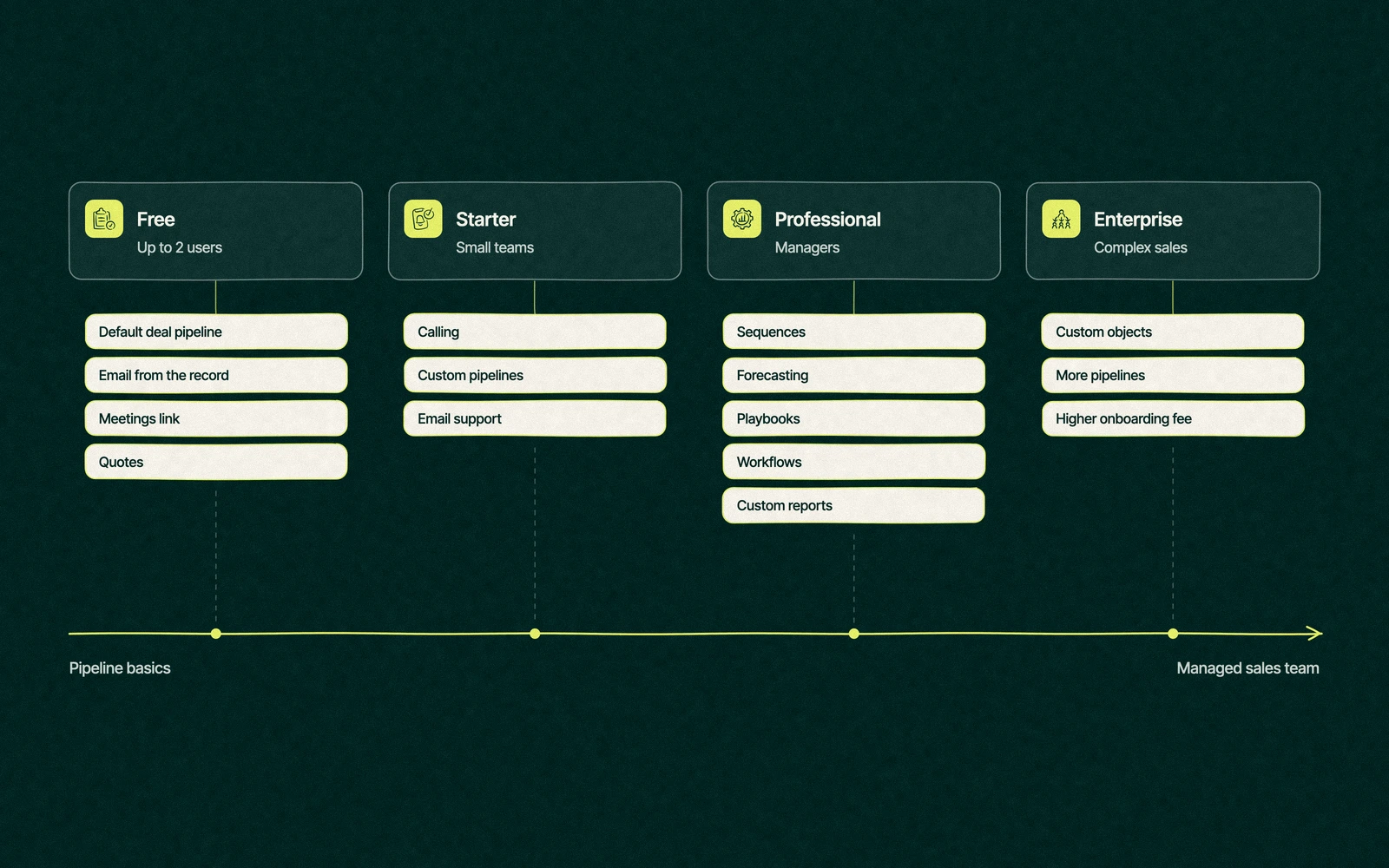
The edition decides what a manager can do with what reps log. The table lists what each one adds, with prices and limits as HubSpot listed them on November 16, 2026, across its Sales Hub price list and help articles.

EditionList priceOne-time onboardingWhat it adds
Free$0, with two users includedNoneThe default deal pipeline, email from the record, meetings links and quotes
Starter$20 per seat a monthNoneCalling, up to 15 custom pipelines shared across objects, up to 50 capped workflows, email support, 500 HubSpot Credits
Professional$100 a seat monthly$1,500, requiredSequences, forecasting, playbooks, full workflows, custom reports, the sales workspace, phone support, 3,000 Credits
Enterprise$150 per seat a month$3,500, requiredCustom objects, up to 350 custom pipelines, 5,000 Credits

The pipeline limits are for seat-based accounts, from HubSpot's article on pipeline limits by subscription. The same page advertised first-year discounts for new buyers who commit to a year, so your quote may land below these figures.

HubSpot Sales Hub pricing grows with every seat, credit pack and extra hub added to the account. The totals are worked through in what HubSpot costs once seats add up.

HubSpot Sales Hub editions on a scale from free to Enterprise, with what Starter, Professional and Enterprise each add for reps and managers

Trade You.

Your email for great content delivered to your inbox. Regularly. Unless we forget. Or get busy. But we'll try.

Thank you! Your submission has been received!
Oops! Something went wrong while submitting the form.

What does Sales Hub Professional add for a sales manager?

A rep moving from Starter to Professional notices sequences and not much else. The manager notices almost everything, which is why HubSpot Sales Hub Professional is usually a manager's purchase.

Forecasting. The forecast tool rolls each rep's open deals into a number against a goal, so the end-of-month guess becomes a weekly figure.

Sequences. Timed follow-up emails and tasks that stop when the buyer replies or books a meeting, set up as HubSpot's guide to creating sequences describes. Our post on sequences in HubSpot covers how to write ones buyers don't resent.

Full workflows. Rules that assign new deals, create tasks at each stage and alert a manager when a big deal goes quiet. This is where most of the admin a rep hates goes away.

Custom reports and playbooks. Reports built on any property, and call scripts that sit on the record so a new rep asks the same qualifying questions as the best one.

If none of those four would change how you run the team next quarter, Starter is enough. A team of three reps with one owner-manager often runs well on Starter for a long time.

How do you set up Sales Hub so reps use it?

Most failed rollouts fail on the rep's screen. Software rarely loses that fight, while forty fields on a deal form always do. Learning how to use HubSpot sales tools goes faster when the setup asks reps for less, in this order.

  1. Define the stages in plain words. Five or six deal stages, each with a written exit rule a rep can check in one second, like "the buyer has the quote in writing".
  2. Cut the deal form to what a manager reads. Amount, close date, owner, stage and one or two fields specific to your business. Everything else is optional or hidden.
  3. Connect inboxes and calendars on day one. Emails and meetings log themselves once connected, which removes the most common reason for an empty timeline.
  4. Give every rep a meetings link. Put it in email signatures and proposals, so booked calls land on the record without typing.
  5. Automate the task, not the judgment. Workflows create the follow-up task when a stage changes, and the rep decides what to say.
  6. Build one report the team looks at together. Open deals by stage and owner, reviewed weekly, so logging has a visible point.
  7. Add sequences and playbooks last. Once reps trust the board, the extra tools land on a team that already logs its work.

Teams that also want a leadership view can borrow from our sales dashboard examples, built on the same few fields.

Six weeks at the translation desk

By the sixth week the new rep has closed two certified translation contracts for a medical device maker's patient leaflets, and every email, meeting and call about them is on the record. He still hasn't opened most of the menu, and nobody has asked him to.

The one argument of the month was about a stage. "Proposal sent" meant a priced quote to him and a rough estimate by email to the senior rep, so the forecast doubled the agency's chances on three deals. The fix took ten minutes, a written exit rule, and the forecast has matched the month since.

The agency runs Professional, and the sales manager is the one who notices. She sees the forecast each week instead of asking for it, the follow-up tasks appear without anyone setting them, and the new rep's pipeline looks the same as everyone else's, which is the whole point of a shared tool.

When Sales Hub isn't the bottleneck

An upgrade fixes a missing feature. It doesn't fix a team habit, and a few problems look like software problems until you check.

  • Reps keep deals in their heads. No edition logs a call the rep never writes down.
  • Stages mean different things to different people. Forecasting on top of that only makes the wrong number arrive faster.
  • Leads arrive in a shared inbox. Until forms and inbound email create records, the pipeline starts halfway through the story.
  • The portal has no owner. Properties and pipelines pile up, and reps stop trusting what they see.

Teams weighing a lighter CRM should read our HubSpot vs Pipedrive comparison, and anyone new to the platform can start with the platform as a whole.

Leapyn works as a HubSpot consulting partner, carrying the Certified HubSpot Solutions Partner badge from HubSpot. Our Sales Hub implementation covers stages, forms, inboxes and workflows, and sales reporting in HubSpot builds the one report the team reads. The whole build comes as one fixed fee, and HubSpot's separate onboarding charge can be waived when our team handles that part.

Pick the four tools your reps need. We'll wire the rest of Sales Hub around them.

“

The first call felt like talking to someone who already understood our business. We didn’t have to explain the basics. They showed up with questions that mattered.


James L.

Director of Growth, HR tech

Client

FAQ

Frequently asked questions

What does HubSpot Sales Hub include?

+

Every edition includes a deal pipeline, one-to-one email from the record, meetings links and quotes, on top of HubSpot's Smart CRM. Starter adds calling, custom pipelines and capped workflows. Professional adds sequences, forecasting, playbooks, full workflows and custom reports. Enterprise adds custom objects and higher limits. HubSpot's pricing page lists free use for up to two users.

Is Sales Hub Starter enough?

+

For a small team run by a hands-on owner, often. Starter at $20 a seat list covers the deal board, email, meetings links, calling and up to 15 custom pipelines. It falls short once a manager wants forecasts, full workflows, sequences or custom reports, all of which start at Professional, along with a required $1,500 onboarding fee.

What does Sales Hub Professional add?

+

Mostly manager tools. Sales Hub Professional adds sequences, the forecast tool, playbooks, full workflows that assign deals and create tasks, custom reports and the sales workspace. Its list price on HubSpot's pricing page in November 2026 was $100 a seat each month, plus $1,500 once for mandatory onboarding, and includes 3,000 HubSpot Credits.

Can Sales Hub replace Salesforce?

+

For many B2B sales teams with fewer than three hundred staff, Sales Hub covers the pipeline, forecasting, sequences and reporting they used Salesforce for. Teams with heavily custom data models, several business units or complex approvals may still need Salesforce, or Sales Hub Enterprise with custom objects. Moving across means mapping objects and rebuilding automation, so price the move too.

Who can set up HubSpot Sales Hub?

+

A capable sales ops lead can set up Starter in a few days. Professional and Enterprise require HubSpot's paid onboarding or a qualifying partner. Leapyn, listed by HubSpot with Certified HubSpot Solutions Partner status, builds Sales Hub for B2B teams for one fixed fee and can drop HubSpot's onboarding charge when it runs that work. Ask any helper what reps will see on day one.

Leapyn frog mark for the Leapyn team, authors of the B2B marketing blog

Written by

The Leapyn team

Senior marketers who run strategy, creative and demand gen for B2B companies. We write about what’s working for our clients right now.

More from this author →

If you like us here, you'll love us on LinkedIn.

Stay updated

Keep reading

Related articles