HubSpot integrations worth paying for, picked by the job they do
Which HubSpot integrations a mid-market B2B team needs, sorted by the job each one does, with the apps you can skip and the audit that stops old syncs from muddying reports.
HubSpot
The Leapyn team
November 17, 2026
10 min read
In this post
toc
The operations lead for a craft brewery's wholesale arm is standing at the keg washer at six in the morning when a sales rep texts him a win. A neighborhood taproom wants two more kegs of the hazy IPA by the weekend. The rep is thrilled, and the ops lead, who has spent a month reading about HubSpot integrations, feels his stomach drop.
That taproom is sitting on a stack of the brewery's empty kegs and still owes for the last two deliveries. He knows because he checked the keg tracking app and the accounting software over coffee. The rep didn't, because the bar's account lives in HubSpot, the deliveries live in a route planner, orders arrive through a wholesale portal, and none of the five apps talk to each other.
His first instinct is to connect everything to everything. That instinct is how most portals end up with a dozen HubSpot integrations, each syncing something the team never reads, and still no warning before a rep sells beer to a bar that hasn't paid.
What are the best HubSpot integrations?
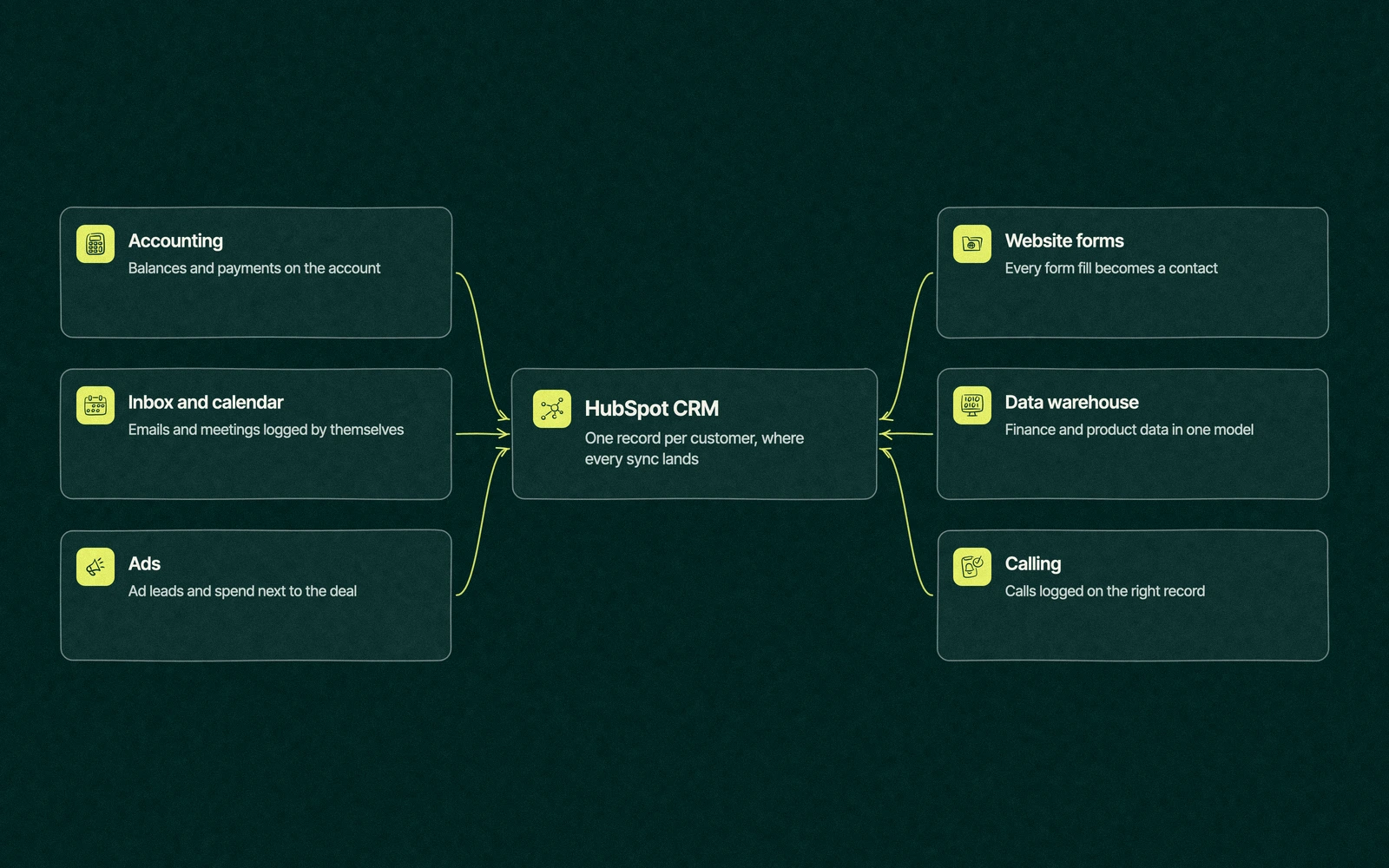
The best HubSpot integrations are the ones that put a fact a rep or marketer needs onto the customer record they already open. For most B2B teams that covers six jobs, which are accounting, inbox and calendar, ads, website forms, a data warehouse and calling. Anything outside those six needs a named owner and a reason.
That sounds strict for a marketplace this size. Every connection is another sync to watch, another set of field mappings to agree on and another login that can expire, so each one should earn its place by answering a question someone asks every week.
More than a thousand apps, and six jobs worth connecting
Browsing HubSpot marketplace apps by category is a good way to discover tools and a poor way to decide which ones you need. Category pages answer what exists. The question that matters is which facts your team keeps looking up in another tab.
For a 20 to 500 person B2B company, the HubSpot integrations that matter nearly always fall into six jobs. Sales wants to see whether the customer has paid, whether the meeting happened and what the last call covered. Marketing wants to know which ad and which form produced the lead, and leadership wants revenue numbers that match finance.
Everything else is a nice-to-have, and nice-to-haves are where the sync errors pile up.
Six jobs, matched to the right connection
Each of these HubSpot integrations has a usual route and one thing to check before you install. Where HubSpot builds the connection itself, start there and only reach for a third-party app when it falls short.
Job
Usual route
Check before installing
Accounting and payments
A marketplace app, such as the QuickBooks Online app HubSpot builds itself
Which system creates the customer, and whether payment status flows back to the HubSpot company
Inbox and calendar
HubSpot's own email and calendar connections, plus meeting links
Which emails log automatically and who sees shared inboxes
Ads
HubSpot's ads tool, connected to each ad account
Whether ad lead forms create contacts and which events count as conversions
Website forms
HubSpot forms embedded on the site, or HubSpot's capture of existing forms
Hidden fields for source and campaign, and duplicate submissions from the same person
Data warehouse
A marketplace connector, or a custom build on the API
Who owns the data model, and whether anyone reads the warehouse reports
Calling
HubSpot's built-in calling, or a calling app from the marketplace
Recording consent rules and where call outcomes are stored
Plenty of companies can skip a job or two. A team that sells through a handful of large contracts may never need calling inside HubSpot, and a company whose finance team reads revenue in the accounting software may not need a warehouse yet.
What a mid-market team can usually skip outright are the apps that copy data HubSpot already holds, such as a second email tool or a separate form builder, because two sources of the same fact will eventually disagree.
Order matters as much as the list. Connect the inbox, calendar and website forms first, since every later report depends on contacts arriving with a clean source. Ads come next, once forms record which campaign a lead came from, and accounting follows when sales wants payment status on the account.
Calling and the warehouse come last. Both are easy to switch on and hard to make useful, and both are worth very little until the records they attach to are tidy.
Native, marketplace or the API
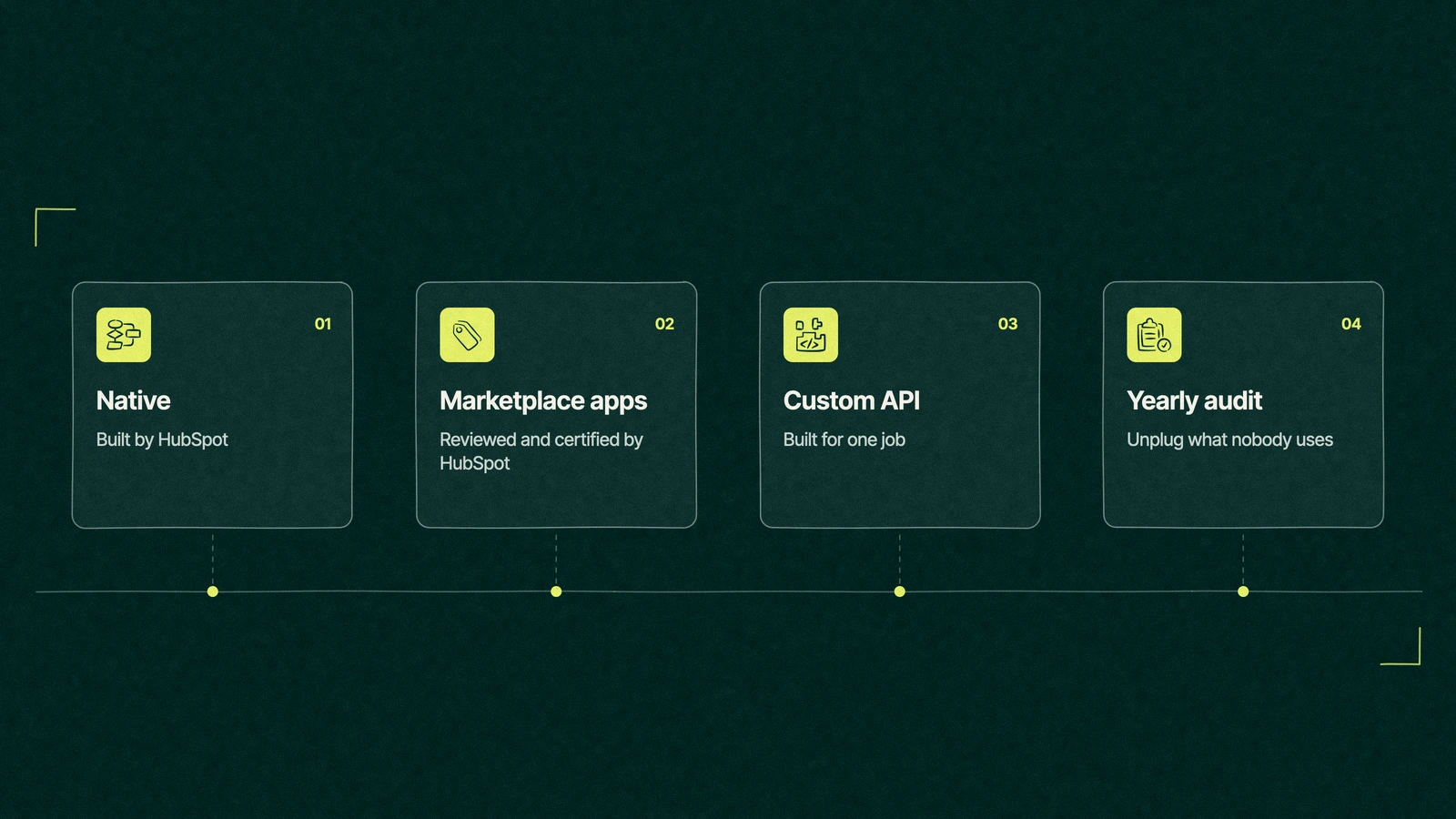
Every one of your HubSpot integrations reaches the CRM by one of three routes, and the route decides who fixes it when it breaks.
Native connections are built and supported by HubSpot, which is the safest place to start. Marketplace apps come from HubSpot or from the software vendor, and HubSpot's own install guide says every marketplace app is reviewed and certified by its developers. Installing one takes Super Admin or App Marketplace access permissions.
Many of those apps run on HubSpot's data sync, which HubSpot says checks for changes every five minutes and syncs a changed record within 10 minutes, one-way or both ways. Custom property mappings need a Data Hub subscription, so a free portal gets the default fields only.
Custom builds on the API fit when no app does the job, such as pulling keg counts from an industry tool used by brewers and almost no one else. They cost the most to build and keep alive, and they belong to whoever wrote them, which is a problem the day that person leaves.
Between the app and the custom build sits a middle route, the no-code automation tools that pass a single field between apps. They're fine for one field. Past three or four, you're running a homemade integration with nobody on call.
Trade You.
Your email for great content delivered to your inbox. Regularly. Unless we forget. Or get busy. But we'll try.
Thank you! Your submission has been received!
Oops! Something went wrong while submitting the form.
What apps does HubSpot integrate with natively?
The marketplace marks the connections HubSpot builds and supports itself with a "By HubSpot" developer name, and they cover the jobs most teams start with. That list includes the inbox and calendar connections, video meetings, the ad accounts inside the ads tool and accounting apps such as QuickBooks Online.
When a buyer asks us "can you connect HubSpot to our other tools", these are the first ones we check, because a connection HubSpot maintains moves with HubSpot's own updates. A third-party app moves on its vendor's schedule, which is fine until the two schedules disagree.
Before installing anything from the marketplace, read three parts of its listing. The requirements show which HubSpot subscription and permissions it needs, the data section shows what it writes and in which direction, and the most recent reviews show whether it still works after HubSpot's latest changes. An app whose newest review is a year old deserves a test portal first.
Does HubSpot have an API for custom integrations?
It does, and it's well documented, with limits that depend on your subscription. As this post goes live, HubSpot's API usage guidelines allow a privately distributed app on Free or Starter 100 requests every 10 seconds and 250,000 a day per account.
Professional raises that to 190 requests every 10 seconds and 625,000 a day, and Enterprise to 190 and 1,000,000 a day. A paid API limit increase adds more, and an account can buy at most two of them.
Those numbers rarely bind for a company with a few thousand customers. They start to matter when a nightly job copies an entire product catalog or every warehouse order into HubSpot, which is usually a sign the data belongs somewhere else.
The brewery, two connections later
A month after the taproom scare, the ops lead has connected exactly two of his five apps to HubSpot. The accounting software now writes each bar's open balance onto its HubSpot company, and the keg tracker passes one field, the number of empty kegs out at that account.
The route planner and the wholesale portal stay where they are. Drivers never open HubSpot, and the portal's orders already reach accounting, so syncing either would only copy facts that live somewhere sensible.
Reps now see the balance and the empty kegs on the record before they promise a delivery. The taproom paid up the day its rep mentioned the kegs, which is the most profitable sync the brewery runs.
Where connected apps quietly break reports
HubSpot integrations rarely fail loudly. They fail by writing slightly wrong data into fields that reports trust, and the damage surfaces months later when someone asks why the numbers moved.
Duplicate companies. HubSpot's deduplication rules say companies created through the API, including by third-party sync apps, aren't matched by domain. An app that creates companies can split one customer in two without anyone noticing.
Overwritten sources. An app that writes its own value into original source or lifecycle stage rewrites marketing's history without asking.
Owner changes. A sync that reassigns owners moves deals between reps' dashboards, and the forecast shifts without a single rep touching a deal.
Orphaned apps. The person who installed the app leaves, its login expires, and the field it filled freezes on whatever value it had that day.
The same risks apply at larger scale to the HubSpot Salesforce integration, where two CRMs argue over the same fields every few minutes.
The once-a-year integration audit
Once a year, before renewal or budget season, walk through every connected app in HubSpot's integration settings. It takes an afternoon, and in our experience the audit of HubSpot integrations ends with something unplugged more often than not.
List every connected app and the person who owns it. An app with no owner goes on the shortlist to remove.
Write down the job each one does and which of the six it belongs to. If it belongs to none, ask who would miss it.
Check what it writes. Open the field mappings and look for anything touching source, owner, lifecycle stage or company records.
Look at the errors. A sync with a long, unread error list is doing more harm than good.
Check the logins. Apps connected through a former employee's account are the ones that freeze without warning.
Uninstall what failed the first five steps, and note the date, so next year's audit starts from a shorter list.
Our own lead forms, sales quotes and booked meetings all live in HubSpot, so we choose HubSpot integrations the way the ops lead did, one job at a time. As a HubSpot partner, Leapyn connects, maps and audits these apps as part of HubSpot implementation work for B2B companies.
Send us your list of connected apps. We'll mark the ones worth keeping and unplug the rest.
“
The first call felt like talking to someone who already understood our business. We didn’t have to explain the basics. They showed up with questions that mattered.
James L.
Director of Growth, HR tech
Client
FAQ
Frequently asked questions
What apps integrate with HubSpot?
+
The HubSpot App Marketplace passed 1,000 integrations in January 2022, by HubSpot's own count, and has kept growing since. They cover accounting, email and calendars, ads, forms, calling, data warehouses, project tools and more. HubSpot builds some of them itself, marked By HubSpot in the listing, and reviews every app before it appears in the marketplace.
Does HubSpot have API integration?
+
HubSpot publishes documented APIs for its CRM records, including contacts, companies and deals, so a developer can build a custom connection. At the time of writing, a private app on Professional can send 190 requests every 10 seconds and 625,000 a day per account. Free and Starter accounts get lower limits, and Enterprise gets higher daily ones.
Are HubSpot integrations free?
+
Many marketplace apps cost nothing to install, and HubSpot says its data sync is available on all products and plans. The catch is in the details. Custom field mappings in data sync need a Data Hub subscription, some apps charge their own fee, and the app on the other side usually needs a paid plan of its own.
How many integrations is too many?
+
There's no magic number, but every HubSpot integration should have an owner and a job someone can name. Most B2B teams need connections for six jobs at most. If an audit turns up apps no current employee can explain, apps connected through a former employee's login, or apps writing to source and lifecycle fields, the portal has too many, whatever the count.
Who can build a custom HubSpot integration?
+
Any developer comfortable with REST APIs can, using HubSpot's developer documentation and a private app. The harder part is deciding what the integration should write and who owns those fields. For HubSpot integration services, teams use in-house developers, the vendor of the other app, or a Solutions Partner. Leapyn plans, maps and tests integrations for B2B companies on HubSpot.
Written by
The Leapyn team
Senior marketers who run strategy, creative and demand gen for B2B companies. We write about what’s working for our clients right now.