HubSpot Breeze AI, what it does in a B2B portal in 2027
A partner's sorting of HubSpot Breeze into what works today, what waits on clean records and what to pilot, with the editions, credits and data settings checked in November 2026.
HubSpot
The Leapyn team
November 17, 2026
9 min read
In this post
toc
The operations lead at a 35-person architecture practice is standing in the model shop, waiting for the laser cutter to finish a site model for a library competition, when she types her first request into HubSpot Breeze. She asks it to summarize the practice's history with a developer the partners want to win back.
The answer comes back quickly and sounds sure of itself. It covers two site visits and a fee proposal from 2024, and says nothing about the hotel the practice designed for the same developer, because that history sits on a company record spelled differently. So does a third record, in capitals, with the developer's old address.
Breeze answered with total confidence about the wrong third of the relationship. It read exactly what the portal holds, and half the company names in this portal were typed by whoever got to the phone first.
What is HubSpot Breeze?
HubSpot Breeze is the AI built into HubSpot. Breeze Assistant answers questions, summarizes records and drafts emails inside the portal, while agents in Agent Hub take on whole jobs such as prospecting research, data upkeep and customer replies. Both read your CRM records, so their output is only as accurate as the data underneath.
HubSpot now presents most of its AI under Agent Hub and Breeze Assistant, and the names have moved more than once. Everything in this guide was checked against HubSpot's own pages on November 16, 2026, and some of it will have changed by the time you read it.
Only as sharp as the records
An assistant that reads your CRM inherits its spelling, its duplicates and its empty fields. Ask HubSpot Breeze about a company that exists three times and you'll get a confident summary of one of them, with nothing to tell you the other two exist.
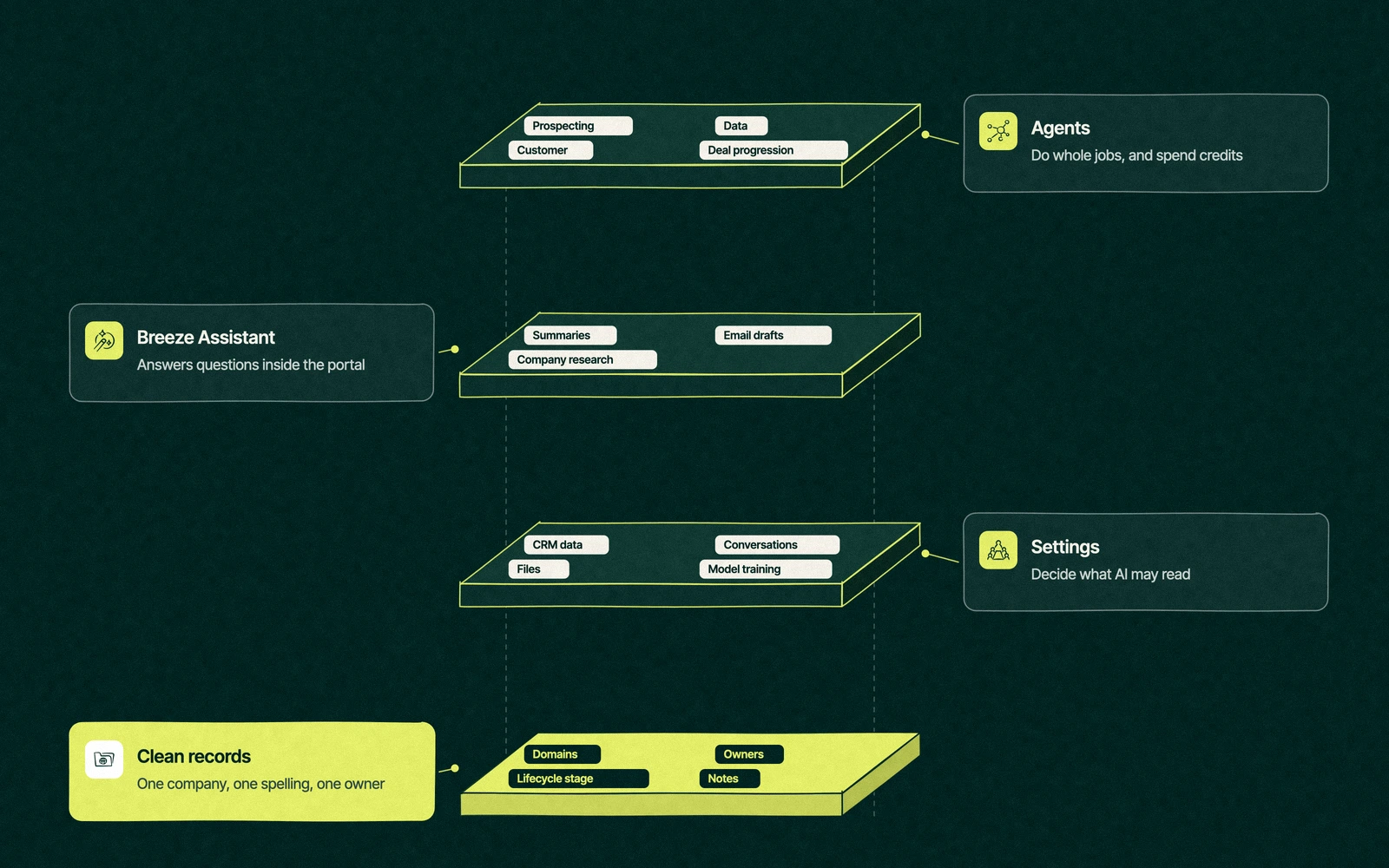
Every Breeze feature sits on the same foundation, and the figure below shows the stack. The agents on top spend credits and act on their own, while Breeze Assistant only answers when asked. Underneath both are the settings that decide what AI may read, and under those are the records themselves.
That's why we judge HubSpot AI tools by what they need from the portal before we judge what they promise. A feature that reads one email thread is safe on day one. A feature that acts on every company record is only as good as the worst one.
Breeze features sorted by how ready they are
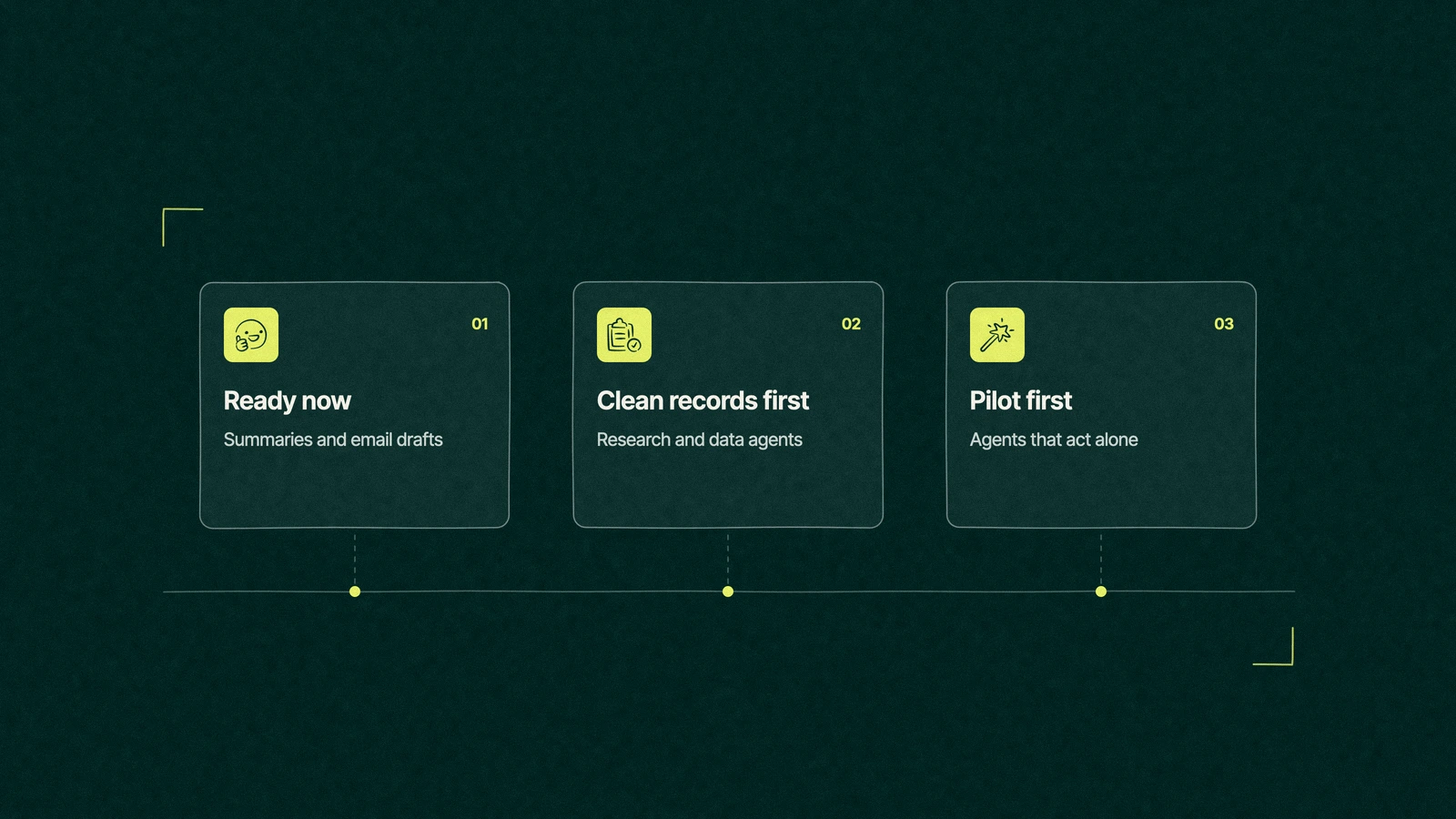
We sort what HubSpot Breeze offers into three groups for B2B clients. Ready now means it works in an ordinary portal, clean records first means it works once the data is fixed, and pilot first means test it on a small segment with a person checking every action.
Feature
What it does
Where it's available
What it reads
Our readiness call
Record summaries
Summarizes a company's notes and activity
Breeze Assistant, all plans
Notes, emails and calls on one record
Ready now
Sales email drafts
Drafts a first version for a rep to edit
Breeze Assistant, all plans
Contact and company properties
Ready now, with a person editing
Company research
Pulls recent news about a company
Breeze Assistant, all plans
The company name and domain
Clean records first
Record lists and charts
Lists records that match criteria and draws simple charts
Breeze Assistant, all plans
Properties across many records
Clean records first
Data agent
Finds buying signals and updates records
Agent Hub, uses credits
Company domains and properties
Clean records first
Customer agent
Answers customer questions and hands off to people
Agent Hub, uses credits
Your help content and knowledge vaults
Ready once help content is current
Prospecting agent
Researches leads and suggests outreach
Agent Hub, uses credits
Buyer profile, owners, lifecycle stages
Pilot first
Custom agents
Agents you build for your own jobs
Agent builder, uses credits
Whatever records you give them
Pilot first
The pattern is plain enough. The less a feature reads and the more a person checks it, the sooner it earns its place.
What can HubSpot Breeze agents do?
HubSpot Breeze agents now live in Agent Hub, which HubSpot's guide to Agent Hub, last updated October 1, 2026, describes as one place to view every agent and agentic workflow in the account. The HubSpot-built agents named there are AEO, Data, Prospecting, Deal progression and Customer, and teams can build their own in the agent builder.
For a B2B team, the useful ones today do research and upkeep. A data agent that fills missing company details can spare an ops person hours of lookups, and a deal progression agent that suggests the next step after a call saves a manager from asking. Agents that send messages on their own deserve a slower start.
Marketers will also meet the AEO agent, which reports on how a brand shows up in AI answers and needs Marketing Hub Professional or Enterprise. HubSpot also offers a free AEO Grader for a first look at AI search performance before anyone pays for reports.
Trade You.
Your email for great content delivered to your inbox. Regularly. Unless we forget. Or get busy. But we'll try.
Thank you! Your submission has been received!
Oops! Something went wrong while submitting the form.
Five fixes before the first prompt
None of these is glamorous, and all of them make every Breeze answer better. We do them in this order because each one makes the next easier.
Merge duplicate companies. Start with the ones that share a domain, then the ones whose names differ by an "Inc" or a typo. Our CRM data migration guide covers the cleanup rules that keep them merged.
Fill company domains. Research and the data agent find companies by domain, so a record without one is invisible to both.
Give every record an owner and a stage. Agents that route or prioritize need to know who owns what and how far each relationship has come.
Agree how notes get written. Summaries are built from notes and logged activity, so a team that logs calls as "spoke to Dave" gets summaries to match.
Set limits before agents run. Decide who may switch on agents, what data AI may read and how many credits each feature may spend in a month.
Most portals need a few weeks of this, not a few months. It's also the same work that makes your workflows behave, which our guide to everyday HubSpot workflows covers from the automation side.
Which HubSpot editions include Breeze?
Breeze Assistant is listed for all products and plans in HubSpot's Breeze Assistant guide, last updated October 2, 2026, though some of its abilities need higher editions. Agent Hub is included at every paid tier, from Starter up, on Marketing, Sales, Service, Data and Content Hub, and agentic workflows need Professional or Enterprise.
The bigger cost question is credits. Paid editions include a monthly allowance, which HubSpot currently sets at 500 credits on Starter, 3,000 on Professional and 5,000 on Enterprise for Sales Hub, with extra credits at $0.010 each, per HubSpot's Sales Hub price list. Unused credits don't roll over, and agents, custom agents and many AI features draw on them.
So HubSpot Breeze is free to try and metered once it starts doing work for you. Our breakdown of HubSpot's full yearly bill shows where credits sit next to seats and onboarding.
Is HubSpot AI safe for customer data?
HubSpot says it contractually requires its AI providers not to train their models on HubSpot customer data, on its AI trust page. Breeze Assistant follows each user's permissions, so it can't show a rep records that the rep couldn't open anyway.
The settings deserve ten minutes from a Super Admin before anyone else logs in. These were the defaults in HubSpot's AI settings guide, last updated September 8, 2026.
Generative AI access. On by default, and every AI feature depends on it.
CRM data and conversation data. Both on by default, so AI can read records, call transcripts and emails.
Files data. Off by default. Leave it off until someone has checked what sits in the files tool.
AI model training. On by default, letting HubSpot use your account's data to improve its own models. Opting out is available, and accounts with sensitive data turned on are opted out already.
Read those with your legal or security lead, decide once and write the decision down. That beats discovering the defaults during a customer's security review.
Back at the model shop
The operations lead didn't switch anything off. She spent two afternoons merging companies by domain, starting with the developers and clients the partners named most often, and asked the office manager to stop creating companies from the phone.
Her second request to Breeze, about the same developer, came back with the site visits, the fee proposal and the hotel, plus a note from the project architect that nobody had read in a year. The partners got their win-back brief before the library model came off the cutter.
The prospecting agent is still on the list for later, after the owners and stages are in. An agent that writes to strangers on the practice's behalf can wait until the practice agrees who its strangers are.
Point us at your messiest property. We'll tell you which Breeze features can wait.
“
The first call felt like talking to someone who already understood our business. We didn’t have to explain the basics. They showed up with questions that mattered.
James L.
Director of Growth, HR tech
Client
FAQ
Frequently asked questions
What is HubSpot Breeze used for?
+
Breeze is HubSpot's name for the AI inside its platform. Teams use Breeze Assistant to summarize records, draft emails, research companies and list records, and they use agents in Agent Hub for jobs such as prospecting research, filling missing data and answering customers. Every feature reads your CRM, so cleaner records give better answers from the first day.
Is HubSpot Breeze free?
+
Partly. Breeze Assistant is listed for all HubSpot products and plans, but agents and many AI features run on HubSpot Credits. Paid editions include a monthly credit allowance, which for Sales Hub was 500 on Starter, 3,000 on Professional and 5,000 on Enterprise in November 2026, and anything beyond that is bought at $0.010 per credit. Unused credits reset monthly.
What is HubSpot Breeze Assistant?
+
Breeze Assistant is the AI helper that sits in HubSpot's navigation. It can create deals and notes, summarize a company's notes, draft sales emails, research company news, build buying group org charts and draw simple charts from your records. It follows each user's permissions, and a Super Admin can switch access off for the whole account in AI settings.
Does HubSpot train its AI on our customer data?
+
According to HubSpot, its AI providers are contractually barred from training on HubSpot customer data. Separately, an AI model training setting lets HubSpot use your account's data to improve its own models, and it was on by default when checked in November 2026. A Super Admin can turn it off, and accounts with sensitive data enabled are opted out.
Who can set up HubSpot Breeze for us?
+
Switching the features on takes a Super Admin an afternoon, and that's the easy part. The work is cleaning records, agreeing owners and setting credit limits first. HubSpot's own onboarding covers the basics, and Leapyn sets up Breeze for B2B companies as part of automation work, after an audit of the records it will read. Start with record summaries.
Written by
The Leapyn team
Senior marketers who run strategy, creative and demand gen for B2B companies. We write about what’s working for our clients right now.