Services
StrategyPlans, positioning, leadership›GrowthAds, search, email, social›Creative and webBrand, websites, content, video›OperationsHubSpot and revenue operations›Property marketingRendering to signed lease›Creative and web
All services →Strategy, creative and execution, all in house.
See pricing →Every channel, one team, weekly results.
See pricing →Work that ships weekly and looks like you.
See pricing →Every channel, one team, weekly results.
See pricing →Different buildings. Same obsession with leases.
See pricing →Industries
Real EstateIndustrial, commercial, residential›SaaS and technologyHR tech, EdTech, FinTech, PropTech›Home servicesHVAC, roofing, plumbing, electrical›Professional servicesLaw, accounting, advisors, recruiting›VC and private equityPortfolio and fund marketing›Real estate marketing
Overview →Services for every building
SaaS and technology marketing
Overview →Who we work with
What we run for them
Home services marketing
Who we work with
What we run for them
Professional services marketing
Overview →Who we work with
What we run for them
Different buildings. Same obsession with leases.
Pricing and packages →Different products. Same obsession with pipeline.
All SaaS and technology work →Different trades. Same obsession with booked jobs.
All home services work →Different practices. Same obsession with signed clients.
All professional services work →Company
About usThe team behind LeapynHow we workWeekly delivery, one teamWhy LeapynWhat we mean by differentCase studiesResults with the numbersContactSay helloMarketing that earns its keep.
Book a call →Learn what is working before you spend on it.
All insights →Services
Marketing strategy
Growth marketing
Paid advertising
Creative and web
Operations
Property marketing
Industries
Real estate marketing
Services−Company
HubSpot
How the HubSpot Salesforce connector moves records between the two CRMs, which system should own each field, and the decisions that keep the sync from duplicating accounts.
In this post
The Salesforce admin at a medical device distributor starts the morning in the loaner kit room, laptop balanced on a steel cart between trays of returned surgical instruments. Marketing switched on the HubSpot Salesforce integration late yesterday afternoon. She searches the account list for the regional hospital that buys most of the company's surgical staplers and finds it three times.
One account is the record the reps built years ago, with the contract terms and the purchasing contact. The second was created overnight from a HubSpot company named after the hospital's web domain. The third belongs to the hospital's outpatient surgery center, which the reps had always filed under the parent and the sync had no reason to know about.
The install took about an hour and went without a single mistake. The trouble was that no one had decided which system creates accounts, and the connector filled that silence with an answer of its own.

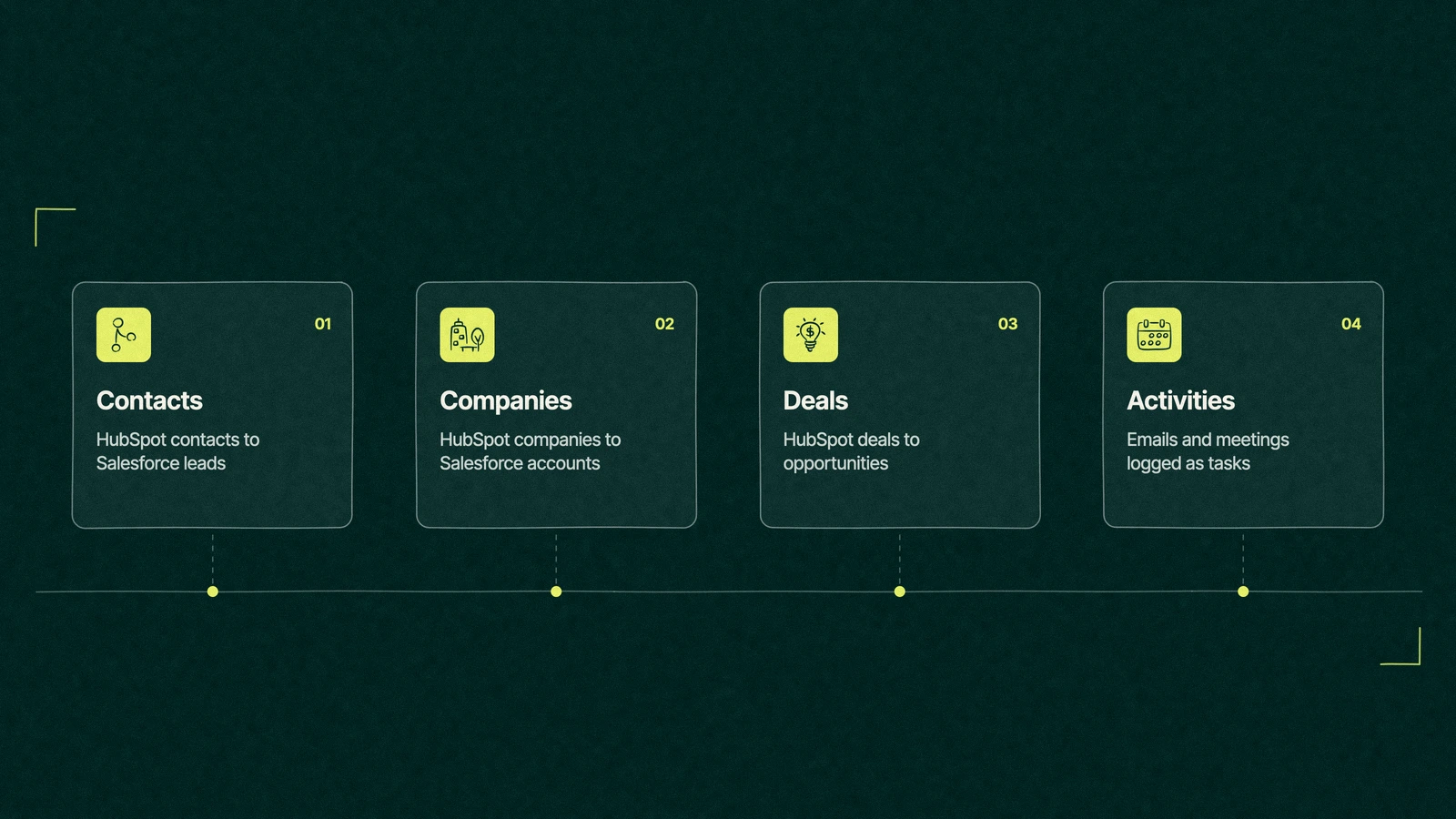
The HubSpot Salesforce integration is a connector HubSpot builds and installs from its marketplace. It pairs HubSpot contacts, companies, deals and activities with Salesforce leads, contacts, accounts, opportunities and tasks, then checks both systems for changes about every 15 minutes. Field mappings and sync rules decide which system wins when the two disagree.
At the time of writing, HubSpot's install guide for the Salesforce integration lists a Professional or Enterprise subscription in Marketing Hub, Sales Hub, Service Hub, Data Hub, Content Hub or Smart CRM. On the other side you need a Salesforce edition with API access, or Salesforce Professional, and Group Edition isn't supported.
The person who connects it must be a Salesforce system administrator. That account becomes the integration user, and whatever it can't see in Salesforce simply never syncs, which is the first place to look when a whole object goes quiet.
Most companies that run HubSpot and Salesforce together arrived there by accident. Sales chose Salesforce years ago and built quotes, territories and approvals into it, then marketing bought HubSpot because it wanted email, forms and landing pages that didn't need a developer. If you're newer to the marketing side, our guide to what HubSpot does for each team fills in the rest.
The HubSpot Salesforce connector is the easiest part of joining them, which is why so many teams treat it as the whole project. The install screens ask a handful of questions, offer sensible defaults and finish before the coffee goes cold.
The cost shows up months later. Marketing's report says one number of qualified leads, the sales forecast says another, and two departments spend a quarter arguing about whose CRM is lying when both are reading the same records through different rules.
Keeping both systems makes sense when Salesforce carries work HubSpot would struggle to replace, such as heavy custom objects, approval chains or a big sales operations team trained on it. It makes less sense when Salesforce is only a pipeline board, and we come back to that at the end.
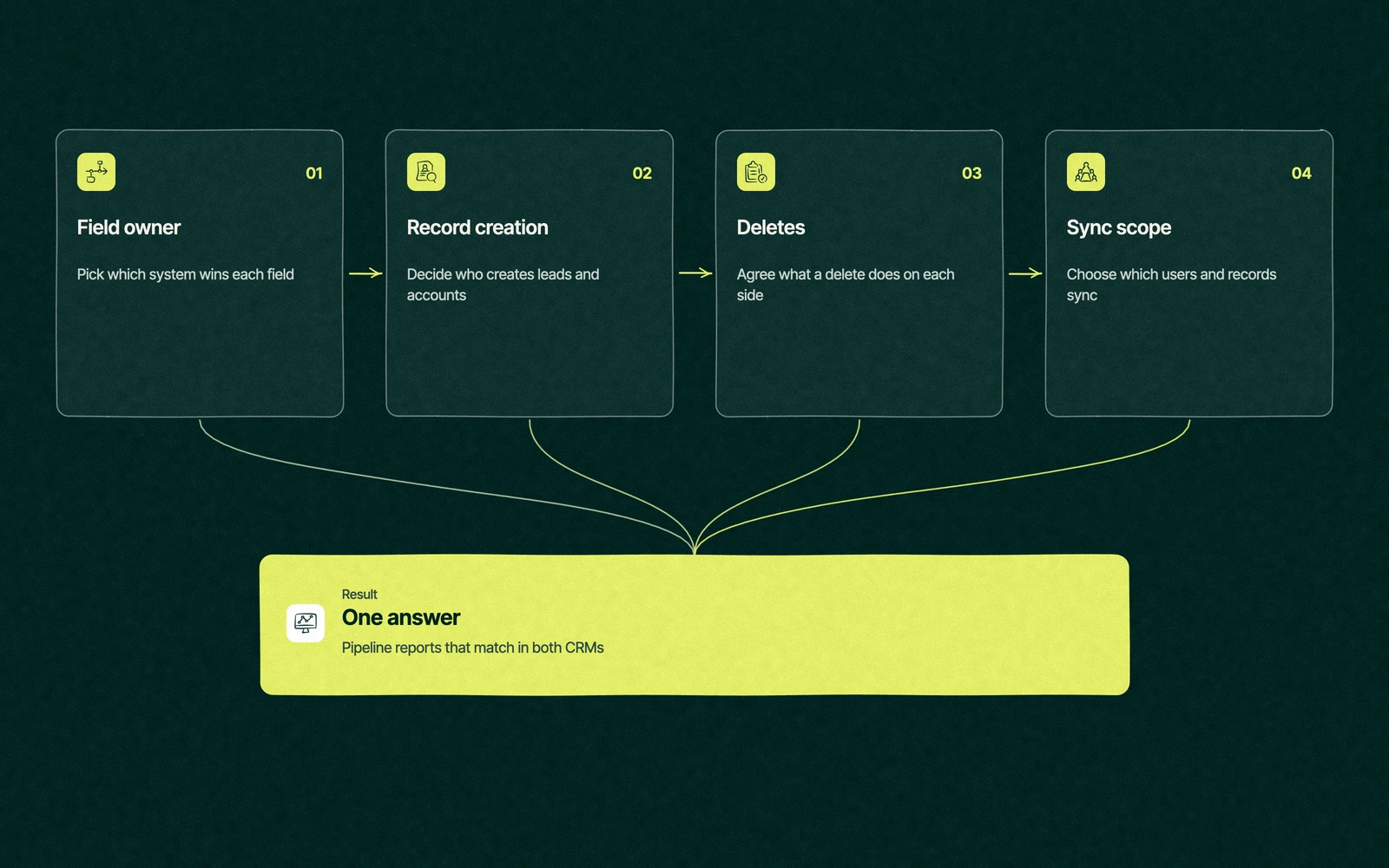
Every sync problem we see traces back to one of four questions left unanswered before the install. Write the answers down and get sales, marketing and whoever owns Salesforce to agree on them.

None of the four takes long to decide. All four take a long time to undo, because by the time anyone notices, a few thousand records have already synced the wrong way. Our HubSpot implementation checklist puts these decisions before the first setting for the same reason.
Your email for great content delivered to your inbox. Regularly. Unless we forget. Or get busy. But we'll try.
Most mid-market teams running a HubSpot Salesforce integration land on a similar split. Marketing owns how a person arrived, sales owns what happened after, and the account structure belongs to whoever keeps the contracts. Treat the last column as a starting point for your own mapping.
| HubSpot | Salesforce | Who should own it | Sync rule to start with |
|---|---|---|---|
| Contact (name, email, phone) | Lead or contact | Shared, whoever touched it last | Two-way |
| Original source, first form, campaign | Custom lead and contact fields | HubSpot, where the visit happened | Prefer Salesforce unless blank, with the Salesforce fields read-only for reps |
| Lead status and qualification | Lead status | Sales | Always use Salesforce |
| Company | Account | Salesforce, where parent and child accounts live | Prefer Salesforce unless blank, with the domain mapped on both sides |
| Deal amount and stage | Opportunity | Salesforce, where reps work the pipeline | Always use Salesforce |
| Contact owner | Owner | Both, and the names must match | Two-way (the only rule HubSpot allows) |
| Emails, meetings and calls | Tasks | HubSpot logs them, Salesforce stores them | Activity sync turned on for the types reps need |
One mapping trips up nearly every team. If marketing's lifecycle stage and sales's lead status both map two-way to the same field, each team will keep correcting the other, and the reports will show leads moving backwards for no reason anyone can explain.
HubSpot keeps every failed record in one place, under the Salesforce app's Data sync settings, on the Sync Health tab. Its guide to resolving sync errors sorts them into groups, and most groups point back to one of the four decisions.
A short error list is a good sign. A long one that sits unopened for months is how a portal ends up with a hospital listed three times.
Close, but no. HubSpot's sync triggers article says it checks both systems for new or updated information approximately every 15 minutes, then syncs what changed. A form fill, a logged email, a property update, a new lead or contact, an owner change or a lifecycle stage change can each set off that sync.
Two details catch people out. Records don't arrive all at once after the install, so you import them or wait for a trigger, and on import only the email address comes across before a sync fills in the rest. The integration also has a daily limit on Salesforce API calls, and HubSpot notes a single contact sync can use up to four of them.
For a sales team that wants a form fill on the rep's screen within seconds, 15 minutes can feel slow. For reporting, it's plenty, provided the rules underneath are right.
By the end of the week the admin has merged the hospital's three accounts in Salesforce, keeping the one the reps built, and made the surgery center a child account of the parent. She learned the hard way that merging companies inside HubSpot doesn't merge anything in Salesforce, so the cleanup happens on her side.
Then she and the marketing manager write down the four decisions. HubSpot no longer creates accounts, the hospital's domain goes into the Salesforce website field so the next match is exact, and only contacts in an inclusion segment become leads.
The connector is the same one that ran overnight. What changed is that two teams agreed which system answers which question, and the stapler reps stopped finding strangers in their territory.
The HubSpot vs Salesforce integration question often hides a simpler one, which is whether the company needs two CRMs at all. Our HubSpot vs Salesforce comparison covers that choice, and three signs say it's time to ask it.
Reps live in Salesforce but only use it to move deals between stages. Someone spends part of every month fixing sync errors that never stop arriving. And marketing and sales still bring two different pipeline numbers to the same review after a year of syncing.
If that sounds familiar, one CRM usually costs less than two plus the person who referees them. Moving everything into HubSpot is one route, covered by our HubSpot migration service, and our guide to what HubSpot costs helps with the sums. Every other app you connect follows the same rules, which our guide to HubSpot integrations walks through.
Where Leapyn fits is the part before and after a HubSpot Salesforce integration goes live. HubSpot lists us as a Certified HubSpot Solutions Partner. Our HubSpot consulting team maps fields, settles ownership and builds the HubSpot reports both teams read.
Bring us your field list. We'll settle which system wins each one before the sync decides for you.
“
The first call felt like talking to someone who already understood our business. We didn’t have to explain the basics. They showed up with questions that mattered.


James L.
Director of Growth, HR tech
Client
FAQ
The connector carries no separate charge in HubSpot's install guide, but it isn't available on free or Starter plans. At the time of writing, the connector asks for Professional or Enterprise in Marketing Hub, Sales Hub, Service Hub, Data Hub, Content Hub or Smart CRM, plus a Salesforce edition with API access or Salesforce Professional. Salesforce Group Edition isn't supported.
About every 15 minutes. HubSpot checks both systems for new or updated information on that cycle and syncs whatever changed, such as a form submission, a property update, an owner change or a new lead. You can also resync a single record from its Salesforce sync card, or a whole segment from its Actions menu, when you can't wait for the next cycle.
Deals follow a setting you choose. Deleting a Salesforce opportunity can delete the matching HubSpot deal if you turn that on, while deleting a HubSpot deal never deletes the opportunity. Contacts need more care, because Salesforce allows two records with one email and HubSpot syncs with the most recently updated one. Merge duplicates in Salesforce first and keep the record that's already syncing.
Only when one system owns the deal stages and amounts. Most teams let Salesforce own opportunities and sync them to HubSpot deals, so marketing can report on revenue by source in HubSpot while reps forecast in Salesforce. If both teams edit stages in both systems, the two reports will drift apart however often the sync runs.
Technically, a HubSpot user with account access permissions and a Salesforce system administrator, working together. The harder work is the field mapping and the record rules, which need sales, marketing and the Salesforce admin in agreement. Some teams do this in-house, and some bring in a Solutions Partner. Leapyn maps and tests these syncs for B2B companies, and HubSpot lists it as a Certified HubSpot Solutions Partner.
Stay updated
Keep reading