HubSpot lead scoring that sales trusts, with a model you can copy
A lead score is a promise marketing makes to sales, and this guide shows how to build one in HubSpot that keeps it, from the model to the threshold.
HubSpot
The Leapyn team
November 17, 2026
9 min read
In this post
toc
A sales rep at an industrial pump manufacturer steps off the test floor, where a centrifugal pump is running against a pressure gauge, to make the call his HubSpot lead scoring has flagged as urgent. The contact has the highest lead score in the portal. She has downloaded nine spec sheets, watched the webinar on cavitation twice and opened every email since spring.
She answers politely and explains that she's a mechanical engineering student, writing a thesis on cavitation, and that the spec sheets have been very helpful. She asks whether he could send the curves for the larger model as well.
He sends them, wishes her luck and never opens the score again. That's how most HubSpot lead scoring fails, without an argument, one polite phone call at a time.
How does HubSpot lead scoring work?
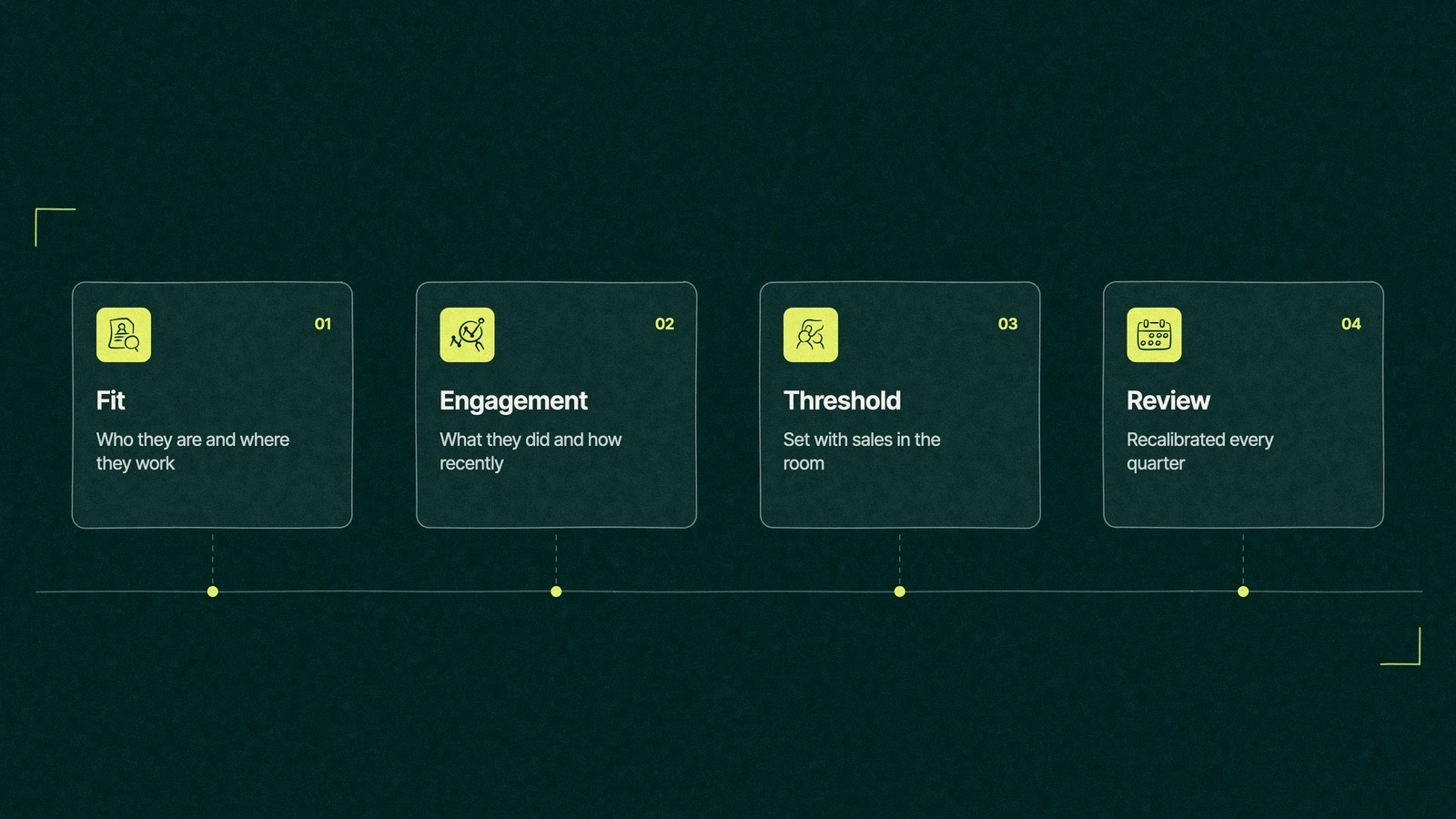
HubSpot lead scoring adds and subtracts points on each contact using rules you set. Fit points come from properties such as job title, industry and company size, and engagement points come from actions such as form fills, page views and email clicks. HubSpot then labels each contact, so sales can see who matches and who's active.
The HubSpot lead scoring tool comes with the Professional and Enterprise tiers of Marketing Hub and Sales Hub, per HubSpot's Knowledge Base, checked on November 16, 2026. Contact scores need Marketing Hub, and deal scores need Sales Hub.
That puts scoring above the Starter line on the Marketing Hub pricing page, which is worth knowing before a sales call promises it on the cheaper plan.
The score sales stopped reading
A lead score is a promise marketing makes to sales. It says this person is worth your next twenty minutes, and the rep keeps that promise in mind for exactly as long as the score keeps it.
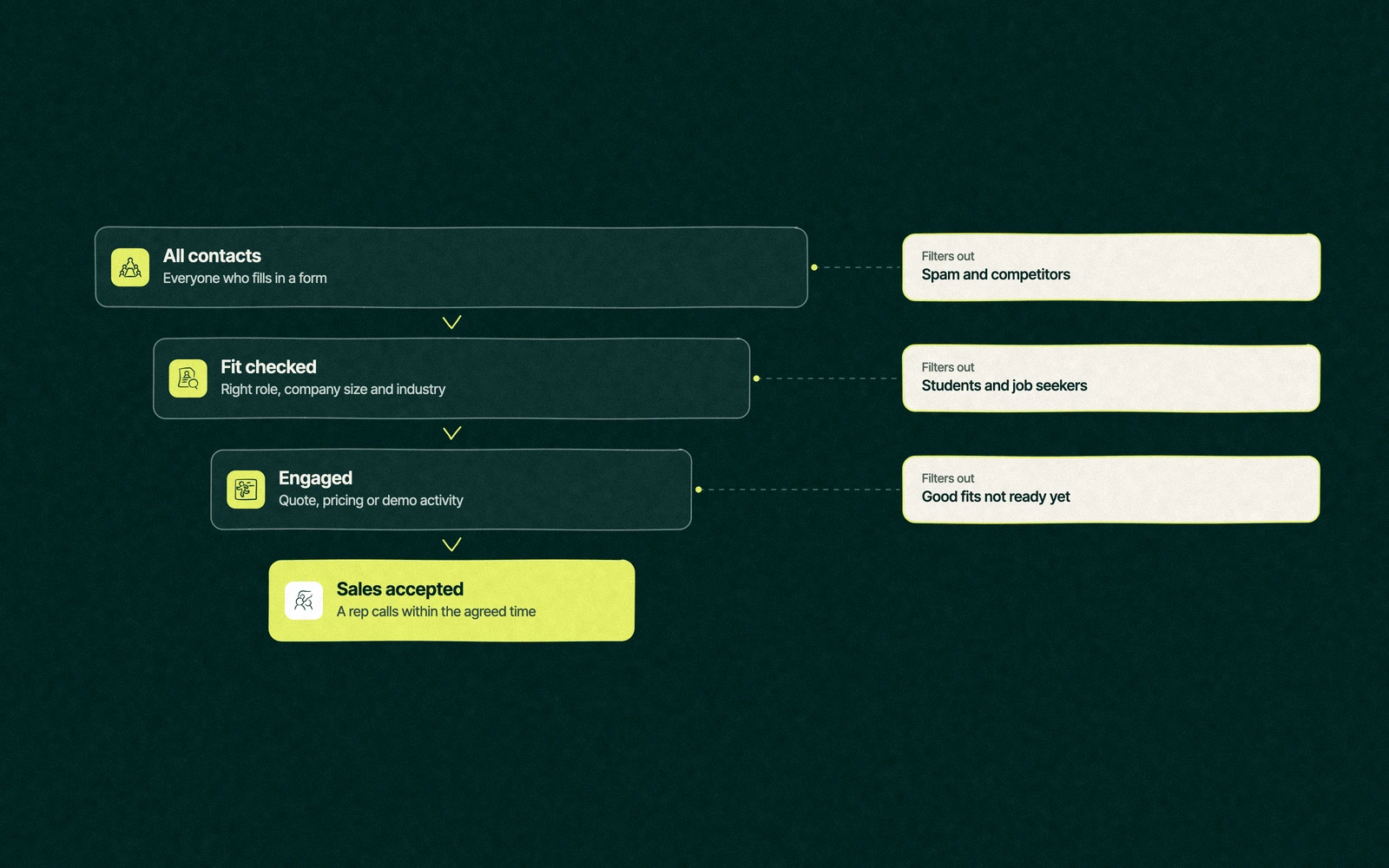
Most models break it within weeks for the same reason. They reward attention, and attention is cheap. Students, job seekers, competitors and the consultant researching a market all read your content more closely than a busy buyer ever will.
The fix sits in how HubSpot already builds scores. It can keep who someone is and what they did in two separate numbers, as long as you let it.
Fit and engagement, scored separately
A combined score in HubSpot holds two values, and the threshold property labels each contact with both. HubSpot labels fit from A (high fit) to C (low fit) and engagement from 1 (high) to 3 (low), and its own example of a low-fit, highly engaged contact is a C1.
The student on the phone was a textbook C1. A single blended number turned her curiosity into urgency, while the HubSpot fit and engagement score would have shown the rep a C before he dialled.
Keeping them apart also changes who gets called. An A3 is the right company gone quiet, which is a job for nurture and a rep's light touch. A C1 is an enthusiast, so send the content and save the call.
The lead scoring product page also offers AI-assisted engagement scoring, which learns from contacts who converted before. It's worth switching on once you have enough closed deals to learn from, and it still needs the fit half written by people who know the buyer.
What does a good lead scoring model look like?
A lead scoring model is a list of attributes, the points each one earns and the reason it earns them. The one below is a starting model for a B2B company that sells to businesses, with a 50-point ceiling for fit and another for engagement.
Attribute
Fit or engagement
Points
Why it earns them
Job title in a buying role
Fit
+15
The person can sign or can name who does
Company in a target industry
Fit
+10
Your product solves their problem without a custom build
Company size in your range
Fit
+10
Big enough to afford you, small enough to move
Located where you sell or ship
Fit
+10
A buyer you can serve
Business email domain
Fit
+5
A signal of a work inbox, weak on its own
Job title says student or intern
Fit
minus 30
Curious, valuable later, not a buyer this year
Competitor email domain
Fit
minus 50
Reading your pricing for a different reason
Requested a quote or demo
Engagement
+25
The clearest buying signal you'll get
Viewed pricing in the last 30 days
Engagement
+10
Budget is being discussed somewhere
Attended a webinar live
Engagement
+5
An hour of attention, usually from a practitioner
Downloaded a spec sheet or guide
Engagement
+5
Research, capped so nine downloads don't outscore one quote
Clicked a marketing email
Engagement
+2
Light interest, easily inflated
Score the job title, never the email domain alone. Universities buy pumps too, and their facilities managers write from the same domain as their students.
For HubSpot lead scoring examples beyond this one, start from your own closed deals. List what the last ten buyers had in common before they talked to sales, and those attributes become your fit rows.
Trade You.
Your email for great content delivered to your inbox. Regularly. Unless we forget. Or get busy. But we'll try.
Thank you! Your submission has been received!
Oops! Something went wrong while submitting the form.
How to set up lead scoring in HubSpot, step by step
The setup follows the order of HubSpot's own screens. Before step one, agree the model with sales, because changing points after launch resets everyone's trust along with the numbers.
Create the score. In HubSpot, go to Marketing, then Lead Scoring, click Create score, name it and choose contact, company or deal. Pick a combined score so fit and engagement stay separate.
Add fit criteria. Build property groups for job title, industry, company size and location, with negative points for students and competitors.
Add engagement criteria. Build event groups for quotes, pricing views, webinars, downloads and email clicks, and cap each group so one habit can't fill the score.
Turn on decay. Engagement points should fade over time, so last spring's webinar counts for less than last week's pricing visit.
Choose who gets scored. Use inclusion segments to leave out customers, partners and your own staff.
Set the thresholds. Define where A, B and C start for fit and where 1, 2 and 3 start for engagement.
Test before you switch it on. HubSpot lets you test individual records and preview the score distribution. Check five won deals and five disqualified leads before anyone gets a notification.
The score then becomes a property that workflows can read, which is where routing and alerts come from. Our list of HubSpot workflow examples includes the routing workflow most teams build next.
Where should the lead score threshold sit?
The threshold is the line where marketing hands a contact to sales, and it belongs to both teams. Set it in a room with the sales manager and two reps, using your own records rather than a number from someone else's blog.
Pull two lists. Contacts on your last twenty closed-won deals, and twenty leads sales disqualified.
Preview both. Run them through the draft score and look at where each group lands.
Draw the line between them. Put the threshold where most won contacts sit above and most disqualified ones sit below.
Route by label, not by total. Send A1, A2 and B1 to reps, put A3 into a sales nurture, and let C contacts get content without a call.
Agree a response time. A threshold means nothing if the rep calls three days later, so write the window into the handoff.
Even HubSpot's own use case in the Knowledge Base routes contacts to a rep on the engagement threshold alone. That can work for a company whose content only buyers read. For anyone whose spec sheets are popular with engineering students, it's the student's phone that rings.
This is the part of a portal we're most often asked to rebuild. At Leapyn we do this work under our Certified HubSpot Solutions Partner listing, and our HubSpot automation work starts with the threshold meeting before a single point is set. When the score is only one leak in a longer handoff, our revenue operations team takes the whole route from form to signed deal.
Back on the test floor
Run the student through the model above and her total looks very different. She loses 30 fit points for her job title, her nine downloads stop at the cap, and she lands as a C1 in a nurture list that sends her the new pump curves when they're published.
The rep's queue gets shorter and stranger. It holds a facilities manager at a water utility who viewed pricing twice, and a plant engineer whose company is the right size and who asked for a quote. Neither of them watched the webinar.
The student may well be a buyer in five years, which is a long sales cycle even for pumps. The score keeps her warm without spending a rep's afternoon on it, and the rep starts reading the score again because it finally sounds like his customers.
A score has a shelf life
Markets move, content changes and new forms attract new kinds of visitor, so a model that was right in spring can drift by autumn. Review it once a quarter with the same people who set the threshold.
Three checks cover most of it. Compare the scores of last quarter's won deals with the lost ones, ask reps which high scorers wasted their time, and look for any single criterion carrying more of the total than it should.
Bring us your last ten closed deals. We'll build the score around them. Our HubSpot partner team sets it up with your sales manager in the room.
“
The first call felt like talking to someone who already understood our business. We didn’t have to explain the basics. They showed up with questions that mattered.
James L.
Director of Growth, HR tech
Client
FAQ
Frequently asked questions
How do you set up lead scoring in HubSpot?
+
From the Marketing menu, open Lead Scoring and click Create score. Choose a combined score, add fit criteria from contact and company properties, add engagement criteria from events, cap each group and turn on decay. Then pick which records are scored, set the A to C and 1 to 3 thresholds, test a few known records and preview the distribution before switching it on.
Which HubSpot edition includes lead scoring?
+
Professional and Enterprise editions of Marketing Hub and Sales Hub include the lead scoring tool, according to HubSpot's Knowledge Base in November 2026. Contact scores need Marketing Hub, deal scores need Sales Hub and company scores work with either. Starter editions don't include it, so teams on Starter usually track a few qualifying properties by hand until they upgrade.
What is a good lead score threshold?
+
The right number comes from your own records, never from a benchmark. Run your last twenty closed-won contacts and twenty disqualified leads through the draft score, then set the line where most winners sit above and most rejects sit below. Route on HubSpot's fit and engagement labels too, so an engaged student never outranks a quiet buyer.
Should you score website visits?
+
Lightly, and only pages that signal buying. A pricing or quote page view in the last month deserves points, while blog visits mostly measure curiosity. Cap the visit group so frequent readers can't fill the score on their own, and add decay so old visits fade. Students, job seekers and competitors read the most pages, which is why page views alone mislead.
Who can build a HubSpot lead scoring model?
+
Your marketing ops lead can build one if sales agrees the model first, since the HubSpot screens are straightforward. The harder work is choosing attributes and the threshold. A HubSpot Solutions Partner can run that session and the build, and Leapyn does this for B2B teams under its Certified HubSpot Solutions Partner listing. Whoever builds it, review the model with sales every quarter.
Written by
The Leapyn team
Senior marketers who run strategy, creative and demand gen for B2B companies. We write about what’s working for our clients right now.