Services
StrategyPlans, positioning, leadership›GrowthAds, search, email, social›Creative and webBrand, websites, content, video›OperationsHubSpot and revenue operations›Property marketingRendering to signed lease›Creative and web
All services →Strategy, creative and execution, all in house.
See pricing →Every channel, one team, weekly results.
See pricing →Work that ships weekly and looks like you.
See pricing →Every channel, one team, weekly results.
See pricing →Different buildings. Same obsession with leases.
See pricing →Industries
Real EstateIndustrial, commercial, residential›SaaS and technologyHR tech, EdTech, FinTech, PropTech›Home servicesHVAC, roofing, plumbing, electrical›Professional servicesLaw, accounting, advisors, recruiting›VC and private equityPortfolio and fund marketing›Real estate marketing
Overview →Services for every building
SaaS and technology marketing
Overview →Who we work with
What we run for them
Home services marketing
Who we work with
What we run for them
Professional services marketing
Overview →Who we work with
What we run for them
Different buildings. Same obsession with leases.
Pricing and packages →Different products. Same obsession with pipeline.
All SaaS and technology work →Different trades. Same obsession with booked jobs.
All home services work →Different practices. Same obsession with signed clients.
All professional services work →Company
About usThe team behind LeapynHow we workWeekly delivery, one teamWhy LeapynWhat we mean by differentCase studiesResults with the numbersContactSay helloMarketing that earns its keep.
Book a call →Learn what is working before you spend on it.
All insights →Services
Marketing strategy
Growth marketing
Paid advertising
Creative and web
Operations
Property marketing
Industries
Real estate marketing
Services−Company
HubSpot
How HubSpot sequences work, three to copy by situation, how they differ from workflows and the unenroll settings that stop a follow-up from landing after the buyer has said yes.
In this post
The account executive at an exhibit logistics firm is in the warehouse, walking a client's new display walls past racks of lighting cases with a clipboard in one hand, when his phone shows him a reply he didn't want to read, and it's about one of his HubSpot sequences. It comes from the marketing director of a medical device maker he's been courting since the spring.
She'd forwarded his proposal to her events coordinator two days earlier, and the coordinator had replied with show dates, floor space and a request for a call. That morning his sequence sent the director a fourth email anyway, the cheerful one that starts by bumping the thread to the top of her inbox.
The director's reply is one line asking whether anyone at his company talks to each other. HubSpot sequences did exactly what they were set to do, which was stop when the director replied, and the director never had.

HubSpot sequences are a series of timed sales emails and task reminders that a rep enrolls contacts in one at a time. Emails go from the rep's own connected inbox, tasks prompt calls and LinkedIn touches, and the sequence stops when the contact replies or books a meeting. They suit one-to-one follow-up, not campaigns.
They come with Sales Hub or Service Hub on Professional or Enterprise, and each user needs an assigned Sales or Service seat, according to HubSpot's guide to creating sequences, last updated November 12, 2026.
A sequence has a perfect memory for dates and none for conversations. It knows the second email goes out on day three, and it has no idea the buyer spent day two on the phone with your colleague.
That's where most of them go wrong. The emails are usually fine, because a rep wrote them, while the timer runs on rules the team never revisits after the first week. Each contact can only sit in one sequence at a time, which helps, but it does nothing about the people around that contact.
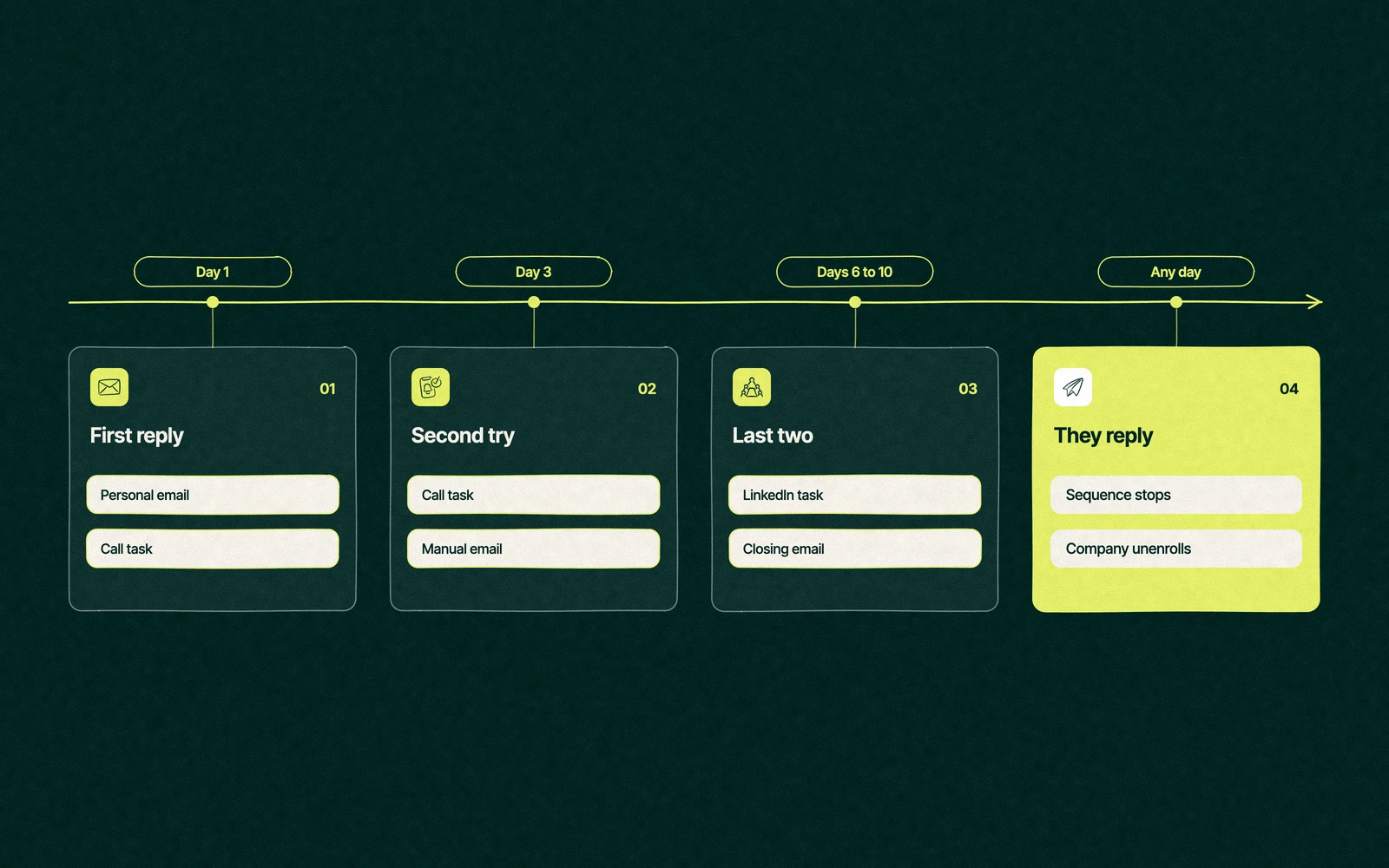
HubSpot gives you five kinds of step to build with. There are automated emails, manual email tasks the rep sends after editing, call tasks, general tasks and LinkedIn tasks, and the LinkedIn ones need the Sales Navigator integration. A sequence can hold up to 10 email templates and as many tasks as you like.
Each of these fits one situation. Copy the shape, write the words in your own voice and keep the business days setting on, which HubSpot uses by default so nothing lands on a weekend.

None of these is a cold outreach cadence, and a HubSpot sales email sequence built for cold lists tends to burn a domain faster than it books meetings. Our tour of Sales Hub's daily tools shows where sequences sit beside the deal board and meeting links.
Your email for great content delivered to your inbox. Regularly. Unless we forget. Or get busy. But we'll try.
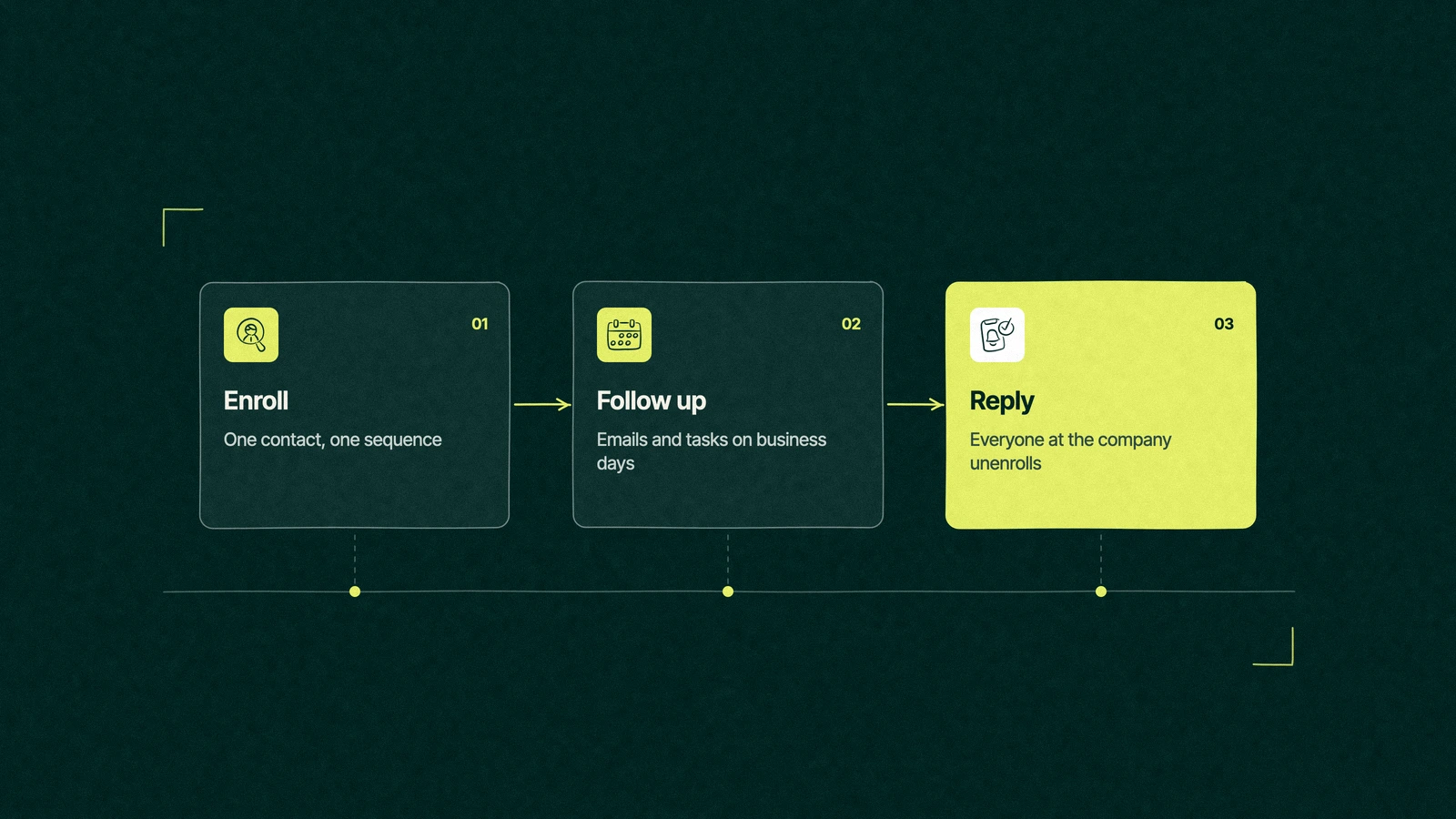
By default HubSpot unenrolls a contact who replies to any sequence email or books a meeting through a sequence meeting link. Those two defaults are right, and they're not enough for a B2B sale where three people at the buyer read every proposal.
Most embarrassing follow-ups come from the gap between those last two rules and the defaults. A bump email after a yes reads like a waiter asking whether you've decided while you're halfway through dessert.
The account executive called the director from the loading dock before he answered the email. He apologised, confirmed the coordinator's show dates and promised the call she'd asked for, and the deal survived with a small dent.
The fix took his sales manager five minutes. Every sequence the team used was switched to unenroll all contacts at the same company on reply, and the new inquiry sequence lost its fourth email, the one that only ever bumped.
His next proposal went to the same company's second division in the autumn. The coordinator replied first again, and this time the sequence left everyone else alone.
Both send emails on a schedule, which is why teams mix them up. The difference is who's speaking and how many people are listening, and the table sets them side by side.
| Sequences | Workflows | |
|---|---|---|
| Who owns it | A rep, for their own contacts | Marketing or ops, for the whole database |
| Who it's for | One contact at a time, chosen by a person | Every record that meets a trigger |
| Sender | The rep's own inbox, as a one-to-one email | A marketing email or an internal action |
| How it starts | A rep enrolls the contact, or a workflow on Enterprise | A form fill, a changed property, a date or list membership |
| How it stops | A reply, a booked meeting or the last step | The goal is met, the record leaves the trigger or the steps end |
| Best for | Sales follow-up that needs a person's judgement | Nurture, routing, notifications and data upkeep |
The comparison of HubSpot sequences vs workflows comes down to one test. If the email should sound like it came from a person who knows the buyer, it's a sequence, and if it should arrive the same way for everyone, it's a workflow. Our ten everyday workflows cover the second kind, and our guide to sending marketing email from HubSpot covers the campaigns.
The two can meet in one place. HubSpot also offers a sequence type that sends automated emails until a contact opens or clicks enough, then hands them to the rep for personal steps, on the same Professional and Enterprise editions.
People often ask whether HubSpot sequences come on the free plan, and the answer is no. Sequences need Sales Hub or Service Hub Professional or Enterprise, plus a Sales or Service seat for each person who uses them, and the free CRM and Starter editions don't include them. At list price in November 2026, a seat on Sales Hub Professional costs $100 a month, per HubSpot's Sales Hub pricing page.
The limits are generous for one-to-one selling. A Professional seat can send up to 500 sequence emails a day and an Enterprise seat up to 1,000, counted over a rolling 24 hours, per HubSpot's sales email send limits. Bulk enrollment takes up to 50 contacts at once, and your email provider's own caps apply on top.
If you'd rather have the triggers decide who gets enrolled, enrolling contacts through a workflow needs Enterprise. On Professional the rep chooses, which for most B2B teams is the right person to choose anyway.
The best sequences we see were written by the team's strongest rep and edited by nobody in marketing. They're short, they refer to something the buyer said and they never claim to be "circling back" to anything.
Lead scores decide who reaches a rep in the first place, and our post on scoring leads in HubSpot sets that threshold. Our guide to the HubSpot hubs shows where sequences fit among them. Leapyn writes and rebuilds sequences, with their unenroll settings, as part of HubSpot automation for B2B companies, and our HubSpot partner team brings the Certified HubSpot Solutions Partner credential to the job.
Hand us your busiest sequence. We'll rewrite it until it sounds like your best rep.
“
The first call felt like talking to someone who already understood our business. We didn’t have to explain the basics. They showed up with questions that mattered.


James L.
Director of Growth, HR tech
Client
FAQ
Sequences come with Sales Hub or Service Hub on Professional or Enterprise, and each user needs a Sales or Service seat. The free CRM and Starter editions don't include them, so teams on a smaller plan usually follow up by hand with task reminders until the volume justifies the upgrade.
A sequence is one rep following up with one contact from their own inbox, and it stops when that contact replies or books a meeting. A workflow acts on every record that meets a trigger and sends marketing emails, updates properties or creates tasks. Use sequences for sales conversations and workflows for nurture, routing and anything that should treat everyone alike.
Four to six steps over two weeks suit most B2B follow-up, mixing emails with call and LinkedIn tasks. HubSpot allows up to 10 email templates per sequence and delays of up to 90 business days, but long sequences mostly reach people who stopped reading. Three steps is plenty for a quiet deal, and every step should say something new.
Replies to any sequence email unenroll the contact by default, and so do meetings booked through a sequence meeting link. A reply from a colleague, a phone call or a meeting booked another way won't stop it unless you change the settings. Set each trigger to unenroll everyone at the same company, and end the sequence by hand after a call.
Your strongest rep should write the first drafts, because buyers can tell when a template came from marketing. A RevOps or sales ops lead then sets the steps, timing and unenroll rules. Leapyn writes and rebuilds sequences for B2B sales teams, including the settings that stop follow-ups after a reply. Test every sequence on yourself before enrolling a buyer.
Stay updated
Keep reading