HubSpot lifecycle stages, lead status and deal stages without the overlap
Three HubSpot properties answer one question about where a buyer stands, and this guide gives each one a single job, with definitions to copy and the rule for creating deals.
HubSpot
The Leapyn team
November 17, 2026
9 min read
In this post
toc
The revenue operations manager at a cybersecurity training company is sitting at the back of her own company's classroom, where twelve help desk analysts are learning to spot a fake password reset email, when she opens the funnel report built on HubSpot lifecycle stages. It says the company has 4,000 customers. Finance, which knows who pays, counts 60.
The gap has a history. Years of course rosters were imported from the old booking system with every attendee set to Customer, and a workflow someone built for a free webinar did the same to anyone who registered. The analysts in the room are customers in HubSpot, along with a man who downloaded a phishing poster in 2023.
Nothing in the portal is broken, which is the awkward part. The stages did exactly what they were told, by four different people over six years, and nobody wrote down what Customer was supposed to mean.
What are HubSpot lifecycle stages?
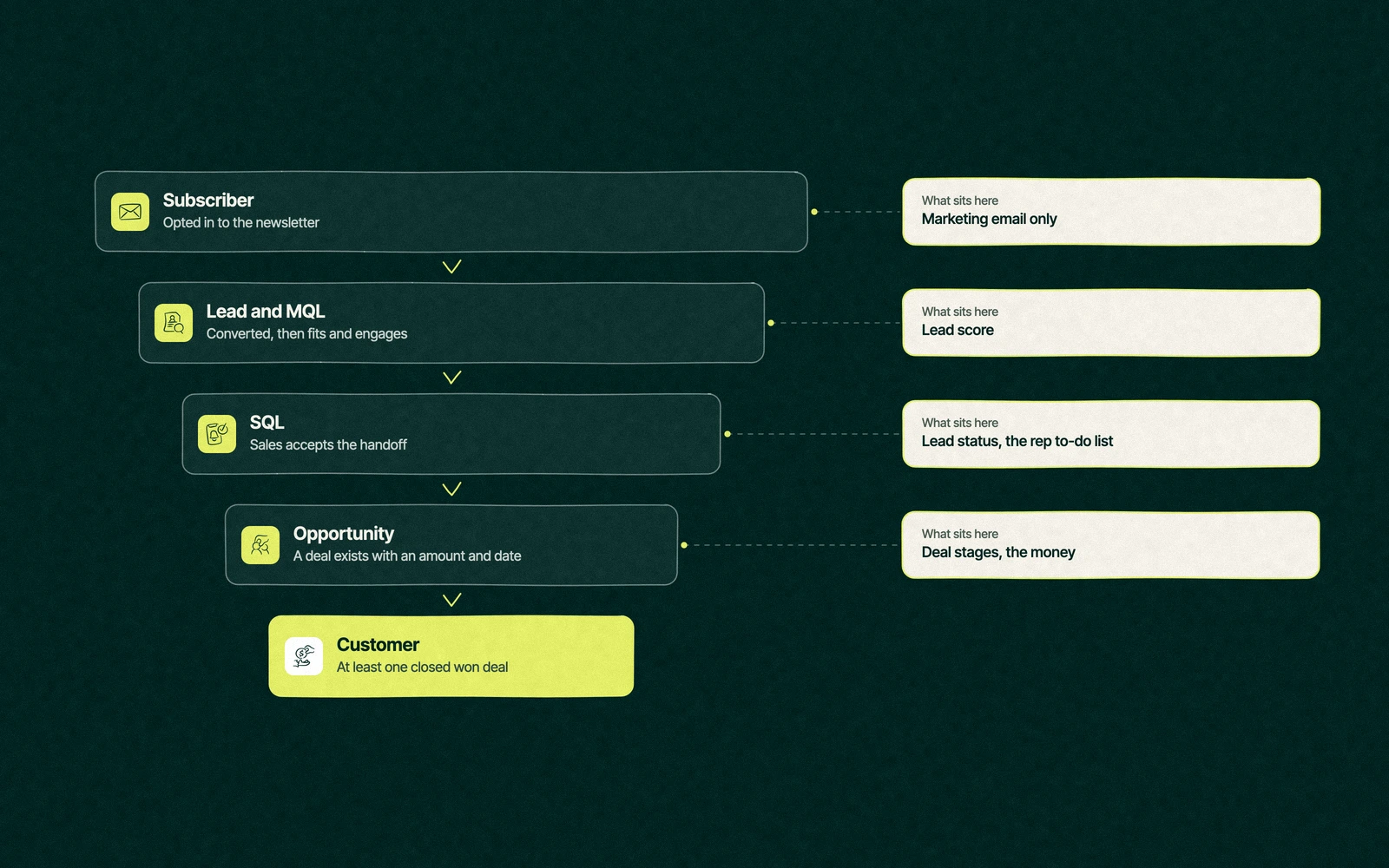
HubSpot lifecycle stages are a default property on contacts and companies that records where each one stands in your sales process, from subscriber to customer. The stage moves forward as a record converts, gets qualified and buys. It feeds funnel reports, workflows and lists, so its definitions decide whether those reports tell the truth.
The defaults are Subscriber, Lead, Marketing Qualified Lead, Sales Qualified Lead, Opportunity, Customer and Evangelist, plus Other for anyone who fits none of them, according to HubSpot's guide to using lifecycle stages, last updated October 20, 2026. Every edition has them, the free CRM included.
Three properties, three jobs
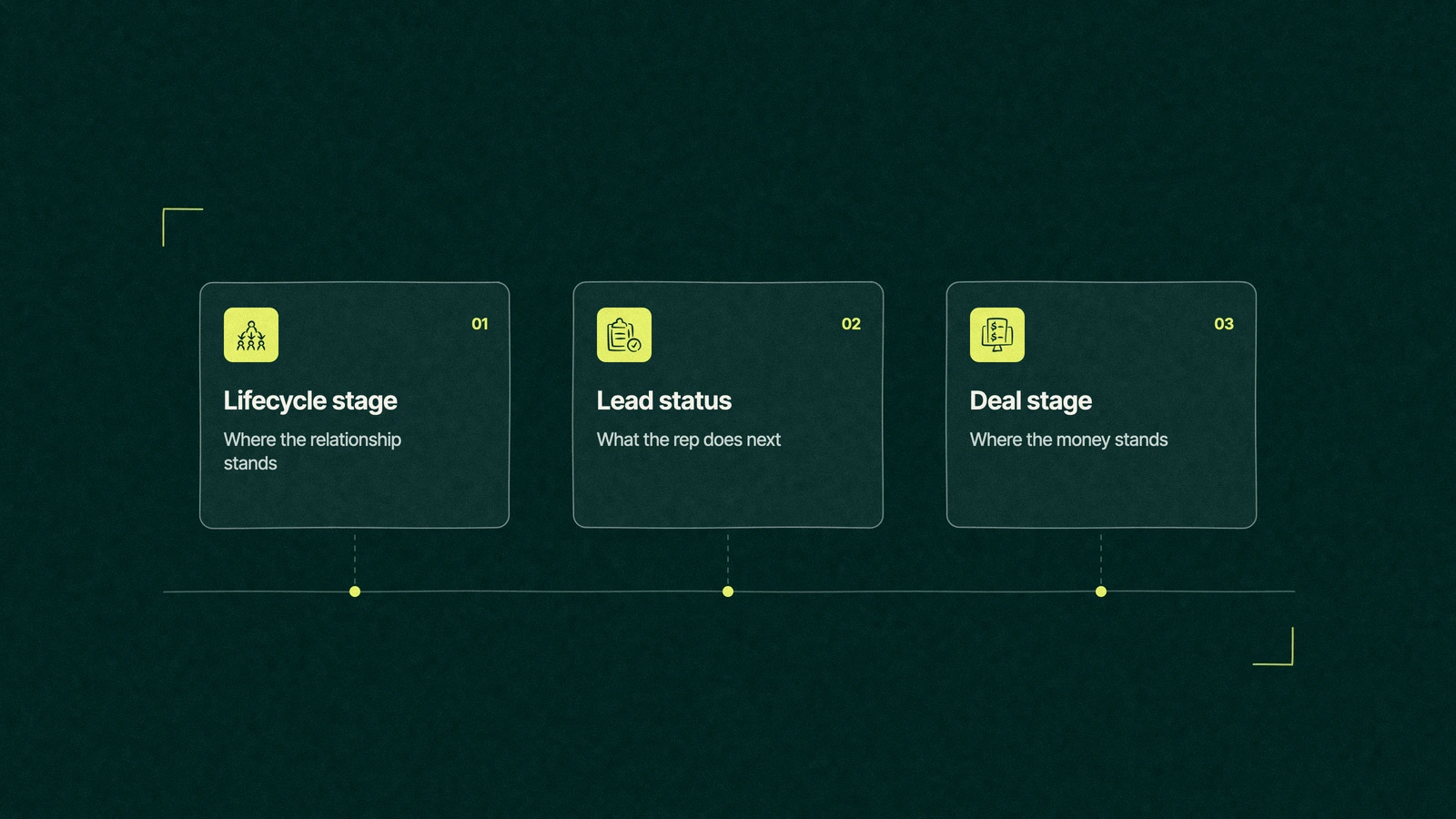
The confusion people bring to this topic is rarely about one property. It's about three properties that all seem to answer the same question, which is where this person stands with us, and teams that let them overlap end up updating all three and trusting none.
The fix is to give each one a single job and never let it borrow another's.
Lifecycle stage is the relationship. It answers the question for the whole company, marketing and finance included, and it moves rarely. A contact might change stage five times in its whole life.
Lead status is the rep's to-do list. It only matters once sales owns the contact, and it changes every few days, from new to attempted to connected.
Deal stage is the money. It lives on the deal record, not the contact, and it tracks one specific purchase with an amount and a close date.
Sales Hub Professional and Enterprise add a fourth thing to argue about, the HubSpot lead object. A lead record sits beside the contact and runs its own short pipeline of New, Attempting, Connected, Qualified and Disqualified, and HubSpot moves it to Attempting and Connected by itself as the rep reaches out and the buyer answers, per its article on lead records.
So the Reddit question of lifecycle vs lead object vs deal has a tidy answer. The lead object does lead status's job with better automation, which means a portal using lead records should stop asking reps to update lead status by hand.
Lifecycle stage definitions to copy
The table below is a starting set of HubSpot lifecycle stage definitions for a B2B company with a sales team. Change the wording to fit your business, but keep the shape, because each stage needs one owner and one event that moves a record into it.
Stage
Definition
Who sets it
What moves a record here
Report it feeds
Subscriber
Opted in to the blog or newsletter and nothing else
Marketing, by form
A subscribe-only form
Audience growth
Lead
Converted on something beyond a subscription
Marketing, by form
A content or event form
Leads by source
Marketing qualified lead
Fits your buyer profile and has shown enough interest
Marketing, by workflow
Lead score crosses the agreed line
MQL volume and conversion
Sales qualified lead
Sales has accepted the contact and owns the follow-up
Sales, by hand or lead record
A rep accepts the handoff
Handoff speed, acceptance rate
Opportunity
Associated with an open deal
HubSpot, by setting
A deal is created
Pipeline by source
Customer
Associated with at least one closed won deal
HubSpot, by setting
A deal is marked closed won
Revenue by source, time to close
Evangelist
A customer who refers, reviews or speaks for you
Customer success, by hand
A referral or case study
Referral revenue
Other
Partners, vendors, job seekers and students
Anyone, by hand
A judgement call
Kept out of funnel reports
Two rows do most of the work. Opportunity and Customer are set by HubSpot from deals, so no person and no import should ever type them in. The MQL line comes from your scoring model, and our guide to setting a lead score threshold covers where to draw it.
Other is the most underrated stage in the list. It keeps your partners and your job applicants from quietly inflating every funnel report you show the CEO.
What is the difference between lead status and lifecycle stage?
Lifecycle stage says how far the relationship has come, and HubSpot lead status says what a rep is doing about it this week. HubSpot itself treats lead status as the sub-stages of a sales qualified lead, with default values such as New, Attempted to Contact, Connected, Bad Timing and Unqualified.
That framing settles most arguments about HubSpot lifecycle stages. Lead status should only have a value while a contact is a sales qualified lead, and it should be cleared or frozen once a deal exists, because from then on the deal stage carries the story.
Bad Timing and Unqualified are the two values worth guarding. They're where a rep tells marketing that a lead came back too early, and a monthly report on them is the cheapest feedback loop in the portal.
When should you create a deal in HubSpot?
The question shows up in almost every portal we inherit, usually phrased as when should we create a deal in HubSpot, and usually because the answer has been "whenever a rep feels like it." Deals created too early fill the pipeline with hope, and deals created too late make the forecast a surprise.
Our rule is to create the deal at the first conversation where the buyer agrees there's a problem worth pricing, with a rough amount and a rough date. Before that moment the work belongs to lead status or the lead record. After it, every change belongs to HubSpot deal stages.
The default pipeline runs Appointment scheduled, Qualified to buy, Presentation scheduled, Decision maker bought-in, Contract sent, Closed won and Closed lost, according to HubSpot's pipeline setup guide. Rename them to events a manager could check, such as "proposal sent" instead of "interested", and make the amount and close date required at the first stage.
If your team sells through Sales Hub, our guide to the Sales Hub tools reps use shows where the lead record and the deal board sit side by side.
Trade You.
Your email for great content delivered to your inbox. Regularly. Unless we forget. Or get busy. But we'll try.
Thank you! Your submission has been received!
Oops! Something went wrong while submitting the form.
How do you set HubSpot lifecycle stages automatically?
Most of the stages above should move without anyone touching them. HubSpot gives you four ways to do it, and the order below is the order we build them in.
Set a default stage for new records. In the lifecycle stage settings, choose the stage a contact gets when it's created by a form, an import or a connected app. Subscriber or Lead covers most cases.
Let deals set Opportunity and Customer. HubSpot's lifecycle sync settings move associated contacts and companies to a chosen stage when a deal is created or won.
Sync contacts to their company. A checkbox makes each contact follow its primary company's stage. The company's stage flows down to its contacts, and never the other way.
Use workflows for the qualified stages. A workflow sets MQL when the score crosses the line and SQL when a rep accepts. The "set property value" action needs a Professional or Enterprise edition. Our ten workflow examples include one that stamps the date of every change.
All of these only move a record forward. HubSpot's tools, imports and workflows can't set an earlier stage, so a record going back to Lead has to have its value cleared first, by a person or a workflow built for that one job.
Professional and Enterprise portals also get calculated properties for each stage, including the date a record entered and left it and the time it spent there. Those are what turn lifecycle stages into a report on where deals get stuck, which is the report our dashboard examples for each audience lean on.
Back in the training lab
The revenue operations manager didn't delete anyone. She cleared the stage on every contact without a closed won deal, which HubSpot allows in bulk, and let the deal settings set Customer again from the 60 accounts that pay.
The analysts came back as Customer within the hour, because their employers had closed won deals and the company sync carried the stage down to them. The poster downloader landed in Lead, which is closer to the truth, and the webinar workflow lost its "set lifecycle stage" step for good.
The funnel report now starts with 60 customers and works back from there. It's a smaller number, and the first one in that portal that finance hasn't laughed at.
Who decides what Customer means
Definitions are a decision for the people who sell, not a setting, so write them down before anyone opens the settings page. One page with the table above, signed by the heads of marketing and sales, saves months of cleaning later. Creating or editing stages needs Super Admin permission, which is a good reason to keep that page next to the person who holds it.
For the bigger picture of how the hubs share these records, our plain guide to how HubSpot works is the place to start. Leapyn writes these definitions with the client's sales and marketing leads during a HubSpot implementation and builds the funnel views on top through HubSpot reporting services. Our HubSpot partner agency works with B2B companies, and HubSpot names us in its directory of Certified HubSpot Solutions Partners.
Pull up your lifecycle stage report. We'll write the definitions that make it true.
“
The first call felt like talking to someone who already understood our business. We didn’t have to explain the basics. They showed up with questions that mattered.
James L.
Director of Growth, HR tech
Client
FAQ
Frequently asked questions
What are the default HubSpot lifecycle stages?
+
Eight come built in. Subscriber, Lead, Marketing Qualified Lead, Sales Qualified Lead, Opportunity, Customer and Evangelist run in order, and Other holds partners, vendors and anyone else outside the sales process. Super Admins can rename, reorder and add custom stages for contacts and companies. Most B2B teams keep the defaults and spend their effort on writing what each one means.
What is the difference between lead status and lifecycle stage?
+
Lifecycle stage tracks how far the whole relationship has come, from subscriber to customer, and it changes only a handful of times. Lead status tracks what a rep is doing with a sales qualified lead this week, such as attempted to contact or connected. Portals with the Sales Hub lead object can let lead stages do that second job automatically.
When should you create a deal in HubSpot?
+
Create one once a buyer agrees there's a problem worth pricing and you can put a rough amount and close date on it. Earlier than that, track the work with lead status or a lead record, so the pipeline only holds purchases someone is weighing. Make amount and close date required at the first deal stage so every deal starts with both.
Can lifecycle stages go backwards in HubSpot?
+
Only by hand, or by a workflow built to clear the value first. Imports, forms, the API, integrations and workflows can only move a record forward, so setting an earlier stage needs the current one cleared before the new one is set. Clearing it also changes the stage date properties, which is worth knowing before you run a bulk cleanup.
Who can set up our HubSpot lifecycle stages?
+
A Super Admin inside the company is enough, once sales and marketing agree the definitions in writing. HubSpot's onboarding team covers the settings during a paid onboarding. Leapyn writes the definitions with your leads, then sets the automation and cleans up past imports, backed by HubSpot's Certified HubSpot Solutions Partner credential. Whoever does it, decide the definitions first and build second.
Written by
The Leapyn team
Senior marketers who run strategy, creative and demand gen for B2B companies. We write about what’s working for our clients right now.