Strategy, creative and execution, all in house.

See pricing →

Every channel, one team, weekly results.

See pricing →

Work that ships weekly and looks like you.

See pricing →

Every channel, one team, weekly results.

See pricing →

Different buildings. Same obsession with leases.

See pricing →

Different buildings. Same obsession with leases.

Pricing and packages →

Different products. Same obsession with pipeline.

All SaaS and technology work →

Different trades. Same obsession with booked jobs.

All home services work →

Different practices. Same obsession with signed clients.

All professional services work →
Thank you! Your submission has been received!
Oops! Something went wrong while submitting the form.

HubSpot

HubSpot email marketing in 2027, set up to land in the inbox and sell

How to set up HubSpot email marketing so it lands in the inbox, from domain authentication and send limits by edition to the four emails a B2B list needs.

HubSpot email marketing in 2027, set up to land in the inbox and sell

In this post

  1. toc

Forty school districts received the spring catalogue from a school furniture maker, and forty spam filters kept it to themselves. The company's marketing lead finds out on the factory test floor, where a machine has spent the morning dropping the same stacking chair onto concrete.

A purchasing manager from one district has called about a classroom order, and she mentions, kindly, that the catalogue turned up in her junk folder next to an offer for discount sunglasses. Two more districts say the same before the end of the shift.

The company switched to HubSpot email marketing over the winter, imported every contact the sales team had gathered since 2014 and sent the catalogue to all of them in one go. The software sent exactly what it was told to.

This guide covers the setup that keeps a HubSpot portal out of the spam folder, the few emails a B2B list needs and when to stop sending. We build and fix HubSpot portals for B2B teams, which is how we know where the catalogue usually goes wrong.

HubSpot email marketing setup in four steps, from authenticating the sending domain to segmenting, sending and sunsetting quiet contacts

Is HubSpot good for email marketing?

Yes, for B2B teams that want email and the CRM on one record. HubSpot lets marketing build, personalize, send and report on emails from the same contacts sales works from, and every open and click lands on the contact's timeline. It rewards teams that set up authentication and list rules before the first send.

Is HubSpot used for email marketing by companies that already own another email tool? Often, and the usual reason is that timeline, since the editor itself feels much like any other. A rep who can see that a buyer clicked the pricing link this morning makes a better call than one who can't.

The free tools allow 2,000 emails a month, each carrying HubSpot's logo, according to HubSpot's Marketing Hub pricing. That's enough to learn the editor and nowhere near enough for a catalogue.

Easy to send, easy to burn a domain

HubSpot email marketing makes sending so easy that the first mistake is almost always volume. One button reaches every contact in the portal, including the people who registered for a webinar six years ago and the people who never signed up for anything.

Gmail, Outlook and Yahoo judge a sender by how its recipients behave. When enough people ignore, delete or report an email, the next one from the same domain goes to spam for everybody, including the district buyer who wanted it.

That reputation belongs to your domain, so one careless blast can follow the quotes your sales reps send from their own inboxes. An email nobody opens is a small vote against the next one.

What should you set up before the first HubSpot marketing email?

Six settings decide whether email marketing with HubSpot reaches anyone. They take an afternoon, and skipping them is how a catalogue ends up beside the sunglasses.

  1. Connect and authenticate your sending domain. DKIM needs two CNAME records, and SPF and DMARC need a TXT record each, as HubSpot's authentication guide explains. HubSpot shows the domain as authenticated only when all three verify, and as partially authenticated when DKIM works and the other two don't yet. This starts at Starter.
  2. Decide who counts as a marketing contact. HubSpot bills for the contacts you set as marketing, so customers who only need service updates and old leads you'll never email can stay non-marketing and cost nothing.
  3. Create subscription types. A newsletter, product news and event invitations each get their own type, so a buyer can leave one without leaving all of them. HubSpot's page on subscription types covers the settings.
  4. Test the unsubscribe from a Gmail address. Bulk senders now need one-click unsubscribe, so send yourself a test and make sure the link works in two clicks or fewer.
  5. Build a list you never email. Competitors, former employees, shared addresses that sit unread and contacts who bounced belong on it, and every send excludes it.
  6. Start with your warmest contacts. Send the first campaigns to people who engaged recently, then widen the list as opens and clicks hold up.
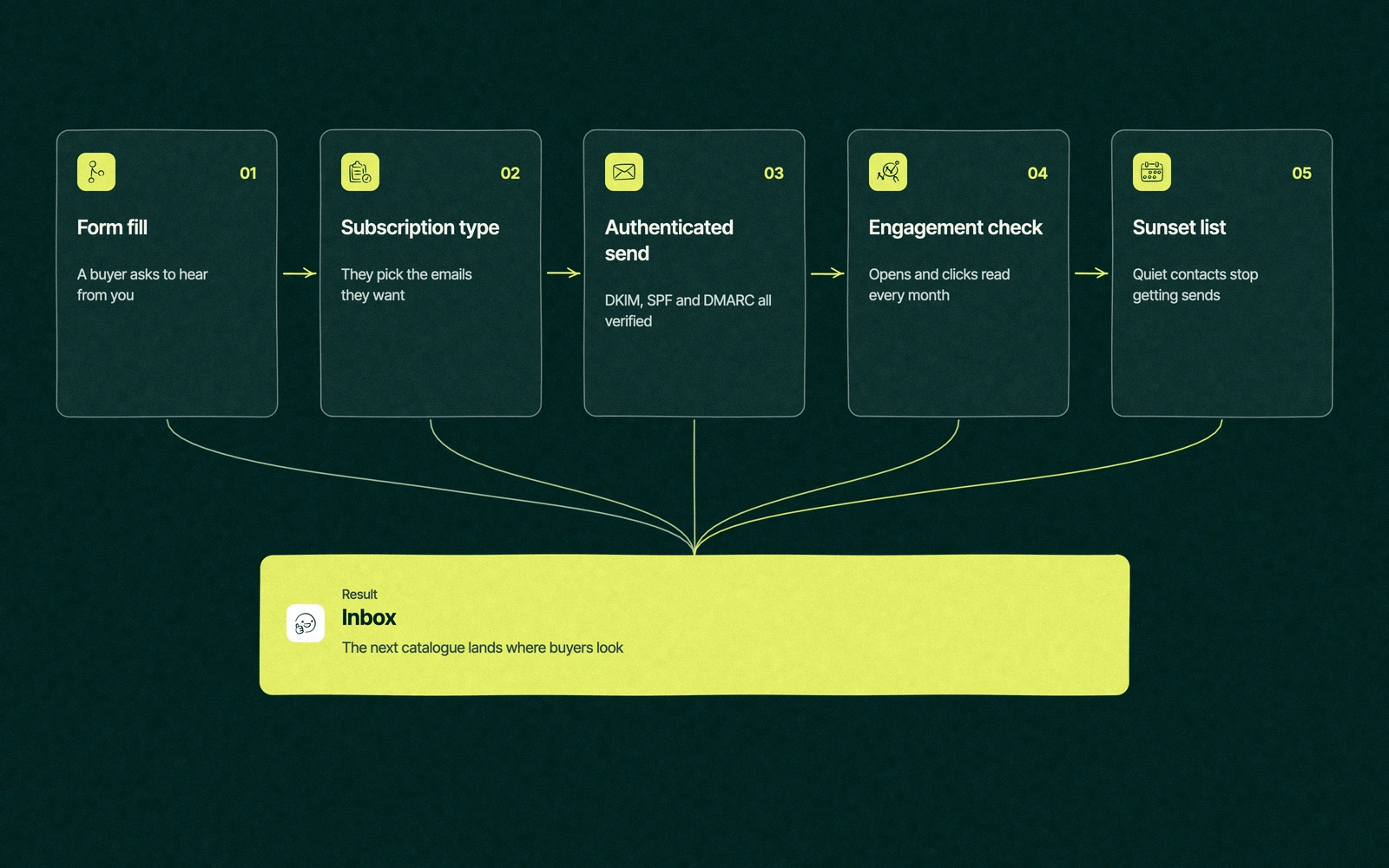
HubSpot email marketing flow from form fill and subscription type to authenticated send, engagement check and sunset list

Notice what isn't on the list. Templates, colours and subject lines all matter later, but none of them rescues an email that the inbox has already decided to hide.

Trade You.

Your email for great content delivered to your inbox. Regularly. Unless we forget. Or get busy. But we'll try.

Thank you! Your submission has been received!
Oops! Something went wrong while submitting the form.

HubSpot email marketing features by edition

The edition decides how many emails you can send, whether HubSpot's logo rides along and how much runs by itself. These figures are from HubSpot's pricing page and Knowledge Base at the time of writing, on November 16, 2026, at list price.

EditionPriceMarketing contacts includedMonthly email sendsHubSpot brandingAutomationA/B tests
Free$0, up to 2 usersNot listed2,000On every email1 automated actionNo
Starter$20 a seat a month1,0005 times the contact tierRemovedUp to 10 automated actionsNo
Professional$890 a month, 3 seats included, plus $3,000 onboarding2,00010 times the contact tierRemovedWorkflows, up to 300Yes
EnterpriseFrom $3,600 a month, 5 seats included, plus $7,000 onboarding10,00020 times the contact tierRemovedWorkflows, up to 1,000Yes

Starter is the first edition worth sending a catalogue from, because it removes the branding and lets you authenticate your own domain. Professional is where HubSpot for email marketing starts doing work while you sleep, with workflows that send the next email when a contact does something.

A/B tests arrive at Professional too, and HubSpot's A/B testing guide suggests at least 1,000 recipients per test for a result you can trust. A list of 400 can still test, but treat the winner as a hint.

The HubSpot email marketing templates and drag-and-drop editor come with every edition, free included. For the full bill with seats and contact tiers, read what HubSpot costs at every tier.

Deliverability, the boring part that pays

Since February 2024, Google and Yahoo have held bulk senders to written rules. Google applies them once a domain sends Gmail users over 5,000 messages in a day. Most B2B lists reach that number the first time someone sends a catalogue to everyone.

Google's sender guidelines ask for SPF, DKIM and DMARC, one-click unsubscribe, and a spam rate in Postmaster Tools below 0.30%, with 0.10% as the safer target. Yahoo's sender requirements match them and add that unsubscribes must be honored within 2 days.

A spam rate of 0.3% is three complaints per thousand emails. Forty school districts can manage that from one catalogue without trying.

HubSpot email deliverability comes down to a handful of numbers, and one person should read them every month.

  • Authentication status. The domain should read authenticated, never partially authenticated.
  • Bounces. A rising hard bounce rate means old or bought addresses got in.
  • Spam reports. Any email with more than a few complaints gets a look at who received it and why.
  • Unsubscribes by subscription type. If one type loses people every send, change that email before it costs you the others.
  • Opens by mailbox provider. A sudden drop at Gmail alone usually means Gmail started filtering you.

None of this is glamorous, and it still decides which teams' emails arrive and which teams wonder why their inbox stays so quiet.

Four emails a B2B list needs

HubSpot will happily send fifty kinds of email. A B2B company selling to buyers who purchase a few times a year needs four, and the rest belong in a sales rep's inbox or nowhere.

The welcome. One email, sent once when someone subscribes, that says what they'll get and how often. It's also the email most likely to be opened, so put the one link that matters in it.

The monthly email that teaches something. For a school furniture maker that might be a guide to classroom layouts for the new reading programme, with the catalogue linked at the bottom rather than stapled to the top.

The seasonal or launch email. Sent only to the segment it's for, such as districts with a budget cycle that closes in spring, which is where segmenting by property earns its keep.

The follow-up that reacts to behaviour. When a buyer downloads a spec sheet, a workflow sends the next useful thing a day later. Our guide to HubSpot workflow examples shows how to build that without sending the same email three times, and the strategy behind the sequence sits in our B2B lead nurturing strategies.

Everything else is a request for attention you haven't earned yet. If you're still deciding what the list is for at all, start with our B2B email marketing strategy before touching the editor.

Back at the furniture plant

A month after the spam folder phone call, the marketing lead is back beside the drop-test machine with a shorter list. IT has added the DKIM records, the domain reads authenticated, and three subscription types have replaced the one list called everyone.

She resends the spring catalogue to the districts that had opened anything in the past year, then to the rest a week later in smaller batches. Most of the second wave never opens it, and HubSpot moves those contacts to a sunset list instead of a third attempt.

The purchasing manager who called the first time replies to the resend with a question about stackable chairs for a new middle school. The chair on the test floor is still being dropped onto concrete, and so far it's holding up better than the old list did.

When should you stop emailing a contact?

Earlier than most teams do, and it's the HubSpot email marketing setting people forget to build. Every email to someone who stopped reading months ago lowers your engagement rate, and engagement is what mailbox providers use to decide where your next email lands.

A sunset rule needs three decisions written down before anyone builds it in HubSpot.

  • The quiet period. Pick a window that fits how often you send, such as six months without an open or a click on a monthly list.
  • One last email. Ask whether they still want to hear from you, and make staying a single click.
  • What happens next. Contacts who don't answer stop getting marketing email and can move to non-marketing status, which also trims what you pay HubSpot.

Sales can still email those people one to one. The sunset only stops the bulk sends, which are the ones that put the domain at risk.

Where a partner earns its place

Most HubSpot email marketing setup is a few hours of careful work, and plenty of in-house marketers handle it well. The trouble starts when DNS sits with an IT contractor, the marketing contact count has no owner and the automation grows one rushed workflow at a time.

That's where our HubSpot agency work tends to begin. We set up authentication, subscription types and sunset rules as part of our email automation service, and build the follow-up workflows under HubSpot automation, for a single fixed fee that's put in writing before we start.

If you're still weighing whether HubSpot is the right home for email at all, our guide to what each HubSpot hub does covers the platform, and our HubSpot vs Mailchimp comparison covers the most common alternative.

Give us your sending domain. We'll get the next catalogue past the spam filter.

“

The first call felt like talking to someone who already understood our business. We didn’t have to explain the basics. They showed up with questions that mattered.

James L.

Director of Growth, HR tech

Client

FAQ

Frequently asked questions

Can you do email marketing in HubSpot?

+

Every HubSpot edition can send marketing email, including the free tools, which cap you at 2,000 a month and add HubSpot's logo. Starter removes the branding and lets you authenticate your own sending domain, and Professional adds workflows and A/B tests. Because email sits on the CRM, each open and click shows on the contact's record, where sales can see it.

How many emails can HubSpot send per month?

+

The limit depends on your edition and marketing contact tier. HubSpot's pricing page currently lists 2,000 sends a month on the free tools, then five times the contact tier on Starter, ten times on Professional and twenty times on Enterprise. A Starter portal with 1,000 marketing contacts can send 5,000 emails in a calendar month.

How do you improve HubSpot email deliverability?

+

Authenticate the sending domain with DKIM, SPF and DMARC until HubSpot shows it as authenticated. Then send only to contacts who opted in, give each kind of email its own subscription type, and stop emailing people who haven't opened in months. Keep the spam rate Google reports well below 0.3%, and read bounces and complaints every month.

Is HubSpot better than Mailchimp for email?

+

For a team that only sends newsletters, Mailchimp is cheaper and quick to learn. HubSpot pulls ahead when sales needs to see who opened and clicked, because every email event lands on the same contact record the reps use. Many growing B2B teams start on Mailchimp and move once the sales team starts asking who clicked.

Who can set up HubSpot email marketing for us?

+

An in-house marketer with access to your DNS settings can handle the basics in an afternoon. Teams that also need workflows, contact cleanup and dashboards usually bring in a HubSpot Solutions Partner. Leapyn is one, listed as a Certified HubSpot Solutions Partner, and handles authentication, subscription types and sunset rules for B2B teams. Whoever does it, ask to see the domain marked authenticated before the first send.



Leapyn frog mark for the Leapyn team, authors of the B2B marketing blog

Written by

The Leapyn team

Senior marketers who run strategy, creative and demand gen for B2B companies. We write about what’s working for our clients right now.

More from this author →

If you like us here, you'll love us on LinkedIn.

Stay updated

Keep reading

Related articles