Strategy, creative and execution, all in house.

See pricing →

Every channel, one team, weekly results.

See pricing →

Work that ships weekly and looks like you.

See pricing →

Every channel, one team, weekly results.

See pricing →

Different buildings. Same obsession with leases.

See pricing →

Different buildings. Same obsession with leases.

Pricing and packages →

Different products. Same obsession with pipeline.

All SaaS and technology work →

Different trades. Same obsession with booked jobs.

All home services work →

Different practices. Same obsession with signed clients.

All professional services work →
Thank you! Your submission has been received!
Oops! Something went wrong while submitting the form.

Paid advertising

LinkedIn ads for HR tech, aimed at the people who sign

How to build LinkedIn audiences for HR software that reach directors and CHROs, keep recruiters and students out and get judged on demos.

LinkedIn ads for HR tech, aimed at the people who sign

In this post

  1. toc

The morning train is late again, so the demand generation manager at a payroll and HR platform reads last night's leads from LinkedIn while she waits on the platform. The first is a talent acquisition partner at a staffing firm. The second is a university student, and the third works for a competitor.

Her LinkedIn ads for HR tech were set up the way most are, aimed at people with HR in their profile at companies of roughly the right size. Every lead matched the targeting perfectly, and not one of them could buy her software.

By the time the train pulls in she has the right question. LinkedIn is rarely the wrong channel for HR software, but the audience is often built wrong, and this guide is about fixing that before the quarter's budget is gone.

LinkedIn ads for HR tech audience build that reaches HR directors and CHROs and excludes recruiters and students

What do LinkedIn ads for HR tech do well?

LinkedIn ads for HR tech reach HR directors, CHROs and the finance and IT leaders around them by job function, seniority and company size, which no other ad platform does with the same precision. They work best for named accounts and early research, and they need exclusions, because most people with HR in their profile will never sign a contract.

Search catches the buyer who is already shopping. LinkedIn finds the one who isn't shopping yet, and that difference should decide how you judge every report it sends you.

Four specialists for every manager

The U.S. Bureau of Labor Statistics counted 939,700 HR specialist jobs in 2025 against 224,900 HR manager jobs. That's roughly four specialists, generalists and coordinators for every manager, before you add the recruiters, consultants and students who also put HR in their headline.

Specialists matter in an HR software sale. They sit in the demo, test the payroll import and tell their boss which vendor was painful to work with, but they rarely sign, and LinkedIn bills their clicks at the CHRO's price.

The people who do sign are spread across the org chart. HR leaders choose, finance signs off on the money and IT checks how employee data is stored, so the audience you want is a small slice of HR plus a few people who aren't in HR at all.

LinkedIn will happily sell you everyone with HR in their headline. It won't refund the ones who are hiring for their own team.

How do you target HR decision makers on LinkedIn?

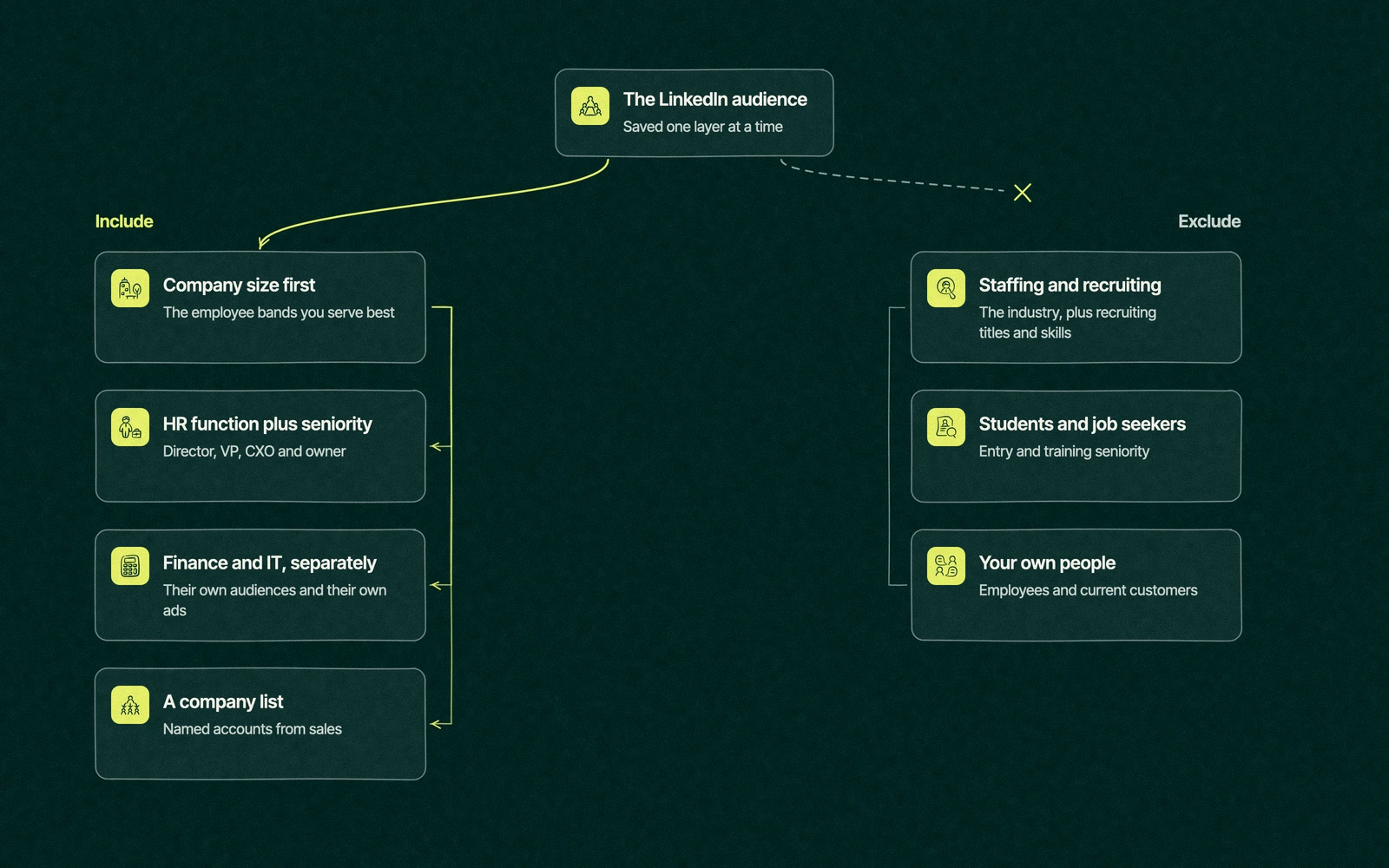
Most LinkedIn ads for HR software go wrong in the audience settings, long before anyone looks at the creative. Start from the facets in LinkedIn's help article on targeting options for LinkedIn Ads, and build the audience in this order, saving each layer so you can see what every filter costs you in reach.

  1. Company size first. Pick the employee bands your product serves best. An HRIS built for 200-person companies has no business paying for impressions at a bank with forty thousand staff.
  2. Job function plus seniority. Use the Human Resources job function with director, VP, CXO and owner seniority instead of a list of typed titles. Function and seniority catch the Head of People and Chief People Officer titles that a keyword list misses.
  3. The other seats. Build separate audiences for finance and IT leaders at the same company sizes, each with its own ads. A CFO will ignore an ad written for an HR director, and so will the IT reviewer.
  4. Exclusions. Exclude the staffing and recruiting industry, recruiting titles and skills, entry and training seniority, your own employees and your current customers. Most of the savings in an HR audience come from this step.
  5. A company list for named accounts. When sales has a target account list, upload it and layer function and seniority on top. Our guide to ABM for HR tech companies covers how to choose those accounts.
  6. Check the size. LinkedIn won't run an ad set below 300 members, and an audience close to that floor costs a fortune per impression anyway. If a layer pushes you near it, widen company size before you loosen seniority.
How to build a LinkedIn audience for HR software, including HR leaders and excluding recruiters, students and job seekers

Each audience build lets someone in who shouldn't be there. The table shows the usual suspects and how to close the door on them.

Audience buildWho it includesWho slips inThe fix
HR in the job titleHR leaders, plus every coordinator and generalistRecruiters, job seekers and HR studentsSwap titles for job function plus seniority
HR function, director and upHR directors, VPs and CHROsAgency recruiters with director titlesExclude the staffing and recruiting industry
Company size bandsCompanies your product fitsHolding companies whose HR sits somewhere elseAdd a company list or exclude known mismatches
Skills such as HRIS or payrollHands-on system ownersConsultants and implementers who sell the same thingExclude competitors and consulting firms by name
Finance and IT leadersCFOs, controllers and IT directorsFinance staff with no say in HR softwareRun these seats only inside a company list
Website retargetingPeople who read pricing or demo pagesYour own staff, customers and job applicantsExclude careers page visitors, employees and customer lists

An HR tech LinkedIn audience built this way is smaller than the one LinkedIn suggests, and that's the point. You're paying to reach the people who can say yes, plus the few who can quietly say no.

Trade You.

Your email for great content delivered to your inbox. Regularly. Unless we forget. Or get busy. But we'll try.

Thank you! Your submission has been received!
Oops! Something went wrong while submitting the form.

Which LinkedIn ad formats work on HR software buyers?

HR leaders have heard every promise about saving time and cutting admin. Formats that carry something useful, such as a guide, a customer's story or the product doing one painful task, tend to beat the polished banner.

FormatWhat it's good forWhat it asks of youWhen to stop
Single image adsTesting messages and offers cheaplyOne clear claim and a picture that isn't a stock handshakeWhen fresh creative stops lifting the click rate
Document adsA guide or checklist read in the feed, gated or openA document worth reading on a phoneWhen reads are high and demos stay flat, so move the gate or change the offer
Promoted posts from peopleTrust, carried by an executive's, employee's or customer's own postSomeone willing to write, and a post that's good before you pay for itWhen the author stops posting
VideoShowing the product fixing one specific headacheProduct footage, not a founder walking through an officeWhen views don't turn into visits from target companies
Lead Gen FormsEasy conversions on mobileFast follow-up, because form fills go cold quicklyWhen sales says the leads never answer

LinkedIn's document ads let people read a PDF or deck without leaving the feed, and you can gate it with a Lead Gen Form or leave it open. For an HR audience, leaving the first pages open and gating the rest is fairer to the reader and usually better for lead quality.

The format that sponsors a person's post has an official name we're not allowed to print on this blog, so we'll call it promoted posts. LinkedIn's page on promoting people's posts says the author can be an employee, an industry expert, a customer or a creator, and the author approves each request.

It runs on awareness and engagement objectives, so judge it on reach inside your target companies. A customer's post about surviving open enrollment will do more for a CHRO than anything your company page can say about itself.

Offers worth a click from a CHRO

The offer is what you ask for in return for the click. Most HR software ads ask a stranger for a demo, which is a little like asking for references before the first interview.

  • A benchmark built from your own aggregated, anonymous customer data that an HR leader can quote to the CFO.
  • A short open guide to one painful moment, such as switching payroll mid-year or preparing for an audit.
  • A cost or ROI calculator the finance seat can check with its own numbers.
  • A recorded panel of HR practitioners, which suits people who spend their days in meetings better than a live webinar does.
  • A demo offer kept for retargeting audiences and company lists, where people already know your name.

Templates are the exception to every rule above. A free PTO policy template is the most popular thing you'll ever give to people who will never buy from you.

The campaign with the cheapest leads in company history

Say a compliance training vendor launched a Lead Gen Form campaign that gave a compliance checklist to anyone in HR at companies of the right size. Cost per lead came in lower than anything the team had seen, and marketing presented the dashboard at the month-end review with some pride.

Then sales started calling. The forms had been filled by HR assistants who wanted the checklist, a few consultants who resell compliance services and a graduate student writing a thesis on onboarding, who was very grateful.

The fix would not need a new channel. Move the checklist to an open document ad for directors and up, retarget the people who read most of it and offer the demo only to them.

Lead volume falls in that version of the quarter, and the sales team stops forwarding screenshots of the form list with a single question mark.

How much should HR software companies spend on LinkedIn?

LinkedIn is usually the most expensive place to reach an HR leader per impression, because everyone selling to HR bids on the same small audience. There's no honest public benchmark for HR tech cost per lead, and the ranges that circulate online come without sources, so we won't add another one.

Set the budget from the sales math instead. Work out how many qualified demos sales needs from the channel each quarter, what a demo is worth at your win rate and deal size, and what you can afford to pay for one.

Then give LinkedIn a full quarter to learn, because HR deals take longer than a month to appear in the CRM. Most HR tech companies run it alongside search, which our guide to Google Ads for HR software covers, and our HR tech advertising channel map shows how the two share a budget.

Reading the results before the budget runs out

  • Judge the channel on qualified demos and opportunities from your target company sizes, counted in the CRM, rather than the lead form total.
  • Check the company and job function breakdown in Campaign Manager every week. If recruiters or students appear, fix the exclusions before you touch the creative.
  • Watch frequency closely. An HR audience is small, and the same ad shown too often reads like a vendor who won't stop calling.
  • Plan the heavy months around the HR calendar. Open enrollment swallows most HR teams each fall, so spend more in the months before it, while next year's budgets are still being argued over.
  • Rebuild the audience when a full quarter produces no opportunities from the right accounts, because more budget won't fix the wrong people.

LinkedIn also builds memory with buyers who won't shop for another year, which a monthly dashboard can't see. We cover that slower work in demand generation for HR software companies, and whether the platform pays back for B2B in general in are LinkedIn ads effective.

A second pair of hands in Campaign Manager

HR software is a market Leapyn knows well, and LinkedIn is where a lot of our HR software work begins. Our LinkedIn ads work starts with the audience build above, and it sits inside our wider paid social service when Meta or Reddit belongs in the plan too.

You can buy LinkedIn as one à la carte monthly service or fold it into a retainer that starts at $150 an hour, and our pricing page lists both. Either way the audience report lands every week, so a recruiter who sneaks into the targeting gets caught in days instead of at quarter end.

Our page for the marketing agency for HR tech companies side of Leapyn covers the rest of what we do in this market, and our HR tech marketing guide shows where LinkedIn fits in a full plan.

Send us your current LinkedIn audience settings. We'll find the recruiters hiding in them. Book a free strategy session and you'll leave knowing what we would exclude first.


“

The first call felt like talking to someone who already understood our business. We didn’t have to explain the basics. They showed up with questions that mattered.

James L.

Director of Growth, HR tech

Client

FAQ

Frequently asked questions

Do LinkedIn ads for HR tech work?

+

LinkedIn works well for HR software when the audience is built around job function, seniority and company size, with recruiters, students and staffing firms excluded. It reaches HR leaders before they start shopping, so judge it on qualified demos and opportunities over a full quarter. Teams that judge it on cost per lead in the first month usually switch it off too early.

How do you target HR directors and CHROs on LinkedIn?

+

Targeting by the Human Resources job function with director, VP and CXO seniority catches more of the right people than a list of typed titles. Add company size bands that match your product, then exclude the staffing and recruiting industry, recruiting skills, entry seniority, employees and customers. For named accounts, upload a company list and layer function and seniority on top of it.

What is a good cost per lead for HR software on LinkedIn?

+

Run the math from cost per qualified demo instead, because no reliable public benchmark for HR tech cost per lead exists and the ranges online come without sources. Work out how many demos sales needs, what each is worth at your win rate and deal size, and what you can pay for one. A cheap lead from a recruiter costs more than an expensive one from a director.

Which LinkedIn ad format works best for B2B software?

+

Creative that teaches tends to beat creative that announces. Document ads work well for guides read in the feed, promoted posts from an executive or customer build trust, and single image ads are the cheapest way to test messages. Video earns its place when it shows the product fixing one specific problem. Keep demo offers for retargeting and named account audiences.

How much should an HR tech company spend on LinkedIn ads?

+

Budget from the sales target rather than a benchmark. Decide how many qualified demos the channel must produce each quarter and what you can pay for one, then fund a full quarter so LinkedIn has time to learn. At Leapyn we usually run it alongside search, since search catches buyers who are already shopping while LinkedIn reaches the ones who will be later.

Leapyn frog mark for the Leapyn team, authors of the B2B marketing blog

Written by

The Leapyn team

Senior marketers who run strategy, creative and demand gen for B2B companies. We write about what’s working for our clients right now.

More from this author →

If you like us here, you'll love us on LinkedIn.

Stay updated

Keep reading

Related articles