What's the real difference between a website that just exists on the internet and one that actually works for your business?

If you've ever tried to explain to someone what "website design" actually means, you've probably realized that the term covers a lot more ground than most people assume. It gets thrown around in sales calls, agency proposals, and LinkedIn posts like everyone already agrees on the definition, but the truth is that most business owners have a vague understanding at best of what they're actually paying for when they hire someone to design their website.
And that's not because business owners aren't smart. It's because the web design industry has done a genuinely terrible job of explaining itself in language that people outside the industry can understand. Most explanations are written for aspiring designers or developers who want to learn the craft, not for the founder or marketing director who just needs to know whether they're getting their money's worth.
So this is the explanation nobody else seems to want to write. Not a design tutorial. Not a glossary of industry jargon. Just a practical, honest breakdown of what website design is, what it includes, why it matters for your business, and how to tell the difference between a site that's actually working and one that's just taking up space on the internet.
Website design is the process of planning and creating the visual appearance, layout, and usability of a website. It determines how your site looks, how information is organized across pages, and how visitors interact with everything from navigation menus to contact forms to calls to action.
Think of it like architecture for your online presence. Just as an architect considers how a building looks from the outside, how people move through the interior, and whether the space actually serves the purpose it was built for, website design considers all of those same factors for your digital space. The colors, the layout, the typography, the way content flows from one section to the next, the way buttons are positioned so people actually click them, all of that falls under the umbrella of website design.
The goal isn't to make something that looks impressive in a portfolio or wins design awards. The goal is to create something that looks professional, works smoothly, and helps visitors do what they came to do, whether that's learning about your services, requesting a quote, booking a consultation, or making a purchase.
When website design is done well, it feels invisible. People don't notice the design because everything just works the way they expect it to. When it's done poorly, everyone notices, usually because they can't find what they're looking for, the site takes forever to load, or the whole thing falls apart on their phone.
Website design is not a single skill. It's a collection of related disciplines that work together to create a complete experience, and understanding what those pieces are helps you evaluate whether the designer or agency you're considering actually knows what they're doing.
When someone says they "do web design," they might specialize in one specific area or handle all of them. The four core components are visual design, layout and structure, user experience, and responsive design. Each one affects whether your website actually works for your business or just exists on the internet looking nice.
Visual design is what most people picture when they hear the words "website design." It includes color choices, typography, imagery, icons, spacing, and the overall aesthetic feel that a visitor experiences the moment a page loads.
Good visual design isn't about making things pretty for the sake of it. It's about using visual elements strategically to communicate who you are, establish credibility, and guide visitors toward the actions you want them to take. The colors you choose send specific signals about your brand personality. The fonts affect readability and perceived professionalism. The imagery either builds trust or undermines it.
Research consistently shows that visitors form an opinion about your website in about 50 milliseconds, which is faster than a blink. That means your visual design is doing the heavy lifting of first impression formation before anyone reads a single word of your copy. If the visual design feels outdated, cluttered, or amateur, visitors have already decided how they feel about your business before they even get to the content.
Layout determines where elements appear on each page. Structure refers to the overall architecture of how pages connect to each other and how information flows through the site as a whole.
This includes decisions about navigation menus, page hierarchy, content groupings, sidebar elements, and the overall logic of how visitors find what they're looking for. Designers often create wireframes during this phase, which are simplified blueprints that show where elements go on each page without any of the visual styling applied. It's like drawing a floor plan before picking out paint colors and furniture.
Good structure makes a website feel intuitive. You land on a page, you immediately understand where you are in the site, and you know exactly how to get to whatever you're looking for. Bad structure makes visitors feel lost, confused, or frustrated, and the frustrating part is that they usually don't realize the structure is the problem. They just know the site "feels hard to use" and they leave.
User experience, which you'll often see shortened to UX, focuses on how visitors actually use your website once they arrive. It considers the paths people take through your site, how easily they can complete specific tasks, and whether the overall experience feels smooth or like an obstacle course.
UX design involves understanding what your visitors want to accomplish and systematically removing anything that gets in their way. That includes button placement, form design, page loading behavior, error messages, the flow from landing on the site to taking a desired action, and dozens of other small decisions that add up to either a pleasant experience or a frustrating one.
A site can look absolutely beautiful and still have terrible user experience if people can't figure out how to navigate it, if forms don't work properly, or if the path from "I'm interested" to "let me reach out" involves too many clicks and too much confusion. UX is where design meets actual business outcomes, because a site that people enjoy using is a site that converts visitors into customers.
Responsive design ensures your website works properly across every screen size and device your visitors might use. A responsive site automatically adjusts its layout, images, navigation, and interactive elements to fit smartphones, tablets, laptops, and desktop monitors without requiring a separate mobile version.
Current traffic data tells a pretty clear story about why this matters. Roughly 60 to 64 percent of all global web traffic now comes from mobile devices, meaning the majority of people will experience your website on their phone before they ever see it on a computer. In practical terms, if your site doesn't look good and function well on a phone screen, you're delivering a bad experience to most of your visitors.
The numbers back up the business impact too. According to web design research compiled in 2026, 73% of visitors say a lack of responsiveness is the primary reason they leave a website. Mobile-optimized websites see up to 40% higher conversion rates than non-optimized ones. And sites with responsive design average 11% higher conversion rates and 20% more user engagement across the board.
Responsive design stopped being a nice-to-have years ago. In 2026, it's table stakes. If your website doesn't work well on mobile, you're actively losing business every single day.
These two terms get used interchangeably all the time, but they actually refer to different things. Understanding the distinction helps you know what you're actually hiring for and why most projects need both.
Web design is about the visual and experiential layer. What do visitors see? How does the site feel? Does it communicate the right message? Does the flow make sense? Web development is about the technical infrastructure that makes the design actually work. Can the site handle traffic? Does the contact form submit properly? Are pages loading quickly?
Many agencies and freelancers handle both, but they're genuinely different skill sets. A talented designer might not write a line of code. A brilliant developer might have zero visual instincts. The best websites come from people who can bridge both disciplines or from teams where designers and developers collaborate closely and respect each other's expertise.
For most business owners, the practical takeaway is this: when you're evaluating proposals, make sure whoever you hire has both design and development capabilities covered, whether that's one versatile person or a team with complementary skills. Gaps in either area show up fast in the final product.
Design is not decoration. It's not the cherry on top of a website that already works. It's the foundation that determines whether visitors trust you, understand what you do, and feel confident enough to take the next step.
The data on this is remarkably consistent across studies. According to research compiled for 2026, 94% of users' initial impressions of a business are influenced by its website design. Three quarters of visitors judge a company's credibility primarily by how its website looks. And 50% of consumers say their overall impression of a business depends directly on the company's website design.
Those numbers matter because trust affects everything downstream. Visitors who don't trust your site won't fill out your contact forms, won't request quotes, won't make purchases, and won't pick up the phone to call you. They'll leave and find a competitor whose site looks more professional, even if your actual service or product is significantly better.
Beyond credibility, good website design does several things that directly affect your bottom line. It reduces friction by making it easy for visitors to find what they need without getting lost or frustrated. It supports your brand by reinforcing who you are and what you stand for at every touchpoint. It increases conversions by guiding visitors naturally toward the actions you want them to take. And it improves your search visibility because search engines factor in user experience signals like page speed, mobile friendliness, and engagement metrics when determining rankings.
Your website is almost always the first meaningful interaction someone has with your business. Whether they found you through a Google search, clicked a link on social media, or got your URL from a referral, the design of your site determines whether that first interaction builds trust or quietly destroys it before you even know they visited.
According to Forrester Research, a seamless UX design has the potential to boost conversion rates by up to 400%. That's not a typo. When the experience is genuinely good, when people can easily find what they need and complete the actions they came to take, the business impact is enormous.
Good design isn't about following the latest trends or using the flashiest animations. It's about creating something that works effectively for both the business and its visitors, and that often means the design itself fades into the background because everything just feels natural.
Clear visual hierarchy. Visitors can immediately tell what's most important on each page because the design uses size, color, spacing, and positioning to create an obvious order of priority. Headlines stand out. Key information is prominent. Secondary details don't compete for attention.
Intuitive navigation. People find what they're looking for without having to stop and think about where it might be. The menu structure makes sense. Pages are logically organized. It's obvious how to get from point A to point B, every time.
Fast loading. Pages appear quickly without making visitors stare at a blank screen. Every 10-second delay in loading increases bounce rate by 123%, according to Google's own research. For ecommerce sites, a single second of delay can cost roughly $2.5 million in annual lost sales for a business doing $100,000 per day.
Mobile friendly. The site works just as well on a phone as it does on a desktop monitor. Text is readable without zooming. Buttons are large enough to tap. Forms are usable on a small screen. Navigation doesn't require precision finger gymnastics.
Consistent branding. Colors, fonts, imagery style, and tone remain consistent throughout the entire site. Every page feels like it belongs to the same business, which builds the kind of subconscious trust that makes visitors feel confident about engaging.
Readable content. Text is sized appropriately with enough contrast against the background and enough spacing between lines and paragraphs that reading feels comfortable rather than exhausting. Nobody wants to squint their way through your services page.
Clear calls to action. Visitors know exactly what to do next at every point in their journey through your site. Whether it's "request a quote," "book a consultation," or "learn more about this service," the next step is always obvious and easy to take.
Accessible to everyone. People with disabilities can use the site properly. This means adequate color contrast, keyboard navigability, screen reader compatibility, and properly labeled form fields, among other considerations. Accessibility isn't just the right thing to do, it's also increasingly a legal requirement.
Good design often goes unnoticed precisely because it's working. When visitors don't have to think about how to use your site, when everything feels natural and intuitive, that's the sign that someone put serious thought into the design even if it doesn't look flashy.
Your email for great content delivered to your inbox. Regularly. Unless we forget. Or get busy. But we'll try.
Bad design is much easier to spot because it creates friction and frustration that visitors notice immediately, even if they can't articulate exactly what's wrong.
Cluttered layouts where everything is competing for attention at the same volume and nothing stands out as the most important element on the page. When everything is screaming at the visitor simultaneously, nothing gets heard.
Confusing navigation that requires visitors to guess where things are located or click through multiple menus to find basic information like your phone number or a list of services. Research shows that 38% of visitors focus on navigation first when they arrive at a new site, so getting this wrong immediately puts you at a disadvantage.
Slow loading pages that make visitors wait, and in 2026, the tolerance for waiting is remarkably low. 40% of visitors abandon a site entirely if it takes more than three seconds to load. That's three seconds. If your homepage takes six seconds, you've already lost a significant chunk of your traffic before they see a single piece of content.
Broken mobile experience where text is too small to read, buttons are too tiny to tap accurately, forms are impossible to fill out, or the layout overlaps in ways that make the content unreadable. Given that the majority of your visitors are on mobile devices, this one is especially costly.
Inconsistent styling with different colors, fonts, and visual approaches scattered randomly across pages, making the site feel like it was assembled by five different people who never spoke to each other. Inconsistency erodes trust quickly because it signals a lack of attention to detail.
Hidden contact information that requires visitors to dig through multiple pages just to find a phone number or email address. If someone is ready to reach out and they can't easily figure out how, they'll go find a competitor who makes it simple.
Outdated appearance that makes your business look like it hasn't evolved since 2015. Design trends change, and while you don't need to chase every new aesthetic fad, a site that looks obviously dated sends a message about how current and engaged your business is.
Bad design doesn't just look unprofessional. It actively costs you business by driving away visitors who would have become customers if the experience had been even moderately better.
At Leapyn, we build websites that work as hard as your business does. Strategy, design, and development under one roof, done fast and done right. If your site isn't pulling its weight, let's talk about what it should be doing. No sales pitch, just a conversation.
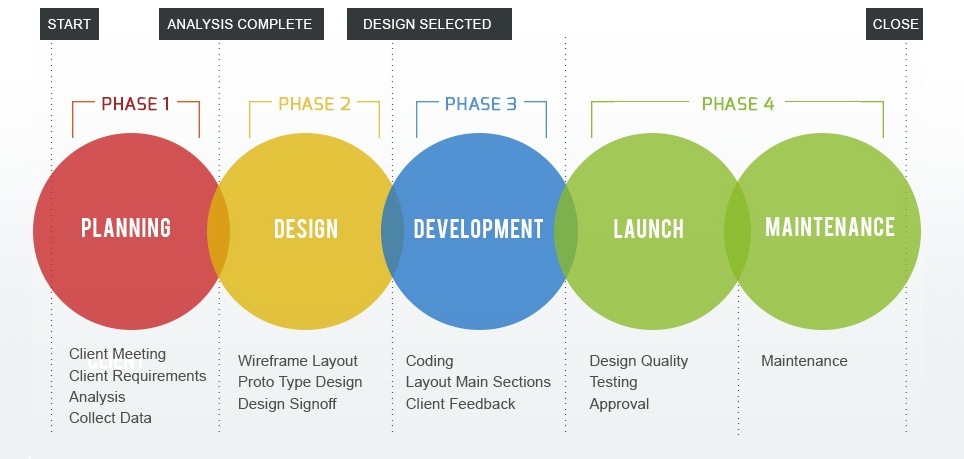
The website design process follows a structured path from initial planning through launch, and each step builds on the one before it. Understanding this sequence helps you evaluate whether the person or team you hire is actually following a real process or just winging it.
Step 1: Discovery and research. This is where you define what the website needs to accomplish and who it's being built for. Business goals, target audience, competitive landscape, and the specific problems the site needs to solve all get mapped out during this phase. Skipping discovery is one of the most common and most expensive mistakes in web design because it means every decision that follows is based on assumptions rather than actual understanding.
Step 2: Planning and strategy. With discovery insights in hand, the team maps out the site structure, page hierarchy, and content requirements. This includes deciding which pages the site needs, how they connect to each other, what content goes where, and what the visitor journey should look like from arrival to conversion. A good strategy phase also identifies technical requirements and potential challenges before they become expensive problems.
Step 3: Wireframing. Wireframes are simplified visual blueprints that show where elements go on each page without any visual styling applied. Think of them as the floor plan of your website. They establish layout, content placement, and user flow before anyone spends time on colors, fonts, or imagery. Reviewing wireframes early catches structural problems when they're cheap and easy to fix.
Step 4: Visual design. This is where the site starts to actually look like something. Colors, typography, imagery, iconography, and brand elements all come together to create the visual experience visitors will see. Design mockups are typically created for key pages first, then the visual system is extended across the entire site once the direction is approved.
Step 5: Development. Developers take the approved designs and build the actual functioning website. This includes coding the front end that visitors see, building any backend functionality the site requires, integrating with other tools and platforms, and making sure everything performs well technically.
Step 6: Content integration. Real text, images, videos, and other media get added to the built site, replacing any placeholder content used during development. This phase also includes optimizing content for search engines, ensuring images are properly compressed for performance, and making sure everything reads well within the actual design.
Step 7: Testing and launch. The site gets tested across different browsers, devices, and screen sizes to make sure everything works correctly everywhere. Forms are tested. Links are checked. Load speeds are verified. Accessibility is reviewed. Once everything passes, the site goes live and the real work of monitoring performance and optimizing begins.
Each step builds on the previous one, and rushing through early steps almost always creates problems that are more expensive to fix later. The teams that produce the best websites are the ones that invest adequate time in discovery and planning before anyone opens a design tool.
This is the question everyone wants answered and the one that gets the most confusing responses because the range is genuinely wide. The cost depends on what kind of site you need, how custom the design is, who you hire, and how much functionality is involved.
Based on 2026 pricing data from multiple industry sources, here's what most businesses should realistically expect to budget:
DIY website builders like Wix, Squarespace, or basic WordPress setups run $20 to $50 per month with very low upfront costs. They work for businesses with simple needs, limited budgets, and the willingness to learn the tools and handle the design themselves.
Professional agencies generally start around $2,000 to $8,000 for a standard small business website, with strategy-driven, conversion-focused builds running $8,500 to $15,000 and complex or enterprise-level projects pushing into the $20,000 to $50,000+ range.
The honest reality is that you tend to get what you pay for. A $500 website and a $10,000 website are not the same product any more than a $30 haircut and a $300 haircut are the same experience. The cheaper option might be perfectly fine for what you need right now. But if your website is where customers find you, evaluate you, and decide whether to work with you, cutting corners on design usually costs more in lost business than it saves in upfront fees.
The most important thing is understanding what's actually included in any quote you receive, because a $5,000 proposal that includes strategy, custom design, development, content, SEO, and post-launch support is a very different value than a $5,000 proposal that covers design and development only with everything else treated as extra.
Timelines vary based on complexity, but here are realistic ranges based on industry standards in 2026:
Simple brochure sites with five to ten pages and straightforward content typically take one to four weeks when everything stays on track.
Standard small business websites with multiple service pages, conversion-focused layouts, and moderate content requirements usually take six to twelve weeks from kickoff to launch.
Complex ecommerce or enterprise builds with custom functionality, integrations, and large content volumes typically take three to six months, sometimes longer for particularly complex projects.
The biggest factor that extends timelines isn't usually the design or development work itself. It's the client side of the equation, specifically how quickly content gets provided, how fast feedback comes back, and how many rounds of revision the project goes through. The most efficient projects are the ones where both sides come prepared and decisions don't get stuck in committee.
Not every business needs to hire a professional designer. But not every business should try to handle it themselves either, and knowing which camp you fall into can save you a lot of time, money, and frustration.
Professional web design makes sense when your website is a primary driver of how customers find and evaluate your business, when you need custom functionality that template-based builders can't handle, when you want a design that genuinely differentiates you from competitors rather than looking like every other site in your industry, or when you'd rather spend your time running your business than learning how to troubleshoot CSS issues and plugin conflicts.
DIY website builders make sense when you have a very limited budget and genuinely simple needs, when you need something basic up quickly while you figure out longer-term plans, when your website isn't central to how you acquire customers, or when you enjoy the process of building and tinkering with your own site.
The honest answer is that it depends on how important your website is to your business. If your site is where customers find you, evaluate whether you're credible, and decide whether to reach out or keep looking, the quality of that experience directly impacts your revenue. Professional design is an investment that pays for itself when it's done well, and the return usually shows up as higher conversion rates, better first impressions, and fewer potential customers bouncing to competitors with more polished sites.
If you've read this far, you probably have a much clearer picture of what website design actually involves and why it matters more than most business owners realize. The design of your website isn't a superficial concern or a nice-to-have that you get around to eventually. It's the foundation of how potential customers experience your business online, and in 2026 that first impression happens in milliseconds.
The businesses that treat their website as a strategic asset rather than a digital business card are the ones that consistently win more customers, build stronger brands, and grow faster than competitors who settled for "good enough" and moved on.
That's the kind of website Leapyn builds. Not templates with your logo swapped in. Not pretty pages that don't convert. Websites that are designed with strategy behind every layout decision, built to perform on every device, and optimized to turn visitors into customers. We handle the full process from strategy through design and development under one roof, with a senior team that does the actual work and weekly delivery cycles that keep projects moving forward instead of disappearing into an endless review process.
If your current site isn't pulling its weight, or if you're starting from scratch and want to get it right the first time, we'd love to talk it through.
Book a free strategy session and we'll bring real ideas, not a sales pitch. No contracts to start. Just a conversation about what your website should actually be doing for your business.
Stay updated
faq
Website design is the process of planning and creating the visual appearance, layout, and usability of a website. It covers how your site looks, how content is organized across pages, and how visitors interact with everything from navigation menus to forms to calls to action. Think of it as architecture for your digital presence: someone has to decide how the space looks, how people move through it, and whether it actually serves the purpose it was built for.
Web designers handle the visual and experiential side of building websites. That includes planning site structure, creating wireframes that map out page layouts, designing visual mockups using tools like Figma or Adobe XD, selecting colors and typography that fit the brand, ensuring designs work properly across different screen sizes, and collaborating with developers who build the functional site. A good designer isn't just someone who makes things look nice. They solve visual and structural problems that directly affect how well your website serves your business.
The seven steps are discovery and research, planning and strategy, wireframing, visual design, development, content integration, and testing and launch. Each step builds on the one before it, which is why skipping early phases like discovery or wireframing almost always creates problems that cost more to fix later. The teams that produce the best websites are the ones that invest adequate time in planning before anyone opens a design tool.
Web design focuses on how a site looks and feels, including visual aesthetics, layout, branding, and user experience. Web development focuses on how a site functions technically, including programming, databases, server configuration, and backend systems. Many agencies and freelancers handle both, but they're genuinely different skill sets. A talented designer might not write code, and a brilliant developer might have limited visual instincts. The best results come from teams where both disciplines are well covered and working closely together.
Costs vary widely based on complexity, who you hire, and how custom the design needs to be. DIY builders run $20 to $50 per month with minimal upfront investment. Freelance designers typically charge $2,000 to $8,000 for a complete small business site. Professional agencies start around $5,000 to $10,000 for standard business websites, with strategy-driven builds running $8,500 to $15,000 and complex enterprise projects pushing into the $20,000 to $50,000+ range. The most important thing isn't finding the cheapest option but understanding what's actually included in any quote you receive.
Simple brochure sites with five to ten pages typically take one to four weeks. Standard small business websites take six to twelve weeks. Complex ecommerce or enterprise builds usually take three to six months. The biggest factor that extends timelines isn't usually the design or development work. It's how quickly content gets provided, how fast feedback comes back, and how many revision rounds the project goes through on the client side.
Good design has clear visual hierarchy, intuitive navigation, fast loading, mobile friendliness, consistent branding, readable content, clear calls to action, and accessibility for people with disabilities. Bad design has cluttered layouts, confusing navigation, slow pages, broken mobile experiences, inconsistent styling, and hidden contact information. The simplest test is whether visitors can accomplish what they came to do without friction or frustration. If they can, the design is working. If they can't, something needs to change.
Website builders work well for businesses with simple needs, limited budgets, and sites that aren't central to customer acquisition. Professional designers make sense when your website is a primary driver of how customers find and evaluate your business, when you need custom functionality, or when you want a design that genuinely differentiates you from competitors. The decision comes down to how important your website is to your revenue and whether the investment in professional design will pay for itself through better business outcomes.
explore further



.png)