Strategy, creative and execution, all in house.

See pricing →

Every channel, one team, weekly results.

See pricing →

Work that ships weekly and looks like you.

See pricing →

Every channel, one team, weekly results.

See pricing →

Different buildings. Same obsession with leases.

See pricing →

Different buildings. Same obsession with leases.

Pricing and packages →

Different products. Same obsession with pipeline.

All SaaS and technology work →

Different trades. Same obsession with booked jobs.

All home services work →

Different practices. Same obsession with signed clients.

All professional services work →
Thank you! Your submission has been received!
Oops! Something went wrong while submitting the form.

Paid advertising

Google Ads for HR software, without paying for job seekers

How to run Google Ads for HR software so the budget reaches buyers comparing and pricing tools instead of people hunting for HR jobs.

Google Ads for HR software, without paying for job seekers

In this post

  1. toc

The monthly ads invoice reaches the CFO of an HR software company on a Tuesday, and she reads it with a pencil, the way a customs officer reads a suitcase. Most lines look reasonable. Then, a few pages in, she finds that the company paid for clicks on HR tech jobs near me.

The same report shows searches for a rival's employee login, a payroll certification course and a free PTO policy template. Nobody chose to fund a job fair. Running Google Ads for HR software on broad match with no negative list does that by default.

The fix is a campaign built around the searches that only buyers make, plus a list of everything else to block. This guide covers both, along with competitor terms and the case for Microsoft Ads.

Google Ads for HR software search terms sorted into buyer keywords to bid on and job seeker searches to block

Do Google Ads for HR software work?

They work when the account bids on searches only buyers make, such as demo, pricing, comparison and alternative terms, and blocks job seekers, students and employees looking for a login. Without that filter, a large share of the budget goes to people who work in HR rather than people who buy software for it.

Search is still the channel closest to a demo for most HR tech companies, because the buyer is typing the question at the exact moment they want an answer. The rest of this guide is about making sure that buyer is the one you pay for.

Everyone who searches HR software and will never buy it

HR is a big profession. The Bureau of Labor Statistics counted 939,700 HR specialist jobs and 224,900 HR manager jobs in 2025, and almost every one of those people searches HR software terms at work for reasons unrelated to buying.

Your ads meet these groups every day.

  • Job seekers typing HR jobs, HRIS analyst careers or a vendor name plus hiring.
  • Employees of companies that already use an HR system, looking for the login page or a pay stub.
  • Students and certification candidates studying for an HR exam or writing a paper on benefits.
  • Template hunters who want a free employee handbook, an onboarding checklist or a W-4 form.
  • Current customers of competitors looking for support, a phone number or a password reset.
  • Buyers, the smallest group and the only one you came for.

Each group uses the same words a buyer uses, so the keyword alone won't sort them. The modifiers around it will.

Your own customers belong on the list too. When their employees search your brand name plus login, a brand campaign without negatives will pay for the click and send them to a demo page, which is a strange way to greet someone who already pays you.

Which HR software keywords bring buyers to Google?

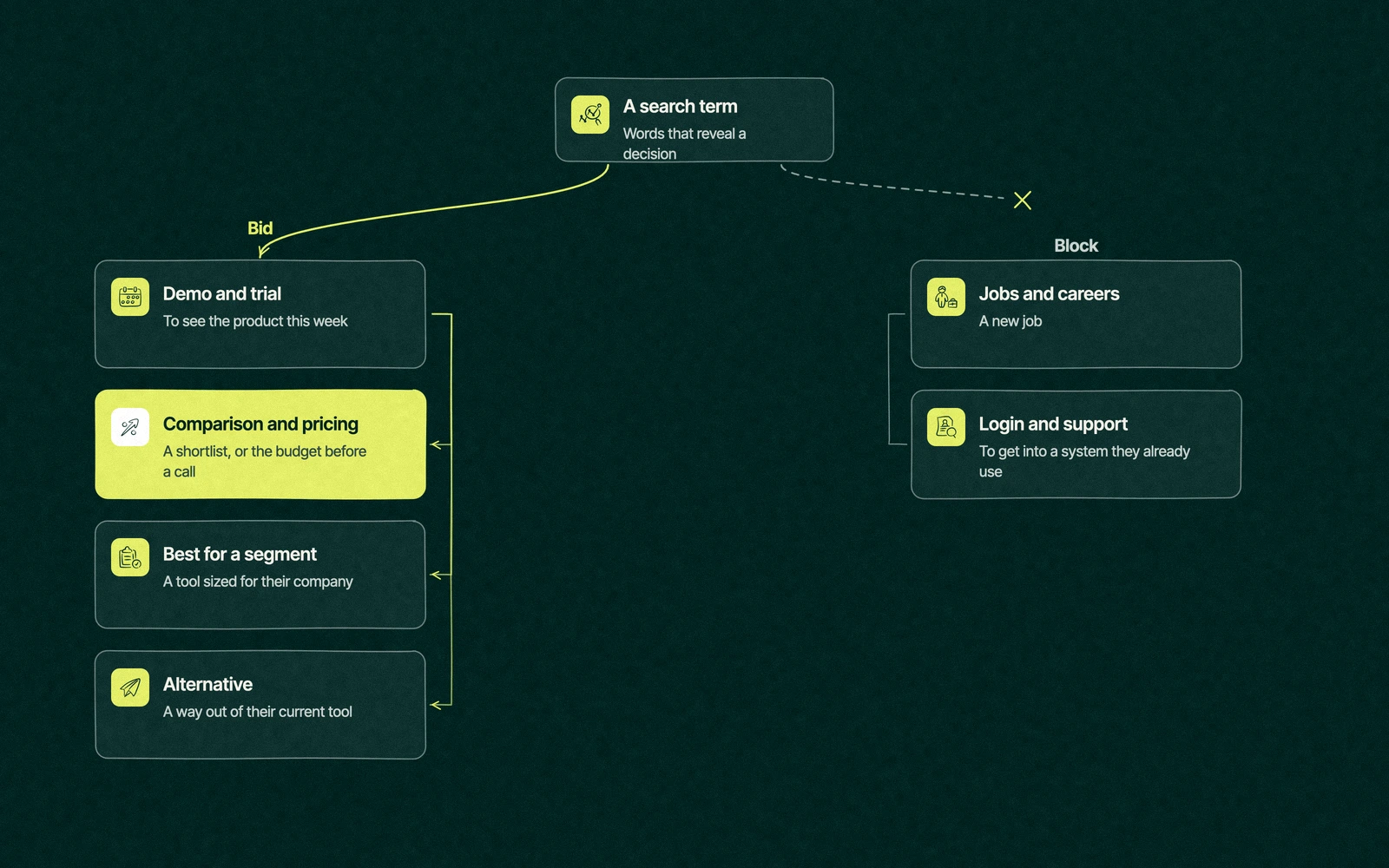
Buyers add words that reveal a decision in progress, such as demo, pricing, comparison, alternative and a company size. The table groups them, with US cost per click from our Semrush pull on November 6, 2026 where we have it.

Keyword groupExample searchCPC (US, Nov 2026)What the searcher wantsBid or block
Demo and trialhr software demo$189.01To see the product this weekBid, exact and phrase match
Comparisonhris comparison$153.29A shortlistBid, send to a comparison page
Best for a segmentbest hris for small business$103.36A tool sized for their companyBid, with a segment landing page
Pricinghris pricing$50.58To check the budget before a callBid, send to a pricing page with numbers
Alternative to[competitor] alternativeNot in our pullA way out of their current toolBid, in its own campaign
Jobs and careershr tech jobs near meNot in our pullA new jobBlock
Login and support[competitor] loginNot in our pullTo get into a system they already useBlock
Flow of HR tech Google Ads search terms split into bid groups for demo, comparison and pricing and block groups for jobs and careers and for login and support

The pricing searcher is the cheapest buyer in the table, at roughly a quarter of the demo click, and the one most likely to leave if your pricing page says contact us. Give that click a page with numbers on it and it often outperforms the expensive terms.

Segment terms reward a page built for the segment. A small business owner who clicks an ad for the best small business HRIS and lands on an enterprise homepage will be gone before the hero image loads.

Trade You.

Your email for great content delivered to your inbox. Regularly. Unless we forget. Or get busy. But we'll try.

Thank you! Your submission has been received!
Oops! Something went wrong while submitting the form.

The negative list, or how to stop sponsoring job hunts

A negative keyword tells Google which searches should never show your ad. Google's help page on negative keywords explains the mechanics, and the list below is where every HR tech Google Ads account should start.

CategoryNegatives to addMatch typeWhy it goes
Jobs and careersjobs, careers, hiring, salary, resume, interview, internship, remote jobs, near mePhraseJob seekers, the biggest leak in HR software accounts
HR job titleshr manager salary, hr generalist, hris analyst, chro salaryPhrasePeople researching a role, not a product
Students and certificationcourse, certification, exam, degree, class, study guide, thesisPhraseLearners who will never have a budget line
Employee self-servicelogin, sign in, password, pay stub, w-2, direct depositPhraseEmployees of companies already on a system
Free templates and formstemplate, free download, sample, example, pdf, formPhraseTemplate hunters, unless you run a template campaign on purpose
Support for other toolssupport, customer service, phone number, outage, cancelPhraseCustomers of competitors with a problem you can't solve from an ad

Phrase match on negatives blocks the phrase wherever it appears in a search, which is what you want for words like jobs. Keep broad and exact negatives for special cases, and read Google's notes on how keyword matching works before you add single words that could block a buyer.

Free is the classic trap. Blocking it outright also blocks free trial, which is one of the better searches a buyer can make.

A list is a starting point, and the search terms report is where it improves. This weekly routine keeps it honest.

  1. Open the search terms report every week for the first two months, then every other week.
  2. Add new junk searches to a shared negative list at the account level, so every campaign inherits it.
  3. Check the last week's negatives against converting searches, so you haven't blocked a buyer by accident.
  4. Move searches that convert into their own exact match keywords with their own ad.

Clean searches only help if Google knows which clicks turned into buyers. Import qualified demos and opportunities from the CRM as offline conversions, so automated bidding learns from the deals sales accepted and stops chasing every template download.

Running Google Ads for HR software on form fills alone teaches the algorithm to find more form fillers. Feeding it pipeline teaches it to find people who look like your customers.

Should HR tech companies bid on competitor names?

Usually yes, with care. Someone searching a competitor's name plus alternative, pricing or versus is weighing a switch, and that's a buyer with a budget already approved.

Run competitor terms in their own campaign with their own budget, so they can't quietly eat the money meant for category terms. Send the click to a comparison page that names the difference honestly, because a rival's name followed by your homepage is a polite way to pay for someone else's brand awareness.

Block the competitor's login, support and careers searches inside that campaign. Those are their employees and customers having a bad day, and none of them is shopping.

Expect a lower click rate and a higher cost per demo than on category terms. Competitor campaigns earn their place on deal size, since a switching buyer often arrives with a contract value and a deadline.

Is Microsoft Ads worth it for HR tech?

For most HR software companies it's worth a test, and the reason is targeting. Microsoft Advertising offers LinkedIn profile targeting, which lets you adjust bids by a searcher's company, industry or job function from their LinkedIn profile.

That means you can bid more on an HR director at a company in your segment and less on everyone else typing the same words. Google search can't do that, and for a category full of HR professionals who aren't buying, it's a useful filter.

Volume is smaller and clicks usually cost less. You can import your Google campaigns as a starting point, then rewrite the bids around the profile data. Our Microsoft Ads team treats it as a second search channel, never a copy of the first.

The week somebody read every search term

Picture the marketing manager at that HR software company the morning after the CFO's pencil found the jobs search. She exports the full search terms report for the quarter and reads every line, which takes most of a day and two coffees.

The pattern is obvious once it's on one screen. Category campaigns are catching job seekers, the competitor campaign is catching a rival's employees trying to log in and a broad pricing keyword is showing for salary searches.

She builds the shared negative list, splits the competitor terms into their own campaign and moves the best pricing and comparison searches into exact match. The next month's clicks drop noticeably.

The CFO asks whether marketing cut the ads. Demo requests held steady, so she shows him the cost per demo instead, which went the right way for the first time all year.

Who reads your search terms report

We run Google Ads and Microsoft Ads for B2B software companies, with senior marketers doing the work and changes shipped weekly. You can buy search as one à la carte monthly service, priced in writing, and our pricing page lays out every model.

The software result we point to is Conduit Tech, an HVAC platform that ServiceTitan later bought. Its Google Ads spend returned 4.2x, and organic search grew 1,389% year over year alongside it.

New to the platform? Our explainer on how Google Ads work for business covers auctions and quality score.

For where search sits beside LinkedIn and review sites, read our guide to HR tech advertising, and for the whole budget, the HR tech marketing budget guide. Search ads and organic search share the same keywords, so SEO for HR tech is worth a read too, and our HR tech marketing agency page shows the full program.

Share your last 90 days of search terms. We'll circle every click that never had a chance. Book a free strategy session and get the negative list back, whether you hire us or not.


“

The first call felt like talking to someone who already understood our business. We didn’t have to explain the basics. They showed up with questions that mattered.

James L.

Director of Growth, HR tech

Client

FAQ

Frequently asked questions

Are Google Ads for HR software worth the cost?

+

They pay back when the account bids on buyer searches like demo, pricing and comparison terms and blocks job seekers, students and employee logins. Those buyer terms are expensive, with the main demo search at $189.01 a click in our November 2026 data, so the landing page and the negative list decide whether that money turns into demos or disappears into job hunts.

What keywords should HR software companies bid on?

+

Demo, comparison and pricing searches come first, because they show a decision in progress. Add segment terms aimed at a company size if you have a page for that segment, and alternative terms for competitors in their own campaign. Leave broad category words like HR software on phrase or exact match with a strong negative list behind them.

How much does a click cost for HR software keywords?

+

In our November 2026 Semrush pull of US data, the main demo search cost $189.01 a click, the main comparison search $153.29, a small business shortlist search $103.36 and the two pricing searches about $50 and $47. Your own auction price will vary with match type, location, quality score and competition, so judge campaigns on cost per qualified demo instead.

Should HR tech companies bid on competitor names?

+

Usually yes, in a separate campaign with its own budget. Searches that pair a competitor's name with alternative, pricing or versus come from buyers weighing a switch. Send them to an honest comparison page, block the competitor's login, support and careers searches, and expect a higher cost per demo that the larger switching deals often justify.


Is Microsoft Ads worth it for B2B software?

+

It deserves a test at most HR and B2B software companies, mainly because LinkedIn profile targeting lets you raise bids for the right company, industry or job function. Volume is lower than Google and clicks usually cost less. Leapyn typically imports the Google campaigns, rewrites bids around profile data and judges the channel after a quarter.

Leapyn frog mark for the Leapyn team, authors of the B2B marketing blog

Written by

The Leapyn team

Senior marketers who run strategy, creative and demand gen for B2B companies. We write about what’s working for our clients right now.

More from this author →

If you like us here, you'll love us on LinkedIn.

Stay updated

Keep reading

Related articles