HubSpot for HR tech, set up for a long and crowded sale
How an HR software company should set up HubSpot so every deal shows the whole committee, the partner who sent it and what moved it forward.
HubSpot
Tech and SaaS
The Leapyn team
November 7, 2026
10 min read
In this post
toc
Ninety days ago the deal moved to Demo completed, and it hasn't moved since. In Monday's pipeline review the rep calls it warm, and nobody in the room can say who at the account is still replying.
The record holds one contact, the HR director who booked the demo. The payroll manager, the CFO who asked about price and the IT lead with the security questionnaire live somewhere else, in an email thread and a spreadsheet called final_v3.
It's the problem we fix most often when we set up HubSpot for HR tech companies. The CRM can track the whole committee, the selection steps HR follows and the partner who sent the deal, but somebody has to build it that way on purpose.
Is HubSpot a good CRM for HR tech companies?
Yes, for most HR software companies selling to small and mid-market employers. HubSpot can hold every member of the buying committee on one deal, run separate pipelines for direct and partner deals, and report on which campaigns created and moved revenue. The catch is the default setup, which was built for a simpler sale than HR's.
The rest of this guide is the setup we'd build for HubSpot for HR tech, with the subscription each piece needs so nobody gets a surprise invoice halfway through.
Why the default pipeline breaks on an HR deal
HubSpot ships with one deal pipeline and a handful of stages that suit a single buyer saying yes. HR software rarely sells that way.
Three departments have a say. HR picks the product, finance owns the money and IT can stop the deal with one question about where payroll data is stored.
The deal stalls for reasons that have nothing to do with interest, such as open enrollment, a payroll cutover date or a benefits renewal.
Many deals arrive through someone else, such as a PEO, a benefits broker or a payroll marketplace, and that partner expects credit.
Security reviews, pilots and reference calls are formal steps, and each one has its own owner on the buyer's side.
The account keeps buying after the first contract, so the CRM has to hold upsells and renewals without polluting new business numbers.
A pipeline that ignores those traits still fills up. It just fills up with deals nobody can explain.
How should an HR tech company set up deal stages in HubSpot?
Name each stage after something the buyer did, then make the evidence for it a required field. HubSpot's guide to setting up and customizing pipelines lets you require properties before a deal can enter a stage, set a win probability for each one and add both Won and Lost stages so reports work.
Demo completed describes something the rep did, which is why it's the stage where deals go to retire. Compare it with the stages below.
Deal stage
What happened at the buyer
Required to enter
Committee members on the deal
Problem confirmed
The HR lead agreed there's a problem worth solving this year
Pain, current system and a target go-live month
HR champion
HR team demo
The people who'll use it saw the product
Attendees and the use cases shown
HR champion, end users
Committee demo
Finance and IT saw it, usually in a second call
Named budget holder and IT reviewer
Budget holder, IT reviewer
Security and integration review
IT received the questionnaire and integration details
Review start date and the HRIS or payroll system it must connect to
IT reviewer
Pilot or references
The buyer is testing or calling customers
Pilot dates or reference names
HR champion, executive sponsor
Proposal
Pricing went to the budget holder
Amount, term and employee count
Budget holder
Contract and procurement
Legal and procurement have the paper
Contract sent date
Executive sponsor, procurement
Add Closed won and Closed lost at the end, with a required loss reason. Nine stages sounds like a lot until you try to forecast a deal that's stuck between finance and IT with only five.
Mapping the buying committee in HubSpot for HR tech
Most CRMs treat a deal as one company and one contact. HR software deals come with a committee, and more of those committees now have an executive at the head of the table.
Executives led 31% of HR system selections in the latest Sapient Insights Group survey of HR systems, up from 25% in 2024. If no executive is on the deal record, you're forecasting a decision without the person making it.
HubSpot handles this with association labels, which describe how a contact relates to a deal. You can create up to 50 labels per pair of objects, custom labels need a Professional or Enterprise subscription, and labels work as filters in reports, segments and workflows.
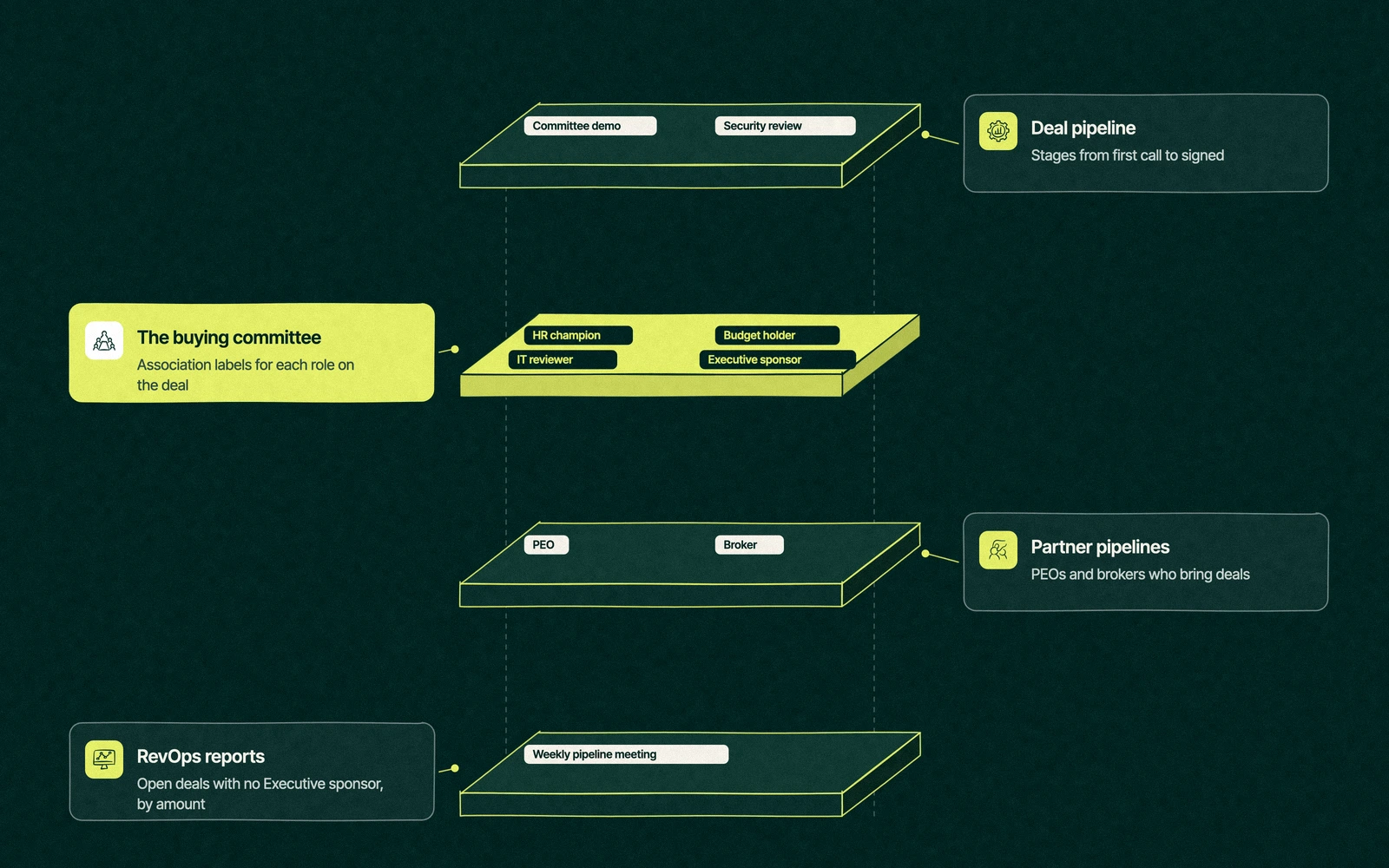
Create contact to deal labels for each committee role, such as HR champion, Budget holder, IT reviewer, Executive sponsor, End user and Procurement.
Associate every person who joins a call, opens the proposal or signs the security questionnaire with the deal, and give each one a label.
Add a workflow that creates a task when a deal enters Committee demo with no Budget holder, or Security review with no IT reviewer.
Build a report of open deals with no Executive sponsor, sorted by amount.
Review it in the weekly pipeline meeting, before anyone calls a deal warm.
Each label belongs to the association rather than the contact, so the same CFO can be a Budget holder on one deal and an End user on a renewal.
Trade You.
Your email for great content delivered to your inbox. Regularly. Unless we forget. Or get busy. But we'll try.
Thank you! Your submission has been received!
Oops! Something went wrong while submitting the form.
The ninety days, replayed with the committee on the record
Run the opening deal again, this time in a portal where HubSpot for HR tech has been set up properly. The HR director books the demo, and the rep associates the payroll manager and labels her End user the same afternoon.
The CFO joins the second call, so the rep adds him as Budget holder and the deal moves to Committee demo. He opens the proposal twice in the first week, and both visits show on his contact timeline.
The IT lead's questionnaire arrives, the deal enters Security and integration review, and HubSpot asks for the review start date before it lets the stage change. Three weeks later the IT lead has replied to everything and the CFO hasn't opened a single email.
Now the pipeline review has an answer. The deal has one silent budget holder, and the next step is a short note from the HR director to the CFO rather than another follow-up from the rep. Same deal, same people, and a meeting that lasts four minutes instead of twenty.
How do you track PEO and broker referrals in HubSpot?
Partners are a quiet source of HR tech deals, and they're the easiest to lose track of. Pick one of three setups, depending on how many partners you have.
Setup
Best when
Subscription note
Trade-off
Partner company label on the deal
You have a handful of PEOs or brokers who refer and step back
Custom association labels need Professional or Enterprise
Simple to report on, but partner terms live outside the CRM
Separate partner pipeline
Partners co-sell, so their deals follow different stages and owners
Custom pipelines start on Starter, which allows 15, while Professional allows 100 on seat-based plans
Clean partner forecasting, at the cost of one more pipeline to keep tidy
Custom partner object
Dozens of partners with tiers, agreements and commission rates
Custom objects need an Enterprise subscription
The most complete view, and the most setup to maintain
Whichever you pick, record two things on every deal. Who sourced it and who influenced it are different questions, and a partner who only joined the last call shouldn't get paid like one who made the introduction.
Most HubSpot for HR software setups we review start with the label, then add a partner pipeline once co-selling partners produce enough deals to forecast on their own.
Reports that tell you what moved the deal
This is where HR tech RevOps earns its keep. Once stages and labels are clean, a few standard reports answer the board's usual questions.
Deal funnel. HubSpot's sales analytics suite shows conversion between stages, the time deals spend in each and how often deals skip a step, on Sales Hub Starter and up.
Time spent in deal stage. It shows where deals stall, which in HR software is usually security review or the gap after the proposal.
Deal push rate. It counts deals whose close date keeps sliding out of the quarter, which is the polite name for a forecast nobody believes.
Attribution.Deal create and deal revenue attribution reports show which campaigns and content created and influenced deals, across first touch, last touch, linear, time decay and empirical models. They need Marketing Hub Enterprise.
Revenue operations for HR tech works best as five reports everybody trusts, read in the same meeting every week. A dashboard with forty tiles mostly proves someone had a quiet afternoon.
The same structure works as HubSpot for SaaS in general, but HR deals test it harder because of the committee and the partners. If your HR tech CRM still runs on the default pipeline, the reports above will show you exactly where it's leaking.
Where a HubSpot partner earns the fee
You can build HubSpot for HR tech yourself, and some teams do. The cost shows up later, when two years of deals carry inconsistent stages and nobody trusts the attribution report enough to cut a channel.
We're a Certified HubSpot Solutions Partner, senior marketers do the work and we deliver weekly. Our HubSpot implementation is priced as a fixed project fee quoted in writing, and our revenue operations work keeps the reports honest afterwards. Every model and rate is on our pricing page.
Send us a screenshot of your pipeline. We'll map the committee your CRM is missing.Pick a time for a free strategy session and we'll mark the first three changes we'd make.
“
The first call felt like talking to someone who already understood our business. We didn’t have to explain the basics. They showed up with questions that mattered.
James L.
Director of Growth, HR tech
Client
FAQ
Frequently asked questions
Can HubSpot track a buying committee?
+
Yes, through association labels on the deal. Each contact gets a label for their role, such as HR champion, Budget holder or IT reviewer, and the label sits on the association, so one person can hold different roles on different deals. Custom labels need a Professional or Enterprise subscription, and you can filter reports, segments and workflows by them.
How many deal stages should an HR tech pipeline have?
+
Enough that every stage describes something the buyer did and has a required field proving it. For most HR software companies that means separate stages for the HR demo, the finance and IT demo, security review, pilot or references, proposal and contract, plus Closed won and Closed lost. Fewer stages hide where deals stall, and more slow the reps down.
How do you track partner referrals in HubSpot?
+
Give each referring PEO or broker a company record and associate it with the deal using a label such as Referral partner. Record who sourced the deal and who influenced it as separate fields. When partners co-sell, add a separate partner pipeline, and if you manage dozens of partners with tiers and commissions, consider a custom object on Enterprise.
What does HubSpot for HR tech cost to set up?
+
Two costs apply, the HubSpot subscription and the setup work. The subscription depends on the hubs and tier you need, since custom labels need Professional and deal attribution needs Marketing Hub Enterprise. Leapyn prices implementation as a fixed project fee quoted in writing before work starts, so the number won't change halfway through the build if the scope doesn't.
Which HubSpot subscription does an HR software company need?
+
Professional covers most of what an HR software company needs, including custom association labels for the committee, multiple pipelines and team permissions. Sales Hub Starter already includes the deal funnel and time-in-stage reports. Move to Enterprise when you need deal create and revenue attribution in Marketing Hub, or custom objects for a large partner program.
Written by
The Leapyn team
Senior marketers who run strategy, creative and demand gen for B2B companies. We write about what’s working for our clients right now.