The HubSpot onboarding fee, what it buys and when a partner can replace it
What the HubSpot onboarding fee pays for, which editions require it, and how to decide whether HubSpot or a partner should run your first ninety days.
HubSpot
The Leapyn team
November 17, 2026
7 min read
In this post
toc
Between demos at a family dental practice, the founder of a dental scheduling app is sitting in an empty treatment room, in the patient's chair, because it's the only seat free. On her phone is a quote for Marketing Hub Professional, and under the subscription sits a line she didn't ask for, a required one-time HubSpot onboarding fee of $3,000.
She is the whole company. She writes the code, runs the demos and answers support tickets from the same laptop, so the question in her head is fair. Who exactly is being onboarded?
If your quote carries the same line, this guide covers what the fee buys, when it's required and when a partner can take its place. We're a HubSpot partner, so we'll also say when paying it is the right call.
What is the HubSpot onboarding fee?
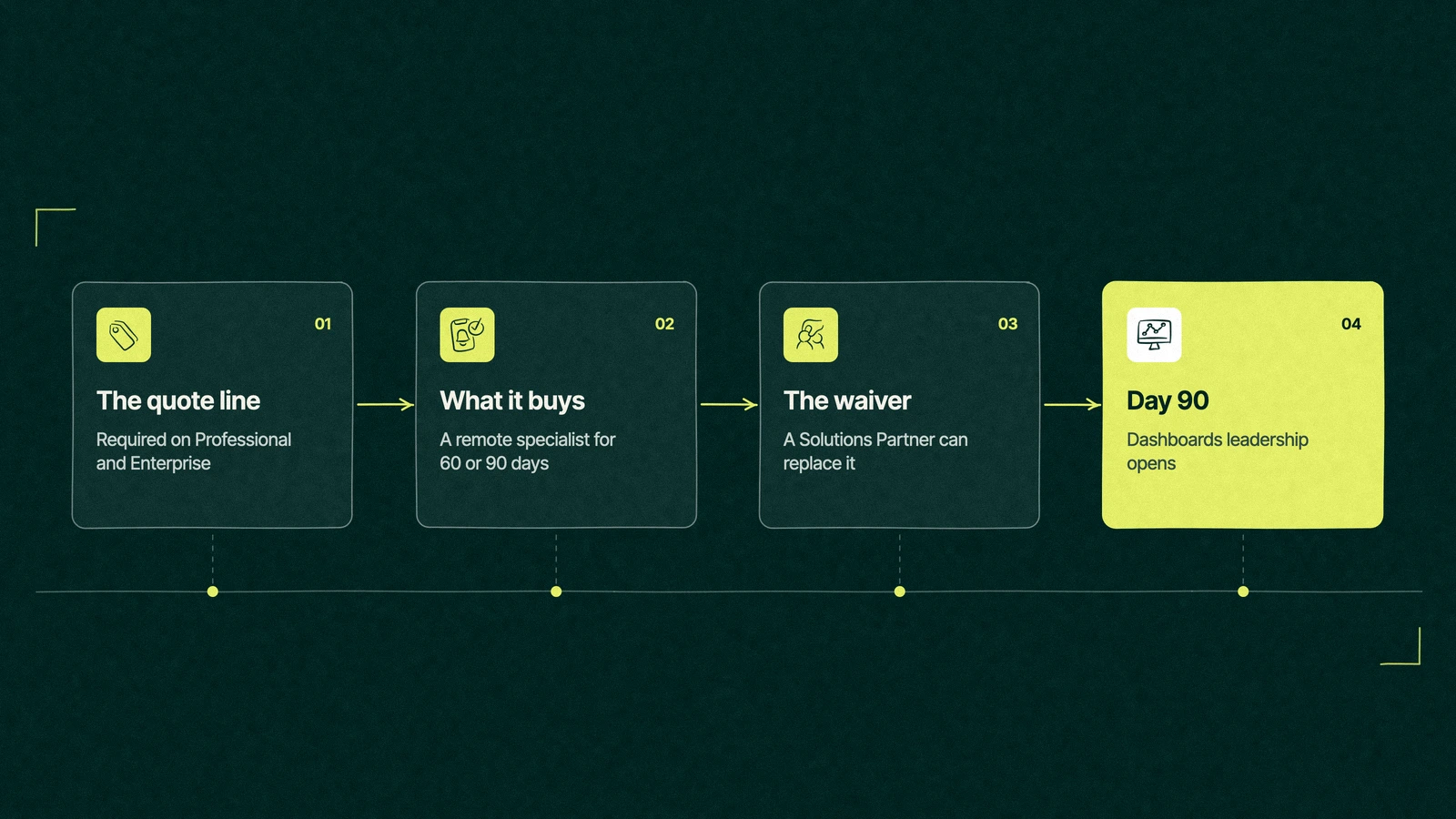
The HubSpot onboarding fee is a one-time charge that HubSpot adds when you buy a Professional or Enterprise edition of Marketing Hub, Sales Hub or Service Hub. It pays for remote access to a HubSpot onboarding specialist for 60 or 90 days. Starter plans don't carry it, and a Solutions Partner can replace it.
It sits on top of the subscription, so it never shows up in the monthly price people compare. For the full bill, including seats and contacts, our guide to the total cost of HubSpot adds it all up.
How much does HubSpot onboarding cost per hub?
Each hub's pricing page lists its own fee in a footnote. These are the US figures at the time of writing, per HubSpot's Marketing Hub pricing page and Sales Hub pricing page, checked on November 16, 2026.
Hub
Professional onboarding
Enterprise onboarding
Time to use it
Marketing Hub
$3,000
$7,000
90 days
Sales Hub
$1,500
$3,500
60 days on Professional, 90 on Enterprise
Service Hub
$1,500
$3,500
60 days on Professional, 90 on Enterprise
Any hub at Starter
None required
None required
Not applicable
So the HubSpot onboarding cost grows with every hub you add at Professional or above, which is how a two-hub purchase can arrive with two onboarding lines on one quote.
What $3,000 buys, according to the fine print
HubSpot's Product and Services Catalog describes onboarding as access to a customer onboarding specialist, delivered remotely by phone, Zoom and email. It must be used within the delivery period, and consulting fees are non-refundable.
That answers the question of what does HubSpot onboarding include, and it's worth reading slowly. The catalog promises access to an expert. It publishes no number of calls, no list of finished workflows and no dashboard count.
What you get. A specialist who sets goals with you, recommends how to set up the portal and checks your progress on calls.
What you still do. The importing, property building, workflow building and report building, usually between those calls.
What HubSpot suggests beyond it. Its own onboarding page says that if you want help executing, you should enlist a certified Solutions Partner.
The fee pays for a coach. The building is still your job, and the clock starts on the purchase date whether or not your data is ready.
Is HubSpot onboarding mandatory?
On Professional and Enterprise editions of the three main hubs, HubSpot's footnotes call it required. On Starter, the pricing FAQ says you won't need to buy onboarding.
The one standard way around it on the paid editions is a Solutions Partner. HubSpot's Solutions Partner program page lists "waive onboarding fees for your clients" as a partner benefit, up to $6,000 of value per client. The partner runs the onboarding instead, and you pay the partner for it.
That makes HubSpot partner vs HubSpot onboarding a choice between two kinds of help, and the better pick turns on who will do the work.
Trade You.
Your email for great content delivered to your inbox. Regularly. Unless we forget. Or get busy. But we'll try.
Thank you! Your submission has been received!
Oops! Something went wrong while submitting the form.
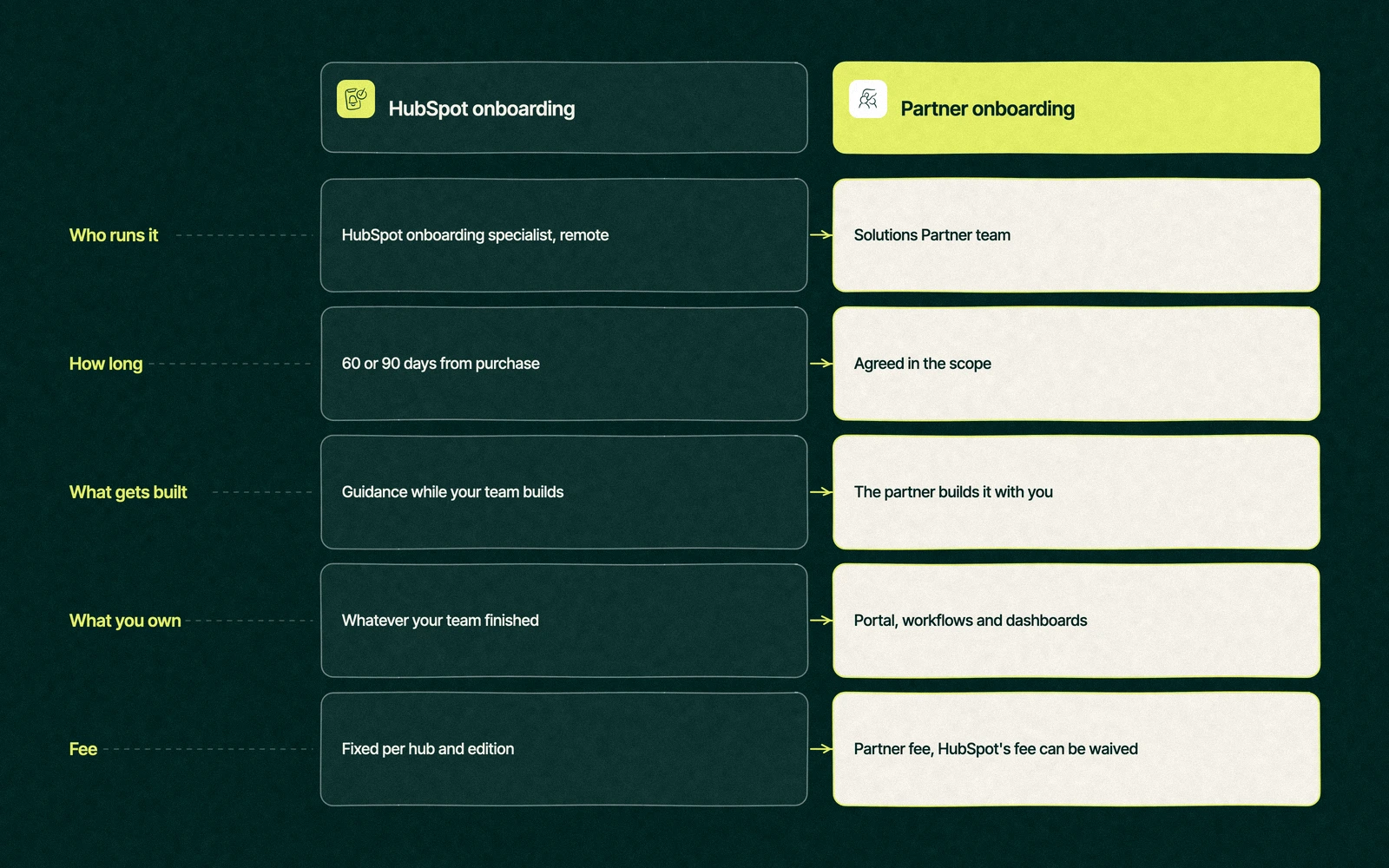
HubSpot onboarding or a partner, side by side
Both routes can work. They differ in who touches the portal and in what you're holding when the help ends.
HubSpot onboarding
Partner onboarding
Who runs it
A HubSpot onboarding specialist, remote
The partner's team, remote or on site
How long
60 or 90 days from purchase
Set in the partner's scope
What gets built
Guidance while your team builds
Whatever the scope lists, built with you
What you own at the end
Whatever your team finished in time
The items in the scope, if you hold the partner to them
What it costs
The fixed fee per hub and edition above
The partner's fee, with HubSpot's fee waivable
Best for
Teams with an admin who has hours to build
Teams without one, or with data to migrate
A partner isn't automatically the better buy. A partner who charges more than HubSpot and delivers the same advice on calls has sold you the fee twice. The questions in choosing a HubSpot agency help you tell the builders from the talkers, and what HubSpot implementation costs covers how partners price the work.
What day 90 should look like
Whichever route you take, judge it by what you can open when it ends. Logins and training certificates don't count. A good HubSpot onboarding process leaves these five things behind.
Clean records. Contacts and companies imported once, deduplicated and owned by a named person.
Written definitions. What a lead is, when a deal is created and what each pipeline stage means, agreed by sales and marketing.
Working automation. The handful of workflows that route, follow up and notify, each tested on a live record.
A dashboard leadership reads. Pipeline by stage and revenue by source, built on the definitions in step two.
An owner. One person who knows why each property and workflow exists and decides what gets added next.
Onboarding for a team of one is a group class with perfect attendance. The founder in the dental chair would spend her 90 days taking notes on calls and building alone at night, and ninety days is long enough to learn HubSpot and short enough to learn it on the wrong data.
She has three honest options. She can drop to Starter and wait on automation until she hires, or pay HubSpot and block out the evenings. The third is a partner to build the three workflows and the one dashboard she needs, with HubSpot's fee waived and the partner's fee in its place.
What decides it is the list she writes before signing anything, the things she wants working on day 90. With that list in hand, any quote can be read line by line.
Leapyn holds the Certified HubSpot Solutions Partner badge, so HubSpot's fee can come off the order when our team delivers the onboarding. Our HubSpot onboarding services are scoped around that day 90 list, and we run guided client onboarding on the same platform that sends our own quotes and books our own sales calls. If you'd rather keep building in house, our HubSpot agency team can still review the plan before you pay for it.
Forward us the HubSpot quote. We'll tell you which line to cross out.
“
The first call felt like talking to someone who already understood our business. We didn’t have to explain the basics. They showed up with questions that mattered.
James L.
Director of Growth, HR tech
Client
FAQ
Frequently asked questions
How much is the HubSpot onboarding fee?
+
HubSpot lists $3,000 for Marketing Hub Professional and $7,000 for Marketing Hub Enterprise. Sales Hub and Service Hub are $1,500 at Professional and $3,500 at Enterprise, per HubSpot's pricing pages in November 2026. Each is a one-time charge per hub, added on top of the subscription. Starter editions have no required onboarding, so the fee only appears once you buy Professional or above.
Can the HubSpot onboarding fee be waived?
+
When a Solutions Partner delivers the onboarding, HubSpot lets the partner waive its fee, listed on HubSpot's partner page as up to $6,000 of value per client. You then pay the partner for its work instead. Ask the partner to confirm the waiver in writing before you sign the HubSpot order, because the quote has to be set up that way from the start.
What does HubSpot onboarding include?
+
Access to a HubSpot onboarding specialist, delivered remotely by phone, Zoom and email, according to HubSpot's Product and Services Catalog. The specialist helps you plan the setup, recommends how to configure the portal and reviews progress. Your own team usually does the hands-on building between calls. HubSpot doesn't publish a set number of calls, so ask your rep what the plan covers.
How long does HubSpot onboarding take?
+
Sixty or ninety days, depending on the hub and edition. Marketing Hub onboarding runs 90 days on both paid editions, while Sales Hub and Service Hub run 60 days on Professional and 90 on Enterprise. The period starts at purchase, so a team that spends its first month cleaning data loses that time. Clean the data before you sign, and the clock works for you.
Which partners can replace HubSpot's onboarding?
+
Any HubSpot Solutions Partner that offers onboarding can run it in place of HubSpot's team, and HubSpot's directory lists them by service and region. Leapyn is one of them, and it holds the Certified HubSpot Solutions Partner badge, so the fee can drop away when it runs the work. Whoever you pick, ask what will be built and working by day 90, then get that list written into the scope.
Written by
The Leapyn team
Senior marketers who run strategy, creative and demand gen for B2B companies. We write about what’s working for our clients right now.